Selling Event Tickets Online: Conversion Secrets from Top Organizers
-
 by
by

Most event organizers wait for people to buy tickets, then panic when sales are low a week before the event. Sound familiar? In 2025, the smartest organizers aren’t just hoping for sales – they’re using specific strategies to sell event tickets online and fill seats early.
The Three Windows That Matter
Forget posting your event everywhere and hoping for sales. There are three specific times when people actually buy tickets:
- Tuesday lunch hour (12-2PM): When companies book team events. Corporate buyers convert at 34% during this window vs. 12% other times.
- After work (6-8PM): When friends plan nights out. Group purchases spike 3x during these hours.
- Sunday afternoon (2-5PM): When families plan their weekends. Family event tickets sell 4x faster during this window.
Time your promotions for these windows, and you’ll sell more tickets than blasting social media all day. Each window needs different messaging and payment options to maximize sales.
Price Points That Actually Sells Event Tickets Online
Stop copying other events’ prices. Think of your pricing like a good menu – clear options without overwhelming choice. With ticketing made simple, sell tickets online with ease to streamline your sales strategy, making it easy to manage various ticket types. Start with early access tickets at a modest discount to reward your eager fans and build momentum. Your regular admission price sets the baseline. VIP tickets at premium prices create an exclusive tier that makes standard tickets feel more accessible. Add group rates for six or more to encourage larger parties. Resist the temptation to create complex tiers – they confuse buyers and actually hurt sales.
Here’s the pricing structure that consistently converts:
- Early access tickets at 15% off regular price (converts 28% of early viewers)
- Regular admission at your target price (baseline for comparison)
- VIP tickets at double your regular price (attracts 12% of buyers)
- Group rates starting at 6+ tickets (increases average order by 40%)
Keep it simple. Let buyers choose without overwhelming them with options. More price tiers actually decrease overall sales by 23%.
Mobile Buyers Aren’t Just Browsing
Three out of four people buy tickets on their phones, but 62% abandon complicated checkouts. When you sell event tickets online, your checkout process should be as smooth as scrolling through social media. Your checkout process should be as smooth as scrolling through social media. Use a clean, single-page checkout that doesn’t send buyers through a maze of forms.
Digital wallets like Apple Pay and Google Pay should be front and center – they’re not just convenient, they’re expected. Skip the lengthy emails and use text messages for confirmations and updates. The easier you make it to buy and share tickets, the more likely friends will bring friends.
A streamlined mobile experience isn’t optional – it’s where most sales happen! Every extra click costs you 8% of potential buyers.
Plan A Pre-Launch Strategy
Start building excitement before tickets go on sale. Create an engaging landing page that gets people excited and captures emails – this is your direct line to potential buyers. Previous attendees should feel special with exclusive early access – they’re your most reliable audience. Prepare event previews that are so compelling people want to share them. Most importantly, test your entire purchase process thoroughly. A smooth launch builds trust; technical hiccups break it.
Events with pre-launch strategies sell 40% of tickets in the first week!
Email Sequences That Convert
Generic event announcements don’t drive ticket sales. Smart organizers use a carefully timed email sequence that matches how people actually make buying decisions. The sequence begins with an exclusive access announcement offering a 48-hour window, creating genuine urgency for early adopters.
Three days later, an early bird reminder highlights the last 24 hours of special pricing, followed by a regular price launch announcement the next day. A week after the initial announcement, featured highlights showcase event value, while weekly updates maintain momentum with new details and social proof from early buyers.
The key to this sequence’s success lies in its simplicity – each email focuses on one clear call to action, as multiple CTAs have been shown to reduce click rates by 17%.
Group Sales Made Simple
To maximize your ticket revenue, understanding how to sell event tickets online helps you cater effectively to these buyers. Group sales require a completely different approach from individual ticket purchases. Corporate and group buyers have unique needs that, when properly addressed, can dramatically increase your event’s revenue. The process starts with unified payment – one person handles the transaction while tickets automatically distribute to all attendees.
Corporate buyers particularly appreciate the simple invoicing option, which has been shown to increase corporate sales by 34%. Flexible name changes before the event remove a major concern for group organizers, while sensible bulk discounts (15% for groups of 6 or more, increasing to 25% for groups of 15+) make the decision easier.
When People Actually Buy
Your event has three natural selling periods, each needing different tactics:
Launch Week (35% of sales):
- Early birds and loyal customers
- Price-sensitive buyers
- Corporate planners Use “Be the first, save money” messaging and highlight early-bird savings
Middle Period (40% of sales):
- Regular price buyers
- Small groups
- Social proof seekers Focus on “Join others who’ve already bought” with real numbers
Last Week (25% of sales):
- Last-minute decisions
- FOMO buyers
- Larger groups finalizing numbers Emphasize “Last chance, limited seats” with actual availability
Effective Follow-Up for Abandoned Carts
When someone adds tickets to their cart but doesn’t finish the purchase, it’s an opportunity, not a failure. Data shows that 68% of shoppers abandon their carts mid-process. For those selling event tickets online, a few strategic nudges can encourage them to complete their purchase without feeling pressured. Here’s a breakdown of follow-up strategies that work:
- Send a Reminder Within 2 Hours
Timing is everything. Sending a reminder within two hours of cart abandonment recaptures about 23% of sales. A simple, friendly email or text can make all the difference, reminding them that their tickets are still available and waiting for them. - Use Social Proof to Build Urgency
Shoppers are more likely to purchase when they see others are interested. Let them know how many other people have recently bought tickets or how many are currently viewing the event. Real-time numbers, like “56 tickets sold in the past 24 hours,” make a difference. These cues increase urgency, as people don’t want to miss out if others are jumping on the opportunity. - Save Their Cart for 24 Hours
Sometimes life gets in the way of completing a purchase. Keeping their cart saved for a full 24 hours gives them time to return when it’s convenient, and around 15% of people come back within this window to finish their transaction. Saving their progress makes it easier to pick up where they left off, removing any friction that could lead to abandoning the process. - Make It a One-Click Return
The more steps they have to take to get back to their cart, the more likely they are to give up. Include a direct “Return to Cart” button in your reminder email or text message. A single click brings them right back to checkout, minimizing distractions or additional steps. - Offer Payment Alternatives
Some buyers are held back by limited payment options. Offering digital wallets, “buy now, pay later” plans, and invoice options for corporate clients captures 12% more buyers. By meeting their payment preferences, you make it easier for them to commit without hesitation.
Don’t spam them – help them finish what they started. Each extra follow-up email reduces conversion by 9%.
How Social Proof Drives Ticket Sales
When you sell event tickets online, social proof taps into our natural inclination to trust the actions of others. Rather than relying on vague statements or empty claims, share real numbers and names that reinforce credibility and urgency:
- Live Ticket Counts
Display the number of tickets sold or viewers browsing the event in real-time. Phrases like “42 tickets sold today” or “128 people currently viewing” tap into a buyer’s fear of missing out. Live updates show momentum and increase urgency without needing flashy promotions. - Recent Buyer Names
Displaying recent buyers’ first names helps build trust and connection. Simple statements like “Just purchased by Sarah from Dallas” signal to new buyers that others are joining. It’s personal and assures them they’re in good company. - Company Logos for Business Events
If you’re organizing a business event, show company logos of confirmed attendees or sponsors. This visual assurance builds confidence among potential corporate buyers, letting them know that reputable companies are already involved. - Authentic Testimonials with Full Names
Positive feedback from previous attendees is powerful. Include testimonials that use the full name and city of the attendee if possible, such as “This event exceeded my expectations – I’ll be back next year! – John, New York.” Personal testimonials feel more genuine and persuasive.
Real social proof increases conversion rates by 28%.
Key Metrics for Tracking Ticket Sales Success
To understand what’s working and what needs adjustment, focus on these core metrics:
- Cart Completion Rate: Aim for a cart completion rate above 60%. Lower rates may suggest friction in the checkout process or other issues that could be causing drop-offs.
- Average Purchase Time: Ideally, it should take under three minutes to complete a ticket purchase. A streamlined experience encourages more sales, especially from mobile users.
- Mobile vs. Desktop Sales: With most buyers using smartphones, a mobile purchase rate of around 75% signals effective mobile optimization. Low mobile rates might indicate issues with mobile usability.
- Conversion Rates by Traffic Source: Analyzing conversion rates from social media, email, and organic search can help you see where your buyers are coming from, allowing for targeted promotions on high-performing channels.
- Group Purchase Trends: Noting the size and frequency of group purchases provides insight into audience behavior. If group sales are strong, consider offering more group discounts or perks to support this trend.
These metrics reveal where to focus first for improvement, from mobile experience adjustments to optimized group sales strategies.
Providing Payment Options That Suit Every Buyer
Payment flexibility directly impacts your event’s success, especially when selling event tickets online. Modern buyers expect multiple payment options, and limiting these choices means losing potential sales. While credit card acceptance serves as a basic requirement, digital wallet integration has proven to increase mobile sales by 27%.
Buy now, pay later options attract a different segment entirely, converting 18% more buyers who might otherwise hesitate at larger ticket prices. Corporate buyers specifically require invoice options for their purchasing processes, while group payment splitting removes friction from large group sales.
Start Selling Better Today
Transform your ticket sales with proven tools:
See It In Action
- 15-minute demo of what works
- Real examples you can copy
- Actual setup help
- No complex training needed
The difference? These aren’t just tips – they’re proven strategies from thousands of successful events. Every tactic here is backed by real sales data and can be implemented today. Book a demo now!
Remember: Your goal isn’t just to sell event tickets online– it’s to sell them earlier, easier, and more predictably. These strategies help you do exactly that.
Latest News
Related Articles

Season Ticket Software for Fall 2026: Subscriptions, Reserved Seating & Renewals
-
by
Fall subscription sales are the single biggest revenue moment for most performing arts organizations. Season packages, member renewals, and early access windows all open between July and September. So the season ticket software you pick this summer decides how the fall series actually sells. This guide covers what season ticket software needs to do in 2026, how to configure it for a theater, symphony, or concert series, and what SimpleTix costs for season-driven event programs. What season ticket software actually needs to do Selling season tickets is nothing like selling single-event tickets. First, one subscriber buys 4 to 20 events in a single package. Second, seats need to lock across the entire season. Third, renewals from prior subscribers happen weeks before the general public gets access. And fourth, add-ons like parking, pre-show dinner, and backstage passes attach to the subscription, not the event. So the operational checklist for season ticket software looks like this: Season pass or subscription products that group multiple events into one purchase Reserved seating with locked seats across the whole season, so the subscriber sits in the same seat every night Priority access windows for existing subscribers before general on-sale Payment plans or full-payment options so patrons can split large subscription costs Renewal workflows that let last year's subscribers re-up with one click Comp ticket management for donors, sponsors, and press seats Membership tiers with different pricing, benefits, and priority access Reporting by subscriber, not just by event If your current tool cannot handle these, you are probably running Excel spreadsheets on the side and losing renewals every year. What is season ticket software? Season ticket software is a ticketing platform designed to sell multi-event packages (season subscriptions) alongside individual tickets, with reserved seat continuity, subscriber priority access, and renewal workflows built in. The core difference...

Holiday Event Ticketing Software: Timed Entry, Reserved Seating & Capacity Control for...
-
by
If you run a holiday event, you are booking dates now. So the ticketing platform you pick this month determines how November and December actually go. This guide covers what holiday event ticketing software needs to do in 2026, how to configure it for the season crunch, and what SimpleTix costs for holiday events of any size. What holiday event ticketing software needs to do Holiday events compress a whole year of sales into six weeks. First, most tickets sell in a 4 to 8 week window between mid-November and January 1. Second, weather cancels outdoor events without warning. Third, family groups buy 4 to 8 tickets in one order, not 1. And fourth, capacity is measured per time slot, not per venue. So the ticketing checklist for holiday operators looks like this: Timed entry with per-slot capacity for drive-throughs, walk-throughs, and Santa visits Reserved seating for holiday theater, Nutcracker, and holiday concerts Group and family bundles so a family of six is one checkout, not six Fast scanning at the gate, including offline mode for cold outdoor venues Waitlists for when peak-hour slots sell out Add-ons for hot chocolate, photo packages, VIP tiers, and holiday merch Automated email reminders so guests do not forget their timed slot Same-day payouts to fund the season's operational costs If your current tool cannot do all of that, October is too late to switch. Move now. How do timed entry tickets work for holiday events? Timed entry lets you release a fixed number of tickets per time slot (typically every 15 or 30 minutes) so guests arrive in waves instead of one 6pm surge. For a Christmas light drive-through with a 45-minute route, that usually means 30 to 60 vehicles per 15-minute window. Over a 5-hour evening, you can process 600 to 1,200...
Eventbrite Pricing 2026: Fees, Refunds & What’s Actually Changed
-
by
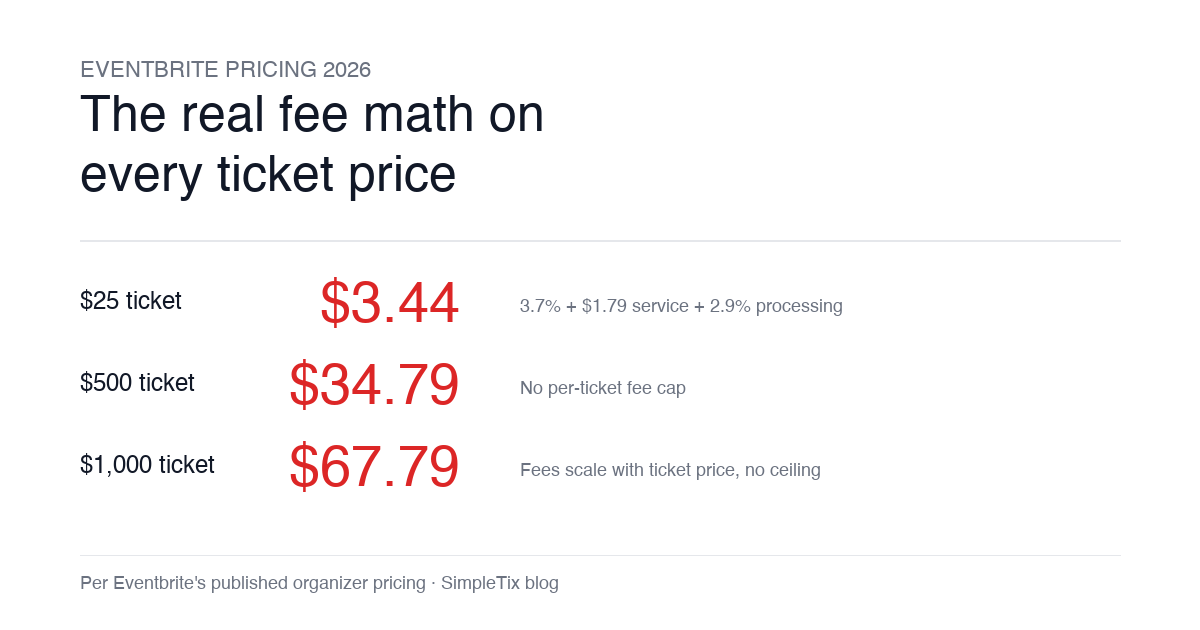
Eventbrite pricing 2026 is a lot for event organizers to sort through. There are longstanding policies that quietly cost paid-event operators real money, and there is genuine news under new ownership. This guide covers what the fees actually cost you today, what actually changed under the Bending Spoons acquisition, and how the alternatives compare on real numbers. Below is the honest breakdown, sourced to Eventbrite's own pricing page and SEC filings. Eventbrite pricing 2026: current fee structure As of 2026, Eventbrite charges 3.7% + $1.79 per paid ticket for the service fee, plus 2.9% for payment processing. In-person sales carry a $1 + 2.9% fee. There is no per-ticket fee cap. For a quick benchmark of total organizer-side fees: On a $25 ticket, fees total about $3.44 (13.8%) On a $50 ticket, fees total about $5.09 (10.2%) On a $100 ticket, fees total about $8.39 (8.4%) On a $500 ticket, fees total about $34.79 (7.0%) On a $1,000 ticket, fees total about $67.79 (6.8%) The fees scale with ticket price with no ceiling. That is the story for anyone selling premium tickets, season passes, VIP tiers, or corporate packages. Eventbrite pricing 2026: no per-ticket fee cap Eventbrite does not cap total ticket fees. This has been true since 2018, when Eventbrite removed the previous cap during its IPO. For most organizers selling everyday tickets ($20 to $50), the absence of a cap rarely comes up in the math. But for organizers selling premium tickets, the uncapped structure translates into real per-event cost. Take a conference selling three ticket tiers on Eventbrite: $150 general admission: fee about $12.34 (8.2%) $400 VIP ticket: fee about $27.09 (6.8%) $800 sponsor ticket: fee about $50.90 (6.4%) For a 200-person conference with a mix of GA and VIP tickets, that translates into hundreds of dollars...