
8 Best Eventbrite Alternatives & Competitors for 2026 (Real Pricing)
-
 by
by
If you are looking for Eventbrite alternatives or Eventbrite competitors, you probably have a specific problem: the fees feel too high, or the platform does not fit how you actually run events. This guide compares the most common Eventbrite alternatives organizers consider in 2026, with real per-ticket pricing for each. Eventbrite alternatives and competitors at a glance Here is the...

Haunted House Ticketing Software: Timed Entry, Scanning & Capacity Control for 2026
-
by
If you run a haunted attraction, October is your Super Bowl. So how you sell tickets from June through September decides how the whole season goes. This guide covers what haunted house ticketing software actually needs to do in 2026, how to pick one, and what SimpleTix costs for haunts of any size. What haunted house ticketing software needs to do Selling haunted house tickets is not like selling concert tickets. First, capacity is measured in throughput per hour, not in seats. Second, weather can shut you down without warning. Third, most of your revenue happens across three or four weekends. And fourth, your staff is often in costume at 9pm in a field with spotty cell service. So the ticketing software has to handle all of that. Here is the checklist most haunt operators use: Timed entry with per-slot capacity control so lines stay manageable Fast scanning at the gate, including offline mode for outdoor venues Re-entry passes for multi-attraction ticketing Add-ons for photos, upcharges, VIP fast-pass Group and family bundles so a family of five is one checkout, not five Waitlists for when peak-hour slots sell out Attendee wallet passes so guests are not fumbling for paper Same-day or fast payouts during the season crunch If your current tool cannot do all of that, it is worth switching now. The last thing you want is to be debugging your ticketing at 8pm on the first weekend of October. How does timed entry work for haunted houses? Timed entry lets you release a fixed number of tickets per time slot (typically every 15 or 30 minutes) so guests arrive in waves instead of a single 7pm crush. For a walkthrough haunt with a 45-minute experience, that usually means 20 to 40 guests per 15-minute window. So over a four-hour...
Partiful Just Launched Ticketing: What Event Organizers Need to Know
-
by
Partiful just launched ticketing. As of June 2, 2026, hosts can now sell tickets directly inside the Partiful app on iOS, Android, and web. Initially, the feature is rolling out to U.S. hosts. Then broader availability is planned in the coming months. If you have run events before, you probably already know Partiful. It is the social-first invitation platform with millions of monthly active users. Until now, every paid event on Partiful had to push guests off-platform to actually buy a ticket. So this launch closes that gap. But here is the question every event organizer needs to ask. Is Partiful's new ticketing the right platform for your event? Or is it built for a different kind of host? Below is the honest breakdown. What Partiful Ticketing actually does Partiful's launch covers the basics every casual social host needs: Ticket tiers with multiple pricing levels Capacity limits to cap attendance Promo codes for special guest pricing QR code check-in at the door SMS notifications to attendees Staff permissions so bouncers or co-hosts can check guests in Sales tracking for real-time payouts and attendance Also, payment processing runs through Stripe. Then payouts are available roughly three days after the event ends. Meanwhile, free tickets carry no fees. Paid ticket fees scale with event size and ticket price. So Partiful shows hosts the exact fee during setup, and hosts can pass it on or absorb it. CEO Shreya Murthy framed the launch this way: "Ticketing has always lived outside the social experience of an event — you buy a ticket somewhere else, then figure out who's going. We think that's backwards." So if your event lives or dies on word of mouth and the "who else is going" dynamic, Partiful's pitch is real. The platform is built around social discovery, dynamic invites,...

Event Ticketing Software: The Complete Guide for Organizers
-
by
Event Ticketing Software: The Complete Guide for Organizers If you’re comparing event ticketing software, you probably want three things fast: lower fees, fewer headaches, and tools that actually help you sell and manage tickets. That’s exactly where many organizers get stuck. Plenty of platforms can process a ticket sale. Fewer support the work before, during, and after the event. SimpleTix is built for organizers who need more than a basic checkout page. You get flexible ticketing, same-day payouts, strong check-in tools, and clear pricing at $0.79 + 2% per ticket. In addition, there are no contracts, no subscriptions, and no fees on free events. What good event ticketing software should actually do The best event ticketing software should do more than collect money. It should help you sell tickets, manage capacity, reduce lines, support your staff, and give attendees a smooth experience. That means looking beyond a pretty event page. You need software that handles real-world event workflows. For example, you may need timed entry, reserved seating, season tickets, or re-entry passes. You may also need mobile scanning, offline check-in, promo codes, waitlists, and reporting that makes sense. SimpleTix covers those core needs. You can sell: General admission tickets with timed entry and capacity management Reserved seating with interactive seat maps Season tickets for GA or reserved seating Flex Pass products with multi-use or re-entry access and attendee photo verification That range matters if you run different kinds of events. Event ticketing software pricing: what to watch for Pricing is often where platforms start to look very different. SimpleTix keeps pricing straightforward: $0.79 + 2% per ticket No contracts No subscriptions No fees on free events You can also choose whether to pass fees to attendees or absorb them yourself. If pricing is a top concern, review the full SimpleTix...
Season Ticket Software for Fall 2026: Subscriptions, Reserved Seating & Renewals
-
by
Fall subscription sales are the single biggest revenue moment for most performing arts organizations. Season packages, member renewals, and early access windows all open between July and September. So the season ticket software you pick this summer decides how the fall series actually sells. This guide covers what season ticket software needs to do in 2026, how to configure it for a theater, symphony, or concert series, and what SimpleTix costs for season-driven event programs. What season ticket software actually needs to do Selling season tickets is nothing like selling single-event tickets. First, one subscriber buys 4 to 20 events in a single package. Second, seats need to lock across the entire season. Third, renewals from prior subscribers happen weeks before the general public gets access. And fourth, add-ons like parking, pre-show dinner, and backstage passes attach to the subscription, not the event. So the operational checklist for season ticket software looks like this: Season pass or subscription products that group multiple events into one purchase Reserved seating with locked seats across the whole season, so the subscriber sits in the same seat every night Priority access windows for existing subscribers before general on-sale Payment plans or full-payment options so patrons can split large subscription costs Renewal workflows that let last year's subscribers re-up with one click Comp ticket management for donors, sponsors, and press seats Membership tiers with different pricing, benefits, and priority access Reporting by subscriber, not just by event If your current tool cannot handle these, you are probably running Excel spreadsheets on the side and losing renewals every year. What is season ticket software? Season ticket software is a ticketing platform designed to sell multi-event packages (season subscriptions) alongside individual tickets, with reserved seat continuity, subscriber priority access, and renewal workflows built in. The core difference...

Holiday Event Ticketing Software: Timed Entry, Reserved Seating & Capacity Control for...
-
by
If you run a holiday event, you are booking dates now. So the ticketing platform you pick this month determines how November and December actually go. This guide covers what holiday event ticketing software needs to do in 2026, how to configure it for the season crunch, and what SimpleTix costs for holiday events of any size. What holiday event ticketing software needs to do Holiday events compress a whole year of sales into six weeks. First, most tickets sell in a 4 to 8 week window between mid-November and January 1. Second, weather cancels outdoor events without warning. Third, family groups buy 4 to 8 tickets in one order, not 1. And fourth, capacity is measured per time slot, not per venue. So the ticketing checklist for holiday operators looks like this: Timed entry with per-slot capacity for drive-throughs, walk-throughs, and Santa visits Reserved seating for holiday theater, Nutcracker, and holiday concerts Group and family bundles so a family of six is one checkout, not six Fast scanning at the gate, including offline mode for cold outdoor venues Waitlists for when peak-hour slots sell out Add-ons for hot chocolate, photo packages, VIP tiers, and holiday merch Automated email reminders so guests do not forget their timed slot Same-day payouts to fund the season's operational costs If your current tool cannot do all of that, October is too late to switch. Move now. How do timed entry tickets work for holiday events? Timed entry lets you release a fixed number of tickets per time slot (typically every 15 or 30 minutes) so guests arrive in waves instead of one 6pm surge. For a Christmas light drive-through with a 45-minute route, that usually means 30 to 60 vehicles per 15-minute window. Over a 5-hour evening, you can process 600 to 1,200...
Eventbrite Pricing 2026: Fees, Refunds & What’s Actually Changed
-
by
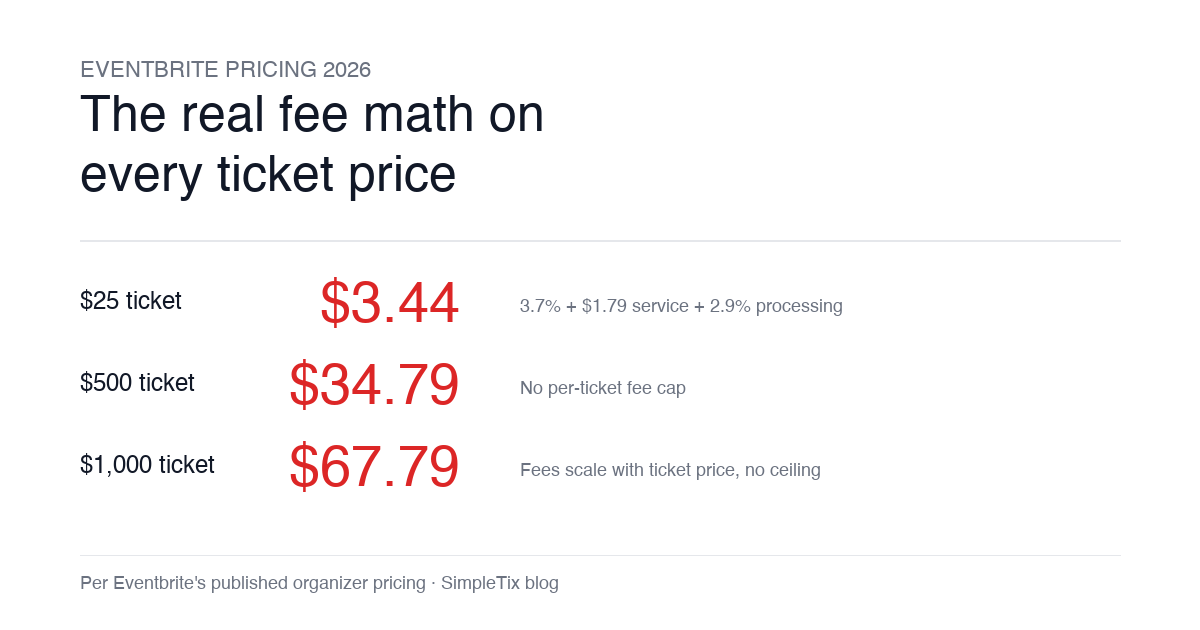
Eventbrite pricing 2026 is a lot for event organizers to sort through. There are longstanding policies that quietly cost paid-event operators real money, and there is genuine news under new ownership. This guide covers what the fees actually cost you today, what actually changed under the Bending Spoons acquisition, and how the alternatives compare on real numbers. Below is the honest breakdown, sourced to Eventbrite's own pricing page and SEC filings. Eventbrite pricing 2026: current fee structure As of 2026, Eventbrite charges 3.7% + $1.79 per paid ticket for the service fee, plus 2.9% for payment processing. In-person sales carry a $1 + 2.9% fee. There is no per-ticket fee cap. For a quick benchmark of total organizer-side fees: On a $25 ticket, fees total about $3.44 (13.8%) On a $50 ticket, fees total about $5.09 (10.2%) On a $100 ticket, fees total about $8.39 (8.4%) On a $500 ticket, fees total about $34.79 (7.0%) On a $1,000 ticket, fees total about $67.79 (6.8%) The fees scale with ticket price with no ceiling. That is the story for anyone selling premium tickets, season passes, VIP tiers, or corporate packages. Eventbrite pricing 2026: no per-ticket fee cap Eventbrite does not cap total ticket fees. This has been true since 2018, when Eventbrite removed the previous cap during its IPO. For most organizers selling everyday tickets ($20 to $50), the absence of a cap rarely comes up in the math. But for organizers selling premium tickets, the uncapped structure translates into real per-event cost. Take a conference selling three ticket tiers on Eventbrite: $150 general admission: fee about $12.34 (8.2%) $400 VIP ticket: fee about $27.09 (6.8%) $800 sponsor ticket: fee about $50.90 (6.4%) For a 200-person conference with a mix of GA and VIP tickets, that translates into hundreds of dollars...
Our Trending Articles

How Vala’s Pumpkin Patch Scaled to 100K+ Visitors...
-
by
How Vala’s Pumpkin Patch Scaled to 100K+ Visitors with SimpleTix If you run a busy fall attraction, you already know the pressure: ticketing has to keep up when demand spikes, guests arrive in waves, and lines move fast. That is exactly what Vala’s Pumpkin Patch faced as it grew into Nebraska’s premier fall destination with more than 100,000 visitors each season. Founded in 1984, Vala’s Pumpkin Patch now draws huge crowds across 50+ attractions and multiple food stands. However, growth exposed weak spots in its old setup. Peak-morning surges strained the system, one technical admin became a bottleneck, and layered tools made operations harder than they needed to be. For Vala’s, the move to SimpleTix was about getting one reliable system for admissions, season passes, bookings, and on-site sales. Why Vala’s needed better farm ticketing software Dan McDonald, MS, PMP, IT Manager at Vala’s Pumpkin Patch, put it plainly: “We originally used a ticketing platform that served us well in our early years, but as our guest volume grew, it could no longer scale to meet demand.” That issue showed up in a few clear ways. First, the system struggled during peak-morning ticket surges. In other words, the exact time the platform mattered most was the time it became risky. Second, operations depended too heavily on one technical administrator. As a result, routine changes and troubleshooting could pile up around one person. Third, the team had to work across multiple layered applications. That created extra steps, more training, and more chances for something to break during the busiest weeks of the season. Finally, outdoor hardware added another challenge. Farm attractions do not run in perfect indoor conditions, so tools need to work in real weather and real crowds. The bottlenecks were operational, not just technical Vala’s wasn’t just trying to...
Event Ticketing Software: The Complete Guide for Organizers
-
by
Event Ticketing Software: The Complete Guide for Organizers If you’re comparing event ticketing software, you probably want three things fast: lower fees, fewer headaches, and tools that actually help you sell and manage tickets. That’s exactly where many organizers get stuck. Plenty of platforms can process a ticket sale. Fewer support the work before, during, and after the event. SimpleTix is built for organizers who need more than a basic checkout page. You get flexible ticketing, same-day payouts, strong check-in tools, and clear pricing at $0.79 + 2% per ticket. In addition, there are no contracts, no subscriptions, and no fees on free events. What good event ticketing software should actually do The best event ticketing software should do more than collect money. It should help you sell tickets, manage capacity, reduce lines, support your staff, and give attendees a smooth experience. That means looking beyond a pretty event page. You need software that handles real-world event workflows. For example, you may need timed entry, reserved seating, season tickets, or re-entry passes. You may also need mobile scanning, offline check-in, promo codes, waitlists, and reporting that makes sense. SimpleTix covers those core needs. You can sell: General admission tickets with timed entry and capacity management Reserved seating with interactive seat maps Season tickets for GA or reserved seating Flex Pass products with multi-use or re-entry access and attendee photo verification That range matters if you run different kinds of events. Event ticketing software pricing: what to watch for Pricing is often where platforms start to look very different. SimpleTix keeps pricing straightforward: $0.79 + 2% per ticket No contracts No subscriptions No fees on free events You can also choose whether to pass fees to attendees or absorb them yourself. If pricing is a top concern, review the full SimpleTix...
SimpleTix vs Eventbrite: Fees, Features, and Which Ticketing Platform Fits...
-
by
SimpleTix vs Eventbrite: Fees, Features, and Which Ticketing Platform Fits Your Event Comparing Eventbrite alternatives? Here’s the short version: SimpleTix offers $0.79 + 2% per ticket, same-day payouts, Square support, and the ticketing tools many organizers look for — without contracts or subscriptions. If you’re searching for “SimpleTix vs Eventbrite,” you’re probably not casually browsing. You’re trying to answer a practical question: Which platform will help me sell tickets without eating my margins, slowing down payouts, or making setup harder than it needs to be? SimpleTix charges $0.79 + 2% per ticket, with no contracts, no subscriptions, and no fees on free events. You can also choose to pass fees to attendees or absorb them yourself. For organizers looking at Eventbrite alternatives, that alone is often enough to justify a closer look. But pricing isn’t the whole story. If you’re switching platforms, you also need the basics to work well: checkout, embeds, seating, scanning, reporting, and support when something breaks an hour before doors open. SimpleTix is built for that. SimpleTix vs Eventbrite at a glance Here’s the practical comparison for organizers evaluating a switch. Why organizers consider SimpleTix $0.79 + 2% per ticket No contracts or monthly subscriptions No fees on free events Same-day payouts Square and Stripe integrations Embeddable checkout widgets for your own website Reserved seating with interactive seat maps Memberships, season tickets, and Flex Passes Waitlists, promo codes, and abandoned cart recovery Box office tools and in-person sales support Customer support If you’re comparison shopping because of fees, payout timing, or wanting more control over your website and in-person workflow, SimpleTix is worth a look. SimpleTix vs Eventbrite: The biggest difference is fees For many organizers, Eventbrite’s pricing structure is the reason they start looking for alternatives in the first place. SimpleTix pricing is simple: $0.79...
Editor’s Pick
Holiday Event Ticketing Software: Timed Entry, Reserved Seating & Capacity Control for...
-
by
If you run a holiday event, you are booking dates now. So the ticketing platform you pick this month determines how November and December actually go. This guide covers what holiday event ticketing software needs to do in 2026, how to configure it for the season crunch, and what SimpleTix costs for holiday events of any size. What holiday event ticketing software needs to do Holiday events compress a whole year of sales into six weeks. First, most tickets sell in a 4 to 8 week window between mid-November and January 1. Second, weather cancels outdoor events without warning. Third, family groups buy 4 to 8 tickets in one order, not 1. And fourth, capacity is measured per time slot, not per venue. So the ticketing checklist for holiday operators looks like this: Timed entry with per-slot capacity for drive-throughs, walk-throughs, and Santa visits Reserved seating for holiday theater, Nutcracker, and holiday concerts Group and family bundles so a family of six is one checkout, not six Fast scanning at the gate, including offline mode for cold outdoor venues Waitlists for when peak-hour slots sell out Add-ons for hot chocolate, photo packages, VIP tiers, and holiday merch Automated email reminders so guests do not forget their timed slot Same-day payouts to fund the season's operational costs If your current tool cannot do all of that, October is too late to switch. Move now. How do timed entry tickets work for holiday events? Timed entry lets you release a fixed number of tickets per time slot (typically every 15 or 30 minutes) so guests arrive in waves instead of one 6pm surge. For a Christmas light drive-through with a 45-minute route, that usually means 30 to 60 vehicles per 15-minute window. Over a 5-hour evening, you can process 600 to 1,200...
Eventbrite Pricing 2026: Fees, Refunds & What’s Actually Changed
-
by
Eventbrite pricing 2026 is a lot for event organizers to sort through. There are longstanding policies that quietly cost paid-event operators real money, and there is genuine news under new ownership. This guide covers what the fees actually cost you today, what actually changed under the Bending Spoons acquisition, and how the alternatives compare on real numbers. Below is the honest breakdown, sourced to Eventbrite's own pricing page and SEC filings. Eventbrite pricing 2026: current fee structure As of 2026, Eventbrite charges 3.7% + $1.79 per paid ticket for the service fee, plus 2.9% for payment processing. In-person sales carry a $1 + 2.9% fee. There is no per-ticket fee cap. For a quick benchmark of total organizer-side fees: On a $25 ticket, fees total about $3.44 (13.8%) On a $50 ticket, fees total about $5.09 (10.2%) On a $100 ticket, fees total about $8.39 (8.4%) On a $500 ticket, fees total about $34.79 (7.0%) On a $1,000 ticket, fees total about $67.79 (6.8%) The fees scale with ticket price with no ceiling. That is the story for anyone selling premium tickets, season passes, VIP tiers, or corporate packages. Eventbrite pricing 2026: no per-ticket fee cap Eventbrite does not cap total ticket fees. This has been true since 2018, when Eventbrite removed the previous cap during its IPO. For most organizers selling everyday tickets ($20 to $50), the absence of a cap rarely comes up in the math. But for organizers selling premium tickets, the uncapped structure translates into real per-event cost. Take a conference selling three ticket tiers on Eventbrite: $150 general admission: fee about $12.34 (8.2%) $400 VIP ticket: fee about $27.09 (6.8%) $800 sponsor ticket: fee about $50.90 (6.4%) For a 200-person conference with a mix of GA and VIP tickets, that translates into hundreds of dollars...
Haunted House Ticketing Software: Timed Entry, Scanning & Capacity Control for 2026
-
by
If you run a haunted attraction, October is your Super Bowl. So how you sell tickets from June through September decides how the whole season goes. This guide covers what haunted house ticketing software actually needs to do in 2026, how to pick one, and what SimpleTix costs for haunts of any size. What haunted house ticketing software needs to do Selling haunted house tickets is not like selling concert tickets. First, capacity is measured in throughput per hour, not in seats. Second, weather can shut you down without warning. Third, most of your revenue happens across three or four weekends. And fourth, your staff is often in costume at 9pm in a field with spotty cell service. So the ticketing software has to handle all of that. Here is the checklist most haunt operators use: Timed entry with per-slot capacity control so lines stay manageable Fast scanning at the gate, including offline mode for outdoor venues Re-entry passes for multi-attraction ticketing Add-ons for photos, upcharges, VIP fast-pass Group and family bundles so a family of five is one checkout, not five Waitlists for when peak-hour slots sell out Attendee wallet passes so guests are not fumbling for paper Same-day or fast payouts during the season crunch If your current tool cannot do all of that, it is worth switching now. The last thing you want is to be debugging your ticketing at 8pm on the first weekend of October. How does timed entry work for haunted houses? Timed entry lets you release a fixed number of tickets per time slot (typically every 15 or 30 minutes) so guests arrive in waves instead of a single 7pm crush. For a walkthrough haunt with a 45-minute experience, that usually means 20 to 40 guests per 15-minute window. So over a four-hour...
Latest News
Our Company News

Eventbrite Is Being Acquired. Here’s What It Means for You.
-
by
On December 2, Eventbrite announced it's being acquired by Bending Spoons for ~$500M, down from a $1.7B peak valuation. The deal takes Eventbrite private and puts it in the hands of a firm known for aggressive cost-cutting and price increases. If you're an Eventbrite customer, this is worth paying attention to. Who is Bending Spoons? Bending Spoons is a Milan-based tech company that acquires underperforming software brands (Evernote, Vimeo, WeTransfer, Meetup, AOL) and restructures them for profitability. Their playbook is consistent: cut headcount (often 50-75%), raise prices, and streamline operations. That's not speculation. It's their stated model. What This Likely Means for Eventbrite Customers Higher fees. Bending Spoons is explicit about monetization being a priority. Eventbrite has already experimented with pricing over the past two years. Expect that to accelerate. Reduced support. Major headcount reductions typically mean fewer experienced support reps and longer response times, especially during the transition. If you run complex events (reserved seating, multi-day festivals, timed entry), this matters. Product stagnation. Ownership changes usually mean roadmap resets and internal focus on cost savings. Don't expect new features anytime soon. Questions to Ask Yourself You don't need to panic. But you should treat this as a prompt to evaluate your options: What are you paying in total fees today? How sensitive is your margin to a 10-20% increase? How critical is hands-on support to your events? Can you afford slower response times mid-season? What's your contingency plan if pricing or policies change after you've already committed to your event calendar? If any of those questions give you pause, now is the time to explore alternatives, not after new pricing is announced. Why SimpleTix Is Different SimpleTix was built for organizers who care about margins, flexibility, and responsive support. A few key differences: Transparent pricing with a hard fee...
Pay with Square Gift Card… is now here!
-
by
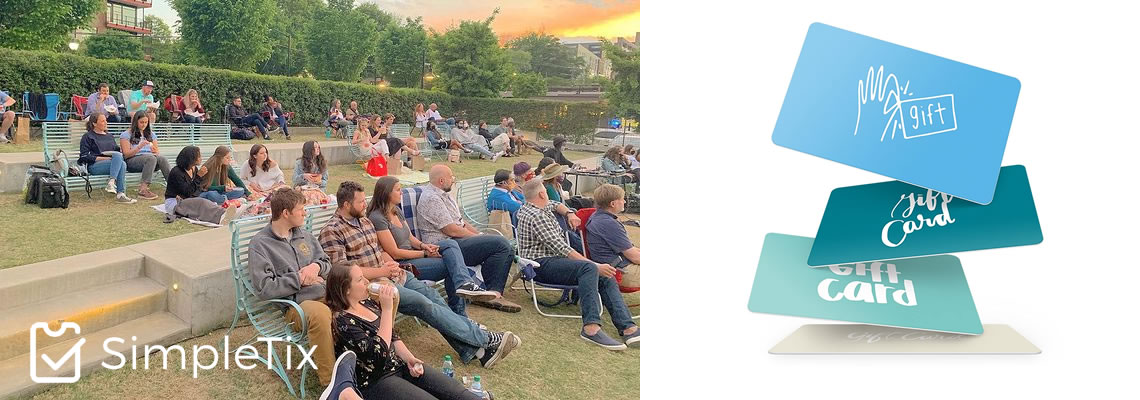
The #1 Request we've had in 2021 - When will you support Square Gift Cards? Square Gift Cards give venues so much flexibility. Want to buy your best friend tickets to the zoo? You’re just not sure what date and time would be best for them.Get ’em a Gift Card! They can later use it online to buy the tickets and pick the best time slot of their schedule. Next time you need to refund an order, make it an opportunity! Imagine the next time you need to refund an order, you can instead ask the patron if they would be interested in supporting your organization and take their refund as a gift card. Thus they can use it for a future event. After enabling Square Gift Cards as a checkout option, the next time you do a refund you’ll have the option to create a Square Gift Card for the order’s amount. This helps keep your cash flow positive. Canceling an event is devastating. Turn it into an opportunity! This August 2021, the COVID-19 Delta variant is starting to spread and jurisdictions are requiring event organizers to postpone or cancel their events. If you have to cancel an event with over 25 orders SimpleTix can offer a special type of bulk refund option for you. Want to simply give all of the attendees a full refund – we can still do that. However, we can offer you a better option now. We can send an email to all ticket buyers and offer them a quick link where they can click and get a full refund. Below this, we’ll include a message, written by you where you explain the reason for the event’s cancellation and how taking a Square Gift Card instead of a refund help your organization stay afloat. The ticket buyer can then click a button to create their Square Gift Card. They can use this...

Buncombe County Switches to Local Event Tech Provider, Saves Hundreds and Sees...
-
by
Buncombe County switched to SimpleTix, a local tech company, for the county’s annual Lake Julian Festival of Lights celebration. Ultimately, the county saved hundreds of dollars in fees and saw a record turnout for opening weekend attendance. Asheville, North Carolina December 9, 2019 – Buncombe County’s annual Lake Julian Festival of Lights was just a bit more festive this year. The county switched to a local tech company to provide the eTicketing service for the event and ultimately saved hundreds of dollars on fees and saw the highest attendance ever for opening weekend. The annual celebration is always a huge draw for Asheville, NC, residents, as well as those across the state. The drive-through only tour includes thousands of dazzling lights and displays carefully choreographed and installed around Lake Julian Park. Each year, 20% of the proceeds goes to support the Buncombe County Special Olympics, as well. For 2019’s event, county organizers switched from Eventbrite to SimpleTix, a local ticketing technology company based in Asheville. The decision was made for multiple reasons, including saving money on fees, but also to help support a local company and bolster the area economy. The result was a record turnout, with almost 1,300 people visiting on Sunday alone, a new single-day record. Part of the increased attendance was due to lower ticket prices. Because the county saved money on fees, it was able to pass those savings along to eventgoers in the form of lower ticket prices. Chris Bubenik, Buncombe County Recreation Services’ Marketing Generalist, stated, “It couldn’t be easier to run an event with SimpleTix. From setting up our festival to scanning tickets, every step of the process is intuitive. The SimpleTix team also provided personal attention to ensure success. Plus, we were able to receive instant payments instead of waiting weeks for a check.” The partnership was so successful that Buncombe...
Zapier now features SimpleTix
-
by
Automate repetitive tasks! Do you use other CRMs, email tools, or even Google Sheets? You can now find SimpleTix in the Zapier app list. Currently the most common SimpleTix Zaps are: Google Sheets - automatically add all new orders into a Google Sheet as the come in. Gmail - automatically email a copy of the order details to other members of your team. Slack - add new orders into Slack, this is ideal if you need to take care of mailing them a welcome packet. MailChimp - automatically add attendees to your email list. SalesForce - automatically add ticket buyers as an opportunity.

Taking the Hassle Out of Conference Registration
-
 by
by
Anyone who has ever registered for a conference knows that it can be time-consuming to click through page after page of registration options. For the past three years, the Pacesetter Conference has used SimpleTix to streamline their process for attendees. The conference is organized by Pacesetter Claims, an insurance claims organization based in Tulsa, Oklahoma. The company utilize the conference to share updates and best practices with its clients across the U.S. Streamlined Process By having all of the registration information on one page, Pacesetter’s employees can easily make all of their selections at once, or keep the page open and come back to it later. This functionality also allows managers to register more than one employee at once and choose which break-out sessions each team member will attend. CRM Integration Each registration is automatically linked to Pacesetter’s customer relationships management system through Zapier. Data does not need to be entered manually into another system or batch loaded once per day. The transfer happens in real time. This allows conference organizers to track and communicate with each registrant. The SimpleTix integration with Zapier allows ticketing data to be automatically sent to any of the major CRM systems on the market, including Salesforce and Constant Contact. Learn More SimpleTix is a low-cost solution for any conference registration, no matter how large or small the event. All of the features that the Pacesetter Conference is using are included for just $0.99 per registration. Other conference registration services can cost $15 or more for each registrant. Contact us to learn more about how SimpleTix can streamline your next conference or professional development event.

Combining Registration and Payment for a Club Event
-
 by
by
It’s winter time in British Columbia and that means one thing — skiing! The Caledonia Nordic Ski Club is a community of more than 1,000 skiiers who share access to trails, equipment, and facilities in Prince George, British Columbia. The club holds events for its members throughout the year and recently used SimpleTix to move the registration process online to save time and money over other vendors. They were familiar with Square and were looking for a way to combine it with event registration for the Moonlight Snowshow event. SimpleTix allowed them to do that by providing a registration page that also collected payment at different tiers for club members and nonmembers. Canadian payment platforms like Beanstream and Moneris can take over a week to setup an account on. There’s also setup fees and monthly fees. With Square the new account took minutes to setup and there’s no setup or monthly fees. The club was able to set everything up themselves and said the process could not have gone more smoothly. “It took less than 10 minutes to setup our entire event page,” said John Bowes, Pesident of the Caledonia Nordic Ski Club. Through their SimpleTix account, the club can monitor registrations and payments in real-time and have that information available to check people in on the day of the event. The Caledonia Nordic Ski Club is one of many athletic groups that use SimpleTix to manage their event registrations. We offer the lowest prices in the industry and combine payment with event registration. For a club like this one, that means more of its members hard-earned money is going toward an unnecessary expense. The nonmember ticket price for the Moonlight Snowshoe is $25. The transaction fee on each SimpleTix purchase is just $0.99, compared to $2.62 from Eventbrite. Money collected from ticket purchases is instantly...