5 Tips For Running a Skeleton Event With a Skeleton Crew
-
 by
by
Riley Manning has worked as a travel and entertainment writer for more than 10 years. Today, he writes about unique events and the technology that helps make them happen.
Fun opportunities for festive events abound as the autumnal equinox ushers in a new season. Cooler temperatures, earlier sunsets, and a festive mood provide the perfect atmosphere for special harvest and Halloween-themed events.
You may be considering throwing certain seasonal events including:
- Pumpkin patches
- Hay rides
- Corn mazes
- Costume contests
- Haunted houses
- Ghost tours
- Halloween film festivals
- Farm harvest festivals
Due to the various effects of the pandemic, you may want fewer employees than usual to staff these events. By employing the right ticketing software, running a skeleton event is easier and safer for your employees and guests, leaving everyone to enjoy the seasonal haunts in peace.
Whether you’re creating a new attraction, hosting a special event, or throwing a small festival, ticketing software allows you to run your seasonal event with a skeleton crew in these five ways:
- Selling tickets online
- Scan-and-go mobile check-ins
- Minimizing cash transactions
- Communicating with customers
- Staying on top of safety
Don’t be scared – it’s that simple.
Selling Tickets Online
Offering ticket purchases online allows your guests more time for assembling their costumes.
Online ticket sales have increased each year since 2016 and are expected to continue to grow 6% each year. Without long lines at the ticket booth, guests can walk right up to the event, ticket in hand.
Since selling your event’s tickets online allows potential visitors the opportunity to buy tickets at their leisure, you can sell tickets all day, every day without any labor on your team’s behalf. It is not only convenient for your customers, but also provides you with clarity for your upcoming event.
With advance ticket sales, you know just how many visitors to expect at your pumpkin patch or haunted house. This allows you to hire the appropriate number of staff for the event. Plus, you and your staff will be happier knowing how many guests to anticipate.
You’ll also be able to better prepare for your expected visitors. More accurately estimating supplies of apple cider, smores, or slices of pumpkin pie will make your concessions experience run more smoothly. You’re less likely to run out of snacks or overbuy and waste food and money.
Scan-and-go Mobile Check-ins

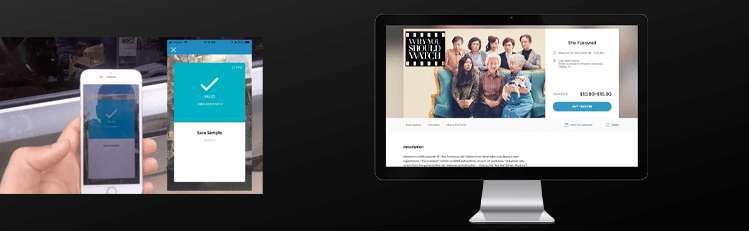
Check people in more quickly than you can say “monster mash.” Mobile tickets generated upon purchase go straight to your guests’ devices. They can skip the will call line and head straight into the event with their ticket in hand.
Contactless technology continues to grow in popularity because of its speed and convenience. Staff can use their own mobile devices to scan in visitors, keeping contact to a minimum and creating a safe and healthy environment for all.
With scan-and-go mobile check-ins, visitors present their mobile ticket, reducing hand to hand contact. Tickets can even be scanned through plexiglass, so any extra health and safety precautions can easily be accommodated. Because check-in moves so quickly, you can avoid long lines and bottlenecked lobbies without much staff working.
Minimize Cash Transactions

Using Square for ticket sales is no tricks and all treats.
Any ticket purchases made on site should be just as quick, convenient, and safe as online purchases are. Using a payment system integrated with Square provides your guests with the most versatile, convenient, and speedy method to purchase their tickets and get inside the event.
Using ticketing software with a Square partnership allows you to take nearly any form of payment on a mobile device. This is more convenient for your guests as it provides them with tons of options (ApplePay, AndroidPay, or chip, to name a few). The quick payment gateway will allow the line to move more quickly, so you need less staff working the ticket booth.
Square also eliminates the need for a cash drawer on site, which is healthier and requires less time and staff to facilitate. In addition, noncash payments continue to accelerate in popularity each year. People are simply carrying less cash and using more versatile payment methods. Taking advantage of Square to complete these payments benefits both you and your guests.
Using Square also means you’ll receive your ticket money immediately. You won’t have to wait until the event is over. Currently, SimpleTix is the only ticketing software with full Square integration.
Communicate with Customers
Don’t let your visitors get lost before they get to the corn maze. With ticketing software, you can communicate vital information to your guests before your event. Any online purchases will give you each guest’s email and phone number. This is to both your advantages.
You can send customizable confirmation emails or texts to your visitors with important information like directions, parking instructions, and frequently asked questions. Any last-minute notices, event follow-ups, or invitations to next year’s event can also be sent to guests before or after the event.
If inclement weather affects your pumpkin patch or hay ride, you can text or email guests about weather delays or new dates immediately. Guests will have all event information immediately in their hands without wondering the event’s status, scouring social media, or calling the box office. This means you won’t need staff manning the phones for last minute phone calls.
Stay on Top of Safety
Don’t let the pandemic scare away your guests. Ticketing software helps you easily remain compliant, healthy, and safe with any area specific health mandates or precautions you’d like to implement.
You don’t want your haunted house to be overcrowded and your staff to be overwhelmed with visitors. Ticketing software should allow you to set up timed entry slots and capacity limits for your events. This creates a safer atmosphere in your event space.
Seating arrangements can help keep parties close to each other without wasting space in your venue. If you do a drive-in horror film screening, you can create custom seating arrangements online, giving each car ample space to enjoy the show.
Once your event has started, you should be able to monitor attendance with a real-time record of all checked-in attendees to ensure a healthy atmosphere. Ticketing software allows you to run your event with less staff members, fewer complications, and more safety for your guests.
SimpleTix has offered an affordable, premium event ticketing platform that outperforms Eventbrite and similar apps for over 12 years. Compared to the competition, SimpleTix offers better options at a better price point. To learn more, call us at +1 (855) 550-3670 or email us at support@simpletix.com.
Latest News
Related Articles

Season Ticket Software for Fall 2026: Subscriptions, Reserved Seating & Renewals
-
 by
by
Fall subscription sales are the single biggest revenue moment for most performing arts organizations. Season packages, member renewals, and early access windows all open between July and September. So the season ticket software you pick this summer decides how the fall series actually sells. This guide covers what season ticket software needs to do in 2026, how to configure it for a theater, symphony, or concert series, and what SimpleTix costs for season-driven event programs. What season ticket software actually needs to do Selling season tickets is nothing like selling single-event tickets. First, one subscriber buys 4 to 20 events in a single package. Second, seats need to lock across the entire season. Third, renewals from prior subscribers happen weeks before the general public gets access. And fourth, add-ons like parking, pre-show dinner, and backstage passes attach to the subscription, not the event. So the operational checklist for season ticket software looks like this: Season pass or subscription products that group multiple events into one purchase Reserved seating with locked seats across the whole season, so the subscriber sits in the same seat every night Priority access windows for existing subscribers before general on-sale Payment plans or full-payment options so patrons can split large subscription costs Renewal workflows that let last year's subscribers re-up with one click Comp ticket management for donors, sponsors, and press seats Membership tiers with different pricing, benefits, and priority access Reporting by subscriber, not just by event If your current tool cannot handle these, you are probably running Excel spreadsheets on the side and losing renewals every year. What is season ticket software? Season ticket software is a ticketing platform designed to sell multi-event packages (season subscriptions) alongside individual tickets, with reserved seat continuity, subscriber priority access, and renewal workflows built in. The core difference...

Holiday Event Ticketing Software: Timed Entry, Reserved Seating & Capacity Control for...
-
by
If you run a holiday event, you are booking dates now. So the ticketing platform you pick this month determines how November and December actually go. This guide covers what holiday event ticketing software needs to do in 2026, how to configure it for the season crunch, and what SimpleTix costs for holiday events of any size. What holiday event ticketing software needs to do Holiday events compress a whole year of sales into six weeks. First, most tickets sell in a 4 to 8 week window between mid-November and January 1. Second, weather cancels outdoor events without warning. Third, family groups buy 4 to 8 tickets in one order, not 1. And fourth, capacity is measured per time slot, not per venue. So the ticketing checklist for holiday operators looks like this: Timed entry with per-slot capacity for drive-throughs, walk-throughs, and Santa visits Reserved seating for holiday theater, Nutcracker, and holiday concerts Group and family bundles so a family of six is one checkout, not six Fast scanning at the gate, including offline mode for cold outdoor venues Waitlists for when peak-hour slots sell out Add-ons for hot chocolate, photo packages, VIP tiers, and holiday merch Automated email reminders so guests do not forget their timed slot Same-day payouts to fund the season's operational costs If your current tool cannot do all of that, October is too late to switch. Move now. How do timed entry tickets work for holiday events? Timed entry lets you release a fixed number of tickets per time slot (typically every 15 or 30 minutes) so guests arrive in waves instead of one 6pm surge. For a Christmas light drive-through with a 45-minute route, that usually means 30 to 60 vehicles per 15-minute window. Over a 5-hour evening, you can process 600 to 1,200...
Eventbrite Pricing 2026: Fees, Refunds & What’s Actually Changed
-
by
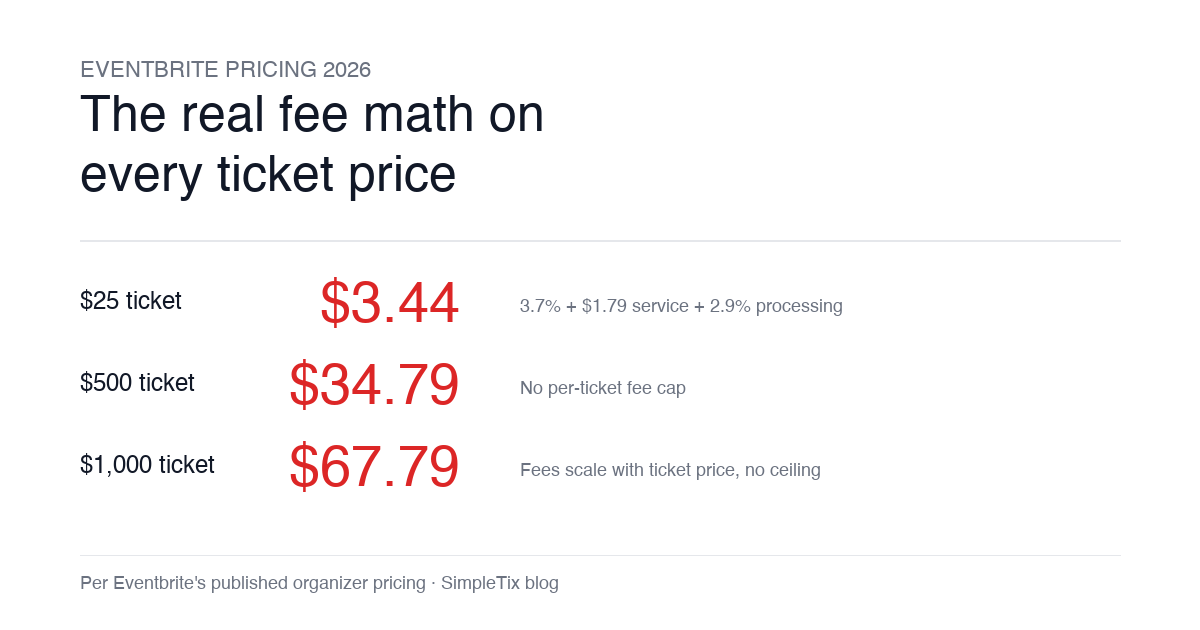
Eventbrite pricing 2026 is a lot for event organizers to sort through. There are longstanding policies that quietly cost paid-event operators real money, and there is genuine news under new ownership. This guide covers what the fees actually cost you today, what actually changed under the Bending Spoons acquisition, and how the alternatives compare on real numbers. Below is the honest breakdown, sourced to Eventbrite's own pricing page and SEC filings. Eventbrite pricing 2026: current fee structure As of 2026, Eventbrite charges 3.7% + $1.79 per paid ticket for the service fee, plus 2.9% for payment processing. In-person sales carry a $1 + 2.9% fee. There is no per-ticket fee cap. For a quick benchmark of total organizer-side fees: On a $25 ticket, fees total about $3.44 (13.8%) On a $50 ticket, fees total about $5.09 (10.2%) On a $100 ticket, fees total about $8.39 (8.4%) On a $500 ticket, fees total about $34.79 (7.0%) On a $1,000 ticket, fees total about $67.79 (6.8%) The fees scale with ticket price with no ceiling. That is the story for anyone selling premium tickets, season passes, VIP tiers, or corporate packages. Eventbrite pricing 2026: no per-ticket fee cap Eventbrite does not cap total ticket fees. This has been true since 2018, when Eventbrite removed the previous cap during its IPO. For most organizers selling everyday tickets ($20 to $50), the absence of a cap rarely comes up in the math. But for organizers selling premium tickets, the uncapped structure translates into real per-event cost. Take a conference selling three ticket tiers on Eventbrite: $150 general admission: fee about $12.34 (8.2%) $400 VIP ticket: fee about $27.09 (6.8%) $800 sponsor ticket: fee about $50.90 (6.4%) For a 200-person conference with a mix of GA and VIP tickets, that translates into hundreds of dollars...