Coupon Vouchers Make Reselling a Breeze
-
 by
by
Vikram, Head of Growth and Co-Owner at SimpleTix, brings a performance marketing background from SeatGeek and early stage startups to SimpleTix’s partnership and growth efforts. A lifelong live event enthusiast, he’s focused on expanding the tools organizers rely on to connect with their audiences.
Ticket vouchers provide a great opportunity to partner with business and other organizations to promote your events. But managing those vouchers can be a pain if you do not have the correct tools and process in place.

The promo code feature in SimpleTix makes reselling a piece of cake — no matter if you are talking about 10 tickets or 10,000 tickets.
Here’s how one of our clients used promo codes to boost attendance and increase their event’s footprint in the community:
The Bronner Bros. International Beauty Show is the largest multicultural/multi-textural hair tradeshow in the United States.
More than 30,000 people attend this event held over three days in Atlanta each year.
The lineup includes competitions, professional education classes, and even musical performances.
The show’s organizers partnered with hair salons around Atlanta to sell tickets. With so many attendees, keeping track of these third party sales would be a nightmare to do manually.
SimpleTix streamlined the process for the show and its attendees.
The SimpleTix Process
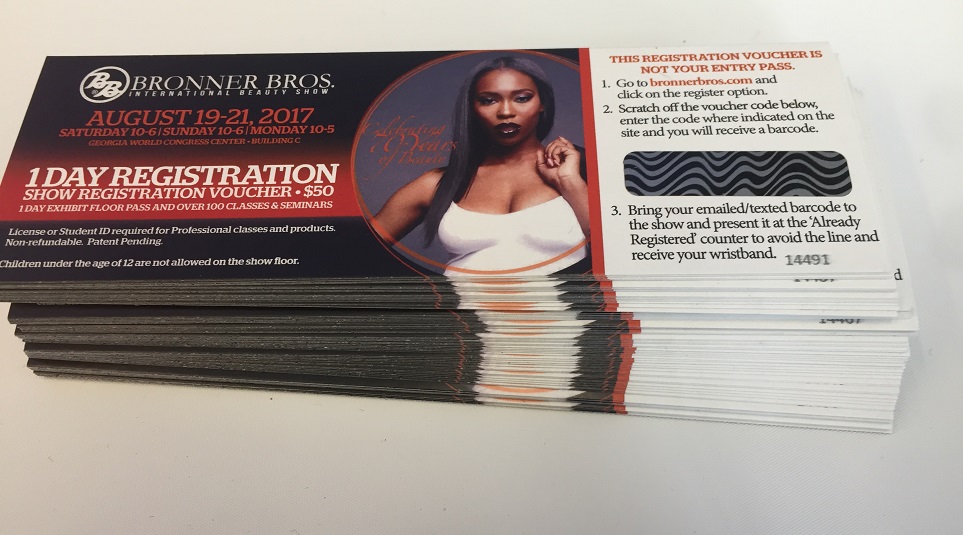
Bronner Bros. used the coupon voucher feature in SimpleTix to generate a list of unique codes. A sample code is: 2d762a79c7. The codes were sent to a print shop and printed on scratch off cards that were placed at the salons.
Clients purchased registrations at a participating salon and received a scratch off card when they did. Then, all each recipient had to do was visit the registration website listed on the card and enter their code at checkout. SimpleTix recognized the code and calculated a $0 registration fee.
Like any other purchase, tickets were emailed right away and the registrant was added to the attendee list to receive email and SMS updates about the event. When it was time to enter the tradeshow, they scanned their tickets just like any other attendee
SimpleTix tracked every code that was redeemed to prevent them from being used again, and the tradeshow coordinators could access a report on how many of the codes were used.

Other Uses
This is just one example of how the coupon voucher feature can be used. It is a great way to partner with outside sellers and increase marketing opportunities for your event.
Vouchers also work well in places where credit cards are not widely used. Sellers can take payment in cash and the voucher is tied back to SimpleTix.
Codes can be used on more than just printed material. Once generated, codes can be added to email messages, set to display on a website, or whatever else you can think of.
You are limited only by your imagination. Email us at support@simpletix.com today for a consultation on how these vouchers can you help spread the word about your event.
Latest News
Related Articles

How Vala’s Pumpkin Patch Scaled to 100K+ Visitors with SimpleTix
-
by
How Vala’s Pumpkin Patch Scaled to 100K+ Visitors with SimpleTix If you run a busy fall attraction, you already know the pressure: ticketing has to keep up when demand spikes, guests arrive in waves, and lines move fast. That is exactly what Vala’s Pumpkin Patch faced as it grew into Nebraska’s premier fall destination with more than 100,000 visitors each season. Founded in 1984, Vala’s Pumpkin Patch now draws huge crowds across 50+ attractions and multiple food stands. However, growth exposed weak spots in its old setup. Peak-morning surges strained the system, one technical admin became a bottleneck, and layered tools made operations harder than they needed to be. For Vala’s, the move to SimpleTix was about getting one reliable system for admissions, season passes, bookings, and on-site sales. Why Vala’s needed better farm ticketing software Dan McDonald, MS, PMP, IT Manager at Vala’s Pumpkin Patch, put it plainly: “We originally used a ticketing platform that served us well in our early years, but as our guest volume grew, it could no longer scale to meet demand.” That issue showed up in a few clear ways. First, the system struggled during peak-morning ticket surges. In other words, the exact time the platform mattered most was the time it became risky. Second, operations depended too heavily on one technical administrator. As a result, routine changes and troubleshooting could pile up around one person. Third, the team had to work across multiple layered applications. That created extra steps, more training, and more chances for something to break during the busiest weeks of the season. Finally, outdoor hardware added another challenge. Farm attractions do not run in perfect indoor conditions, so tools need to work in real weather and real crowds. The bottlenecks were operational, not just technical Vala’s wasn’t just trying to...

Best Eventbrite Alternatives for 2026: Lower Fees, Better Support, and More Control
-
by
Eventbrite Alternatives for 2026: Comparing SimpleTix, TicketSpice, Ticket Tailor, and TicketLeap If you’re looking for Eventbrite alternatives, you probably have a pretty specific problem: the fees feel too high, or the platform just doesn’t fit the way you actually run events. You don’t need more software for the sake of it. You need a ticketing platform that fits your event setup, works for your staff, and makes sense for your budget. This guide compares a few commonly compared options for 2026: SimpleTix, TicketSpice, Ticket Tailor, and TicketLeap. Instead of doing a feature dump, we’ll look at which type of organizer each one may fit best. What to look for in an Eventbrite alternative Before comparing platforms, get clear on what matters most for your event operation. For most organizers, it comes down to five things. 1. Fees that don’t eat your margin If you run low-cost tickets, fundraisers, seasonal events, or family attractions, fees add up fast. A platform can look fine on paper and still become expensive once volume picks up. SimpleTix keeps pricing straightforward: $0.79 + 2% per ticket, with no contracts, no subscriptions, and no fees on free events. You can also pass fees to attendees or absorb them yourself. 2. Ticketing that fits how you run events You may need more than basic GA tickets: timed entry, reserved seating, memberships, season passes, promo bundles, or waivers. That’s where differences between platforms start to show. Some are built around simpler setups. Others are better suited for venues, attractions, or recurring programs. 3. Easy check-in for staff On event day, check-in needs to be simple. Fast scanning, offline mode, and clear staff permissions can make operations smoother. 4. Tools for in-person sales If you sell at the gate, box office, or front desk, you’ll want to know whether...

Farm Ticketing Software: How to Set Up Spring Events, Season Passes, and...
-
by
Farm Ticketing Software for Spring Events, Season Passes, and Fall Admissions Spring setup gets hectic fast. School field trips, baby animal days, tulip weekends, strawberry openings, sunflower dates, pumpkin season planning, corn maze admissions — it all stacks up. If you’re looking for farm ticketing software that can handle seasonal traffic without adding complexity, SimpleTix gives you the tools farms actually need: timed entry, season passes, waivers, online and on-site sales, and same-day payouts — all for $0.79 + 2% per ticket. No contracts. No subscriptions. No fees on free events. Get started — $0.79 + 2% per ticket Built for farms that sell more than one kind of admission Most farms don’t run one simple event. You’re usually managing a mix of: Spring festivals and flower events School and homeschool visits U-pick reservations Summer camps or family activity days Fall admissions for pumpkin patches and corn mazes Photo sessions and specialty weekends Season passes for repeat local visitors That’s where basic ticketing tools start to break down. SimpleTix supports seasonal operations with timed General Admission, Season Tickets, Flex Passes, and in-person sales without juggling disconnected systems. Sell timed entry without creating bottlenecks at the gate Timed entry can help farms spread arrivals across the day. With SimpleTix, you can use General Admission with timed entry and capacity management to help: Reduce long entry lines Control parking and staffing pressure Avoid overcrowding in high-traffic areas Improve the arrival experience Keep peak weekends more manageable This matters in spring when weather windows are tight, and it matters even more in fall when everyone shows up at once. At the gate, staff can use the SimpleTix Organizer mobile app on iOS or Android to scan tickets quickly. If connectivity is spotty in the field, offline scanning mode helps keep the line moving....