Staying COVID-Ready: Four Tips for Your Holiday Event
-
 by
by
Riley Manning has worked as a travel and entertainment writer for more than 10 years. Today, he writes about unique events and the technology that helps make them happen.

With 85% of Americans stating they were planning on celebrating the holidays, even during the 2021 Winter COVID wave, it is easy to see how the spread of the pandemic would impact holiday event operations. In 2021, holiday retail sales alone were nearly 850 billion dollars, so celebrating the season is big business for your event operation. As a holiday event venue, your number one priority is to keep your attendees safe when they are at your ice rink, holiday play, or other amusement. While concerns like fire exits, clear paths of egress, and maximum room capacities have always been paramount in your safety plan, stopping the spread of COVID-19 at your holiday event needs to be prioritized as well.
If there is one thing COVID-19 has shown, it is that large indoor gatherings of people are the first to be impacted by the waves of variants of the coronavirus. Venues and event managers are well-rehearsed in this reality. Spikes in positive cases tend to coincide with holiday event programming. Are you prepared if COVID cases spike again and you have to change how you run your ice-skating rink or other holiday attraction? By following these four simple tips, you can leverage your event ticketing software to help you meet these challenges head-on.
Tip 1: Stay Informed to Be Prepared

Sources like the Centers for Disease Control and Prevention will have solid, science-based guidelines for large gatherings and live events. Your state or county’s health departments may have specific regulations or recommendations for your venue to establish based on local variants or conditions. As we have learned over the past two and a half years, the landscape of the pandemic can change at a moment’s notice. Keeping abreast of conditions and developments within your community will enable you to be flexible and adaptable with your event operations.
Oftentimes just following these agencies on social media will be enough to keep you up-to-date on the time-sensitive public health developments that could affect holiday events. There may also be email lists you can join, health department apps you can download, or SMS/text threads you can subscribe to that will deliver instantaneous notifications or alerts about the community’s COVID status. Contact your county health authority or even other event managers in your network to see what options are available in your area.
Tip 2: Prepare for the Potential for Limited Occupancy

Limited occupancy is an obvious COVID restriction, but this time around, you know a little more about what to expect. Look back to last year and remind yourself what the occupancy limits were during a similar level of COVID infections.
Once you have the data, your event ticket software, like SimpleTix, can help by making it simpler for you to change the number of pre-sale tickets you offer on a specific day. You can also limit the number of attendees you admit by a specific time slot or timed entry.
Timed entry ticketing is another feature that can help your business drive revenue during a COVID outbreak. With ticket types built into specific time slots, spaced over an afternoon or an evening, you avoid the typical 15-minutes-before-doors-open mob that many ice-skating rinks and holiday events typically experience. Building in phased admission using timed entry creates a social distance paradigm, but it also allows for a more relaxed experience for your attendees. SimpleTix makes event ticketing options like this easy and flexible enough to allow your customers to easily switch between time slots when available.
Tip 3: Minimize Contact between Customers and Employees

While the CDC has lowered some of its restrictions on gatherings during the pandemic, social distancing is still a solid safety procedure you can build into your event operations. Your attendees and your employees are used to these guidelines by now, so no one is really shocked by these restrictions at events any longer.
Social distancing requires extra space between all individuals at your event (guests and employees alike). This includes limiting the number of interactions between guests and employees and minimizing or eliminating the use of cash. With the right event ticket software, this can be easily accomplished while streamlining your day-of operations.
Pre-sale tickets, concessions, and merch mean less cash exchanged at the event. With the right platform, you can encourage your guests to purchase these upsells while they are already in the app, purchasing their tickets. In many cases, you get the opportunity to expose your guests to products they may not have even known existed!
The more you can sell online in advance, the less cash-wrangling you’ll have to do on the day of your event. Not only is this good for you, but it’s also good for the customers. They can simply show up and get all the things they paid for without having to buy them on the spot. Pandemic uptick or not, this is a sensible workflow to roll into your operation at any point, and you’ll see the opportunity it creates.
Tip 4: Make Refunds Easier

Time to face the music: If COVID spikes in the next few months, some people will cancel their holiday plans, or you may have to cancel the event entirely. Providing refunds for pre-booked tickets can be a hassle, especially in the magnitudes of scale a pandemic can present.
Other ticketing platforms payout ticket revenue weeks after an event is over. This can make issuing a refund a challenge, especially a bulk refund in the event of a cancellation. But SimpleTix pays the event manager as they sell tickets, so these funds are available to inject into other areas of your operation as needed. This means always having a little extra cash flow around that you can tap into!
Refunds don’t have to be a nightmare with the right event ticket software. SimpleTix allows for easy refunds through Square gift cards. With SimpleTix, you can issue a refund instantly in the form of a Square gift card, which makes the whole process almost painless. With a refund workflow like this, you can meet your guests’ refund needs immediately, which preserves the stellar customer experience that you are striving for. And through the gift card refund matrix, you can keep ticket revenue until that guest spends the card value. And think of how many gift cards out in the world are never redeemed at all.
Square gift cards don’t tie a recipient to a particular time or date. They can use it as they want for tickets, merch, concessions, and other holiday party favors. Square gift cards also allow people to gift tickets and passes without binding the recipient to a particular date or time, either. You’ll also enjoy the benefit of Square’s high brand recognition, which builds trust and confidence in your attendees.
Take care of the health of your attendees and employees this winter. And if COVID spikes again this holiday season, just follow the four tips above, utilize your event ticket software, and be better prepared for that potentiality.
SimpleTix has offered an affordable, premium event ticketing platform that outperforms Eventbrite and similar apps for over 12 years. Compared to the competition, SimpleTix offers better options at a better price point. To learn more, call us at +1 (855) 550-3670 or email us at support@simpletix.com.
Latest News
Related Articles

Season Ticket Software for Fall 2026: Subscriptions, Reserved Seating & Renewals
-
 by
by
Fall subscription sales are the single biggest revenue moment for most performing arts organizations. Season packages, member renewals, and early access windows all open between July and September. So the season ticket software you pick this summer decides how the fall series actually sells. This guide covers what season ticket software needs to do in 2026, how to configure it for a theater, symphony, or concert series, and what SimpleTix costs for season-driven event programs. What season ticket software actually needs to do Selling season tickets is nothing like selling single-event tickets. First, one subscriber buys 4 to 20 events in a single package. Second, seats need to lock across the entire season. Third, renewals from prior subscribers happen weeks before the general public gets access. And fourth, add-ons like parking, pre-show dinner, and backstage passes attach to the subscription, not the event. So the operational checklist for season ticket software looks like this: Season pass or subscription products that group multiple events into one purchase Reserved seating with locked seats across the whole season, so the subscriber sits in the same seat every night Priority access windows for existing subscribers before general on-sale Payment plans or full-payment options so patrons can split large subscription costs Renewal workflows that let last year's subscribers re-up with one click Comp ticket management for donors, sponsors, and press seats Membership tiers with different pricing, benefits, and priority access Reporting by subscriber, not just by event If your current tool cannot handle these, you are probably running Excel spreadsheets on the side and losing renewals every year. What is season ticket software? Season ticket software is a ticketing platform designed to sell multi-event packages (season subscriptions) alongside individual tickets, with reserved seat continuity, subscriber priority access, and renewal workflows built in. The core difference...

Holiday Event Ticketing Software: Timed Entry, Reserved Seating & Capacity Control for...
-
by
If you run a holiday event, you are booking dates now. So the ticketing platform you pick this month determines how November and December actually go. This guide covers what holiday event ticketing software needs to do in 2026, how to configure it for the season crunch, and what SimpleTix costs for holiday events of any size. What holiday event ticketing software needs to do Holiday events compress a whole year of sales into six weeks. First, most tickets sell in a 4 to 8 week window between mid-November and January 1. Second, weather cancels outdoor events without warning. Third, family groups buy 4 to 8 tickets in one order, not 1. And fourth, capacity is measured per time slot, not per venue. So the ticketing checklist for holiday operators looks like this: Timed entry with per-slot capacity for drive-throughs, walk-throughs, and Santa visits Reserved seating for holiday theater, Nutcracker, and holiday concerts Group and family bundles so a family of six is one checkout, not six Fast scanning at the gate, including offline mode for cold outdoor venues Waitlists for when peak-hour slots sell out Add-ons for hot chocolate, photo packages, VIP tiers, and holiday merch Automated email reminders so guests do not forget their timed slot Same-day payouts to fund the season's operational costs If your current tool cannot do all of that, October is too late to switch. Move now. How do timed entry tickets work for holiday events? Timed entry lets you release a fixed number of tickets per time slot (typically every 15 or 30 minutes) so guests arrive in waves instead of one 6pm surge. For a Christmas light drive-through with a 45-minute route, that usually means 30 to 60 vehicles per 15-minute window. Over a 5-hour evening, you can process 600 to 1,200...
Eventbrite Pricing 2026: Fees, Refunds & What’s Actually Changed
-
by
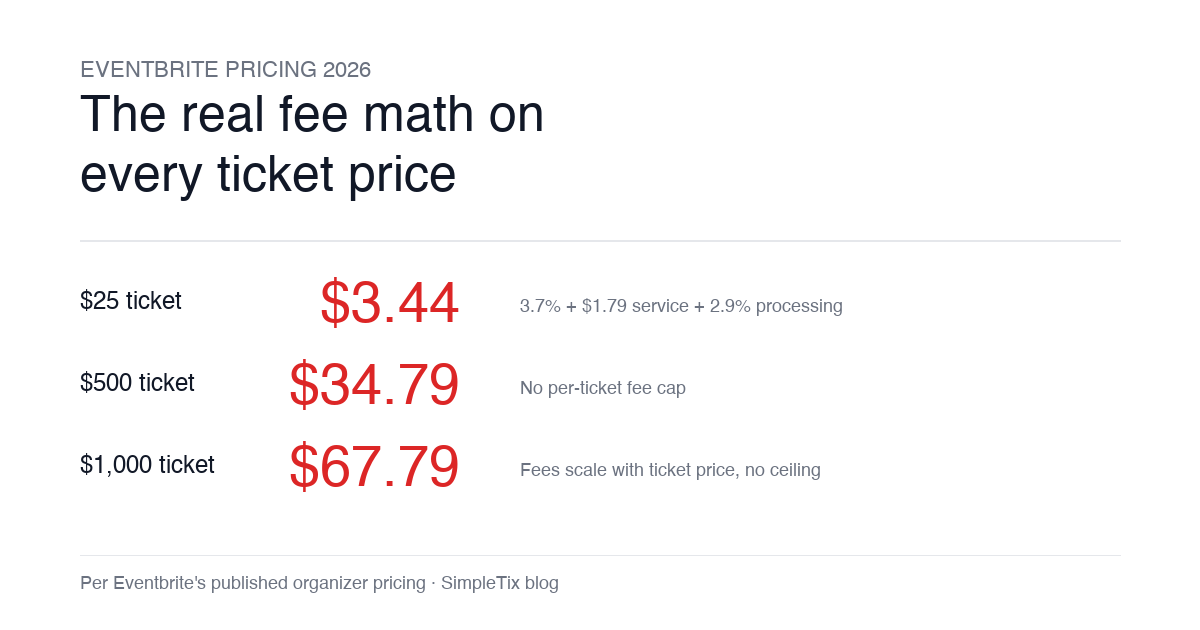
Eventbrite pricing 2026 is a lot for event organizers to sort through. There are longstanding policies that quietly cost paid-event operators real money, and there is genuine news under new ownership. This guide covers what the fees actually cost you today, what actually changed under the Bending Spoons acquisition, and how the alternatives compare on real numbers. Below is the honest breakdown, sourced to Eventbrite's own pricing page and SEC filings. Eventbrite pricing 2026: current fee structure As of 2026, Eventbrite charges 3.7% + $1.79 per paid ticket for the service fee, plus 2.9% for payment processing. In-person sales carry a $1 + 2.9% fee. There is no per-ticket fee cap. For a quick benchmark of total organizer-side fees: On a $25 ticket, fees total about $3.44 (13.8%) On a $50 ticket, fees total about $5.09 (10.2%) On a $100 ticket, fees total about $8.39 (8.4%) On a $500 ticket, fees total about $34.79 (7.0%) On a $1,000 ticket, fees total about $67.79 (6.8%) The fees scale with ticket price with no ceiling. That is the story for anyone selling premium tickets, season passes, VIP tiers, or corporate packages. Eventbrite pricing 2026: no per-ticket fee cap Eventbrite does not cap total ticket fees. This has been true since 2018, when Eventbrite removed the previous cap during its IPO. For most organizers selling everyday tickets ($20 to $50), the absence of a cap rarely comes up in the math. But for organizers selling premium tickets, the uncapped structure translates into real per-event cost. Take a conference selling three ticket tiers on Eventbrite: $150 general admission: fee about $12.34 (8.2%) $400 VIP ticket: fee about $27.09 (6.8%) $800 sponsor ticket: fee about $50.90 (6.4%) For a 200-person conference with a mix of GA and VIP tickets, that translates into hundreds of dollars...