Holiday Event Ticketing Software: Timed Entry, Reserved Seating & Capacity Control for 2026
-
 by
by

If you run a holiday event, you are booking dates now. So the ticketing platform you pick this month determines how November and December actually go. This guide covers what holiday event ticketing software needs to do in 2026, how to configure it for the season crunch, and what SimpleTix costs for holiday events of any size.
What holiday event ticketing software needs to do
Holiday events compress a whole year of sales into six weeks. First, most tickets sell in a 4 to 8 week window between mid-November and January 1. Second, weather cancels outdoor events without warning. Third, family groups buy 4 to 8 tickets in one order, not 1. And fourth, capacity is measured per time slot, not per venue.
So the ticketing checklist for holiday operators looks like this:
- Timed entry with per-slot capacity for drive-throughs, walk-throughs, and Santa visits
- Reserved seating for holiday theater, Nutcracker, and holiday concerts
- Group and family bundles so a family of six is one checkout, not six
- Fast scanning at the gate, including offline mode for cold outdoor venues
- Waitlists for when peak-hour slots sell out
- Add-ons for hot chocolate, photo packages, VIP tiers, and holiday merch
- Automated email reminders so guests do not forget their timed slot
- Same-day payouts to fund the season’s operational costs
If your current tool cannot do all of that, October is too late to switch. Move now.
How do timed entry tickets work for holiday events?
Timed entry lets you release a fixed number of tickets per time slot (typically every 15 or 30 minutes) so guests arrive in waves instead of one 6pm surge.
For a Christmas light drive-through with a 45-minute route, that usually means 30 to 60 vehicles per 15-minute window. Over a 5-hour evening, you can process 600 to 1,200 vehicles without ever forming a wait longer than 20 minutes.
Also, SimpleTix’s timed entry lets you:
- Set exact per-slot capacity by window (e.g., 40 vehicles per 15 minutes)
- Auto-close slots once they fill
- Publish start times that guests can pick during checkout
- Adjust capacity mid-season if throughput improves
Then on event day, your gate staff scans a ticket and the app knows exactly which slot the guest was sold. So you can enforce “your ticket is for 7:15pm, come back in 20 minutes” without arguing at the entrance.
How do I sell tickets for Christmas light shows and holiday drive-throughs?
Set up the event as General Admission with timed entry, add ticket types per vehicle size, connect a payment processor, and embed the checkout on your holiday event website.
The full setup inside SimpleTix takes about an hour:
- Create the event — pick General Admission with timed entry
- Set dates and time slots — most holiday drive-throughs run Fri/Sat/Sun in December, plus opening weekend late November
- Add ticket types — Standard Vehicle, Large Vehicle (bus/van), VIP Fast Pass, Season Pass
- Connect a payment processor — Stripe, Square, or PayPal at your standard rates
- Enable Apple Wallet and Google Wallet so guests get a phone pass automatically
- Publish and embed the buy button on your existing holiday event site
Also, most holiday operators embed the checkout directly into an existing marketing page rather than sending guests to a separate ticketing site. SimpleTix supports both.
How does reserved seating work for holiday theater and concerts?
Reserved seating lets attendees pick specific seats from an interactive seat map at checkout, so families and groups can sit together for Nutcracker, holiday concerts, and Christmas plays.
For a 400-seat theater running Nutcracker, that means:
- Build the seat map once during setup
- Guests see the map at checkout with sold, available, and held seats color-coded
- Groups pick adjacent seats
- Season subscribers get priority access windows before general on-sale
Also, SimpleTix supports section-based pricing (front orchestra vs mezzanine vs balcony) and can hold seats for donors, sponsors, and press. Then check-in on event day scans the seat number so ushers can direct guests.
How much does holiday event ticketing cost with SimpleTix?
SimpleTix charges $0.79 + 2% per ticket, with the service fee capped at $9.99. There are no contracts, no monthly subscriptions, and no fees on free events.
On a $25 holiday ticket, SimpleTix’s platform fee is $1.29 (5.16%). On a $50 family bundle, it is $1.79 (3.58%). Payment processing runs through your own Stripe, Square, or PayPal at standard rates (typically 2.9% + 30¢).
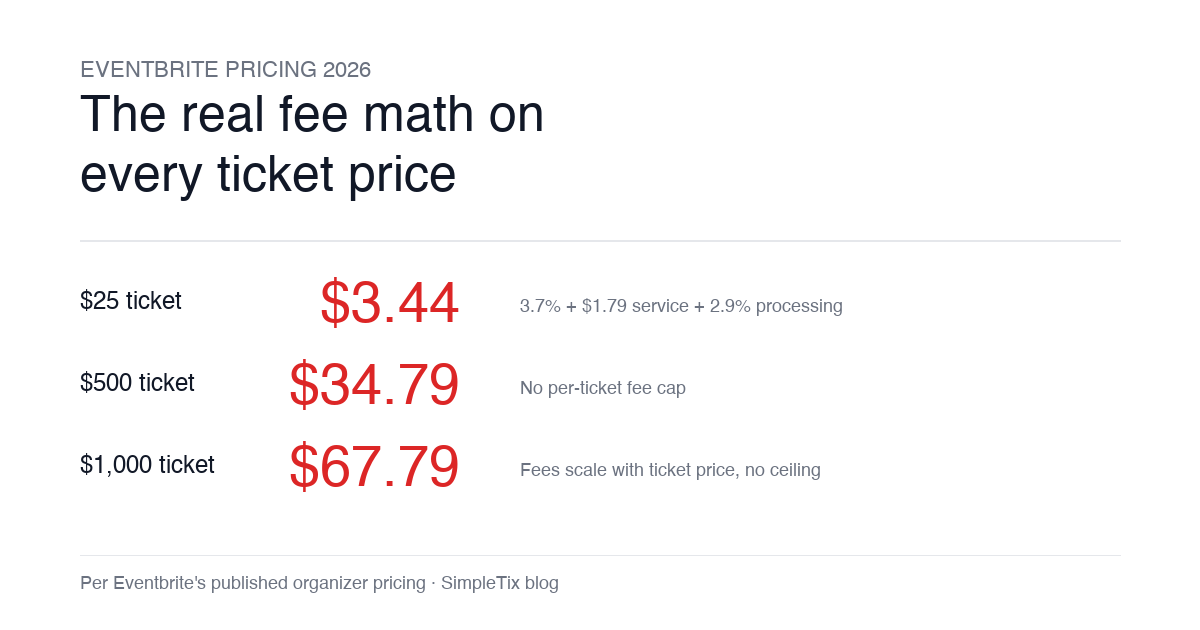
For comparison, Eventbrite charges 3.7% + $1.79 service fee plus 2.9% processing, with no fee cap. On the same $25 ticket, Eventbrite is $3.44 (13.8%). On a $50 family bundle, it is $5.09 (10.2%).
Also, holiday operators can:
- Pass the SimpleTix fee to attendees at checkout, or absorb it
- Sell free preview nights, media nights, or first-responder appreciation events with zero platform fees
- Refund tickets fully when weather cancels, without losing the platform fee
How do I handle multi-night holiday event runs?
Set up each night as a separate ticket type under one event, so guests can pick their preferred date at checkout and you get consolidated reporting across the season.
For a 20-night Christmas light run (weekends late Nov through Dec 30), that means:
- One event listing with 20 date-based ticket types
- Guests pick their night during checkout
- Season pass ticket type valid for multiple nights (Flex Pass in SimpleTix)
- Consolidated dashboard showing sold-vs-remaining by night
Also, if you sell add-ons (hot chocolate, holiday photos, VIP fast pass), attach them to the parent event so guests can bundle them into the same checkout.
Best holiday event types for SimpleTix
Christmas light shows and drive-throughs
For a linear drive-through with a 30 to 60 minute route, timed entry with 15-minute slots is the standard. Capacity per slot is usually 30 to 60 vehicles depending on route length and traffic flow.
Holiday markets and Christmas villages
For open-air or covered holiday markets with vendor stalls, use General Admission with day-of-week pricing (weekday vs weekend). Season passes work well for regulars.
Nutcracker, holiday plays, and Christmas concerts
For seated performances, use Reserved Seating with interactive seat maps. Section-based pricing (orchestra vs mezzanine vs balcony) works. Season subscribers get priority access.
Santa visits, photos with Santa, and holiday character experiences
For appointment-based experiences, use Timed Entry with tight per-slot capacity (usually 4 to 8 families per 15 minutes). Add-ons for photo packages and merch.
Holiday festivals and community events
For free community events (tree lightings, holiday parades, city-run festivals), SimpleTix charges no platform fees. Still collect RSVPs, send reminders, and manage capacity.
New Year’s Eve ticketed events
For NYE parties, dinners, or countdown events, use Reserved Seating for seated venues or General Admission with capacity caps for standing events. Timed entry helps stagger arrivals.
Frequently asked questions
What is the best ticketing software for holiday events in 2026?
The best holiday event ticketing software handles timed entry with per-slot capacity, reserved seating for holiday theater, group and family bundles, offline scanning for outdoor gates, and mobile wallet tickets. SimpleTix supports all of these at $0.79 + 2% per ticket.
Can I use SimpleTix for a Christmas light drive-through?
Yes. Christmas light drive-throughs are one of SimpleTix’s most common holiday use cases. Set up the event with General Admission plus timed entry, configure per-slot vehicle capacity, and use the Organizer app for offline scanning at the gate.
How do I sell Nutcracker or holiday concert tickets online?
Use SimpleTix Reserved Seating with an interactive seat map. Attendees pick specific seats at checkout. Section-based pricing (orchestra, mezzanine, balcony) is supported. Season subscribers can get priority access windows before general on-sale.
How does timed entry work for Santa visits and holiday photos?
Timed entry lets you release a set number of tickets per time slot (typically every 15 minutes) so families arrive in waves instead of forming a long line. Configure capacity per slot to match your photographer or Santa throughput (usually 4 to 8 families per 15 minutes).
Can guests use their phone as a holiday event ticket?
Yes. SimpleTix supports Apple Wallet and Google Wallet passes automatically. Guests receive a phone pass the moment they buy, with no paper printing required. This is especially useful for cold outdoor holiday events where fumbling with paper tickets is painful.
What if weather cancels my holiday event?
SimpleTix refunds its platform fee automatically alongside any ticket refund, at no charge. So a weather cancellation costs you nothing beyond the ticket refund itself. Some competitors keep the platform fee on canceled events; SimpleTix does not.
How much does SimpleTix cost for holiday events?
SimpleTix charges $0.79 + 2% per paid ticket, with the service fee capped at $9.99. There are no contracts, no monthly subscriptions, and no fees on free events. Payment processing runs at your connected Stripe, Square, or PayPal rate.
Can I sell holiday season passes on SimpleTix?
Yes. Flex Pass in SimpleTix supports multi-night or multi-visit passes with configurable attempt limits (e.g., “this pass is good for 5 visits”). Also useful for holiday season subscribers who plan to attend multiple nights.
The bottom line for holiday event operators
Holiday event operators are booking dates now. So the ticketing platform you choose in July or August determines how the season crunch actually runs. Timed entry, reserved seating, offline scanning, and family bundles are the features that matter.
If you are running a Christmas light show, a holiday theater production, a Santa experience, or any capacity-based holiday event in 2026, SimpleTix is built for how you actually run the season. Compare pricing on your specific ticket volumes here: SimpleTix pricing.
Latest News
Related Articles

Season Ticket Software for Fall 2026: Subscriptions, Reserved Seating & Renewals
-
by
Fall subscription sales are the single biggest revenue moment for most performing arts organizations. Season packages, member renewals, and early access windows all open between July and September. So the season ticket software you pick this summer decides how the fall series actually sells. This guide covers what season ticket software needs to do in 2026, how to configure it for a theater, symphony, or concert series, and what SimpleTix costs for season-driven event programs. What season ticket software actually needs to do Selling season tickets is nothing like selling single-event tickets. First, one subscriber buys 4 to 20 events in a single package. Second, seats need to lock across the entire season. Third, renewals from prior subscribers happen weeks before the general public gets access. And fourth, add-ons like parking, pre-show dinner, and backstage passes attach to the subscription, not the event. So the operational checklist for season ticket software looks like this: Season pass or subscription products that group multiple events into one purchase Reserved seating with locked seats across the whole season, so the subscriber sits in the same seat every night Priority access windows for existing subscribers before general on-sale Payment plans or full-payment options so patrons can split large subscription costs Renewal workflows that let last year's subscribers re-up with one click Comp ticket management for donors, sponsors, and press seats Membership tiers with different pricing, benefits, and priority access Reporting by subscriber, not just by event If your current tool cannot handle these, you are probably running Excel spreadsheets on the side and losing renewals every year. What is season ticket software? Season ticket software is a ticketing platform designed to sell multi-event packages (season subscriptions) alongside individual tickets, with reserved seat continuity, subscriber priority access, and renewal workflows built in. The core difference...
Eventbrite Pricing 2026: Fees, Refunds & What’s Actually Changed
-
by
Eventbrite pricing 2026 is a lot for event organizers to sort through. There are longstanding policies that quietly cost paid-event operators real money, and there is genuine news under new ownership. This guide covers what the fees actually cost you today, what actually changed under the Bending Spoons acquisition, and how the alternatives compare on real numbers. Below is the honest breakdown, sourced to Eventbrite's own pricing page and SEC filings. Eventbrite pricing 2026: current fee structure As of 2026, Eventbrite charges 3.7% + $1.79 per paid ticket for the service fee, plus 2.9% for payment processing. In-person sales carry a $1 + 2.9% fee. There is no per-ticket fee cap. For a quick benchmark of total organizer-side fees: On a $25 ticket, fees total about $3.44 (13.8%) On a $50 ticket, fees total about $5.09 (10.2%) On a $100 ticket, fees total about $8.39 (8.4%) On a $500 ticket, fees total about $34.79 (7.0%) On a $1,000 ticket, fees total about $67.79 (6.8%) The fees scale with ticket price with no ceiling. That is the story for anyone selling premium tickets, season passes, VIP tiers, or corporate packages. Eventbrite pricing 2026: no per-ticket fee cap Eventbrite does not cap total ticket fees. This has been true since 2018, when Eventbrite removed the previous cap during its IPO. For most organizers selling everyday tickets ($20 to $50), the absence of a cap rarely comes up in the math. But for organizers selling premium tickets, the uncapped structure translates into real per-event cost. Take a conference selling three ticket tiers on Eventbrite: $150 general admission: fee about $12.34 (8.2%) $400 VIP ticket: fee about $27.09 (6.8%) $800 sponsor ticket: fee about $50.90 (6.4%) For a 200-person conference with a mix of GA and VIP tickets, that translates into hundreds of dollars...
Haunted House Ticketing Software: Timed Entry, Scanning & Capacity Control for 2026
-
by
If you run a haunted attraction, October is your Super Bowl. So how you sell tickets from June through September decides how the whole season goes. This guide covers what haunted house ticketing software actually needs to do in 2026, how to pick one, and what SimpleTix costs for haunts of any size. What haunted house ticketing software needs to do Selling haunted house tickets is not like selling concert tickets. First, capacity is measured in throughput per hour, not in seats. Second, weather can shut you down without warning. Third, most of your revenue happens across three or four weekends. And fourth, your staff is often in costume at 9pm in a field with spotty cell service. So the ticketing software has to handle all of that. Here is the checklist most haunt operators use: Timed entry with per-slot capacity control so lines stay manageable Fast scanning at the gate, including offline mode for outdoor venues Re-entry passes for multi-attraction ticketing Add-ons for photos, upcharges, VIP fast-pass Group and family bundles so a family of five is one checkout, not five Waitlists for when peak-hour slots sell out Attendee wallet passes so guests are not fumbling for paper Same-day or fast payouts during the season crunch If your current tool cannot do all of that, it is worth switching now. The last thing you want is to be debugging your ticketing at 8pm on the first weekend of October. How does timed entry work for haunted houses? Timed entry lets you release a fixed number of tickets per time slot (typically every 15 or 30 minutes) so guests arrive in waves instead of a single 7pm crush. For a walkthrough haunt with a 45-minute experience, that usually means 20 to 40 guests per 15-minute window. So over a four-hour...