4 Event Ticketing Hacks to Make Your Drive-In Theater More Efficient and Profitable
-
 by
by
Riley Manning has worked as a travel and entertainment writer for more than 10 years. Today, he writes about unique events and the technology that helps make them happen.
Are you taking advantage of your event ticketing platform to guarantee that you are maximizing the revenue you can achieve from all those excited customers, eagerly anticipating the late-night, double-feature picture show?
There are so many touch points and opportunities to upsell and improve your guests’ experience with the right event ticketing application… does yours bring all the opportunities available to your operation? By deploying the best event ticketing software, you will ensure that your drive-in theater isn’t leaving any money on the table.
Missed opportunities from the wrong ticketing systems are not unique to drive-in theaters. Christmas light exhibitions, haunted houses, and other drive-thru operations will see increased profits from the following hacks as well.
Check out how these 4 hacks can make your drive-in theater more efficient and profitable.
Hack #1: Going Digital
Traditionally, drive-in theaters have been cash-only for tickets and concessions. Families would line their cars up fifteen minutes before dusk, file in, park, wait through a lengthy concessions line, and then hope to get back to their car before the feature film started.
Thankfully, this is no longer the case. The best event ticketing software can transform the movie-going experience for both you and your patrons. A state-of-the-art digital ticketing system can enable 24/7 online ticket sales and open up a new line of ticket buyers, while also eliminating the cash shuffle at the gate and the concession stand, which increases your guests’ wait times. Not only will you have more real-time visibility into your drive-in’s finances, but the convenience of online ticketing options will likely drive an increase in ticket sales as well.
The best event ticketing software offers your operation much more flexibility than traditional cash tickets purchased at the time of the film, and the system is intuitive and easy to use. With SimpleTix as your event ticketing software, you can offer your customers
- promotional codes
- early bird or off-peak hour rates
- membership pricing
- upgraded reserved parking
Each ticket type offers its own benefits to your guest and will encourage them to return to your drive-in theater. With SimpleTix, your customers can enjoy unlimited ticket types, all at no extra charge to you. Consider creating multi-movie ticket bundles, membership programs, or clubs for your most loyal customers. More cars at your drive-in theater mean more sales at the concessions stand. This is just one example of how you can make your event ticketing app make more money for you.
Hack #2: Single QR Entry
One of the biggest complaints about attending drive-in movies is the time you inevitably spend waiting for the cars in front of you to purchase their tickets. When you have to scan individual tickets or QR codes at the gate or, worse, sell tickets at the gate, entry lines can slow down. This can back up parking among other frustrations.
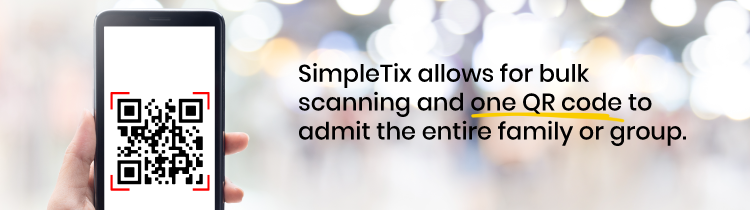
An intuitive event ticketing solution like SimpleTix can decrease the wait time while increasing your customers’ satisfaction with their movie-going evening. Try transitioning to QR codes for pre-sale tickets to lower the line time for all of your guests. SimpleTix allows for bulk scanning and one QR code to admit the entire family or group. QR codes allow your staff to do their job quickly and efficiently and spend more time ensuring movie-goers have the best experience possible.
A robust event ticketing platform like SimpleTix can help with your staffing challenges. When you properly leverage the platform and take advantage of the myriad of options embedded in the system, you end up able to do more with less staff. If the majority of your tickets are purchased pre-sale through the app, you need fewer ticket salespeople.
Hack # 3: Pre-Sell Concessions

Concessions sales are a vital component of the night at the movies. At the drive-in theater, concessions sales make the bulk of the operation’s profit. To stay in the black, a drive-in theater must sell a large number of tickets because more ticket sales mean more families making concessions purchases.
With SimpleTix’s event management software, you can offer pre-sales of concessions as an option for your customers. Try offering concessions like popcorn, hot dogs, and sodas, along with premium parking spots, and merchandise when they purchase their ticket. The options are limitless, but the best time to offer said provisions is at the time of ticket purchase so your guests are ready to enjoy their movie with little hassle upon arrival. SimpleTix doesn’t charge for any of these upsells, unlike other event ticketing platforms.
Pre-sale concessions help your inventory systems so you have the amount you need for the evening and can avoid over- and under-stocking items. Popped, unsold popcorn goes into the bin at the end of the evening, which equates to wasted money and lost sales. The more you sell online, in advance, the more efficient your concession stand will be.
Pre-sell concessions make the movie-going experience a little easier on the customer as well by eliminating their long wait in line at the concessions stand only to find that the item they wanted is sold out or the question mark around how much the food will cost them. When your guests reach the concession stand, they know what they have already ordered and paid for, so there’s no standing in front of the menu, trying to decide what to get while slowing down the line behind them. Pre-sales customers come up to the ticket window, show their scan code, and pick up the popcorn and soft drinks just like that.
No cash or cards are needed at this point of exchange. Once your customers experience how easy these transactions are, they’ll continue purchasing pre-sell concessions for future visits. This makes your night-of operations run much more smoothly.
Hack #4: Deliver Concessions to Guests

Our final hack to make your theater more efficient and profitable also rewards customers for purchasing pre-sell concessions: What if you delivered pre-paid concessions to their car, so no one has to stand in line?
It’s really a simple solution when you think about it. Providing an environment without lines for concessions, or at least much smaller lines, keeps everything moving more efficiently.
SimpleTix pre-sell reporting also eliminates confusion about how to coordinate on-site concessions staff. Your employees will have a detailed record of which food goes where and how much food to make during each show. It’s easy to “level up” your customer service and take the pre-sell goodies directly to the car that purchased them.
Additionally, reserved spots can be a ticketing type in the SimpleTix platform. Adding reserved spots as an upsell for tickets helps your staff deliver concessions efficiently because they know where each order goes and can plan to deliver them upon that guest’s arrival.
These are the top four hacks we’ve seen to increase profitability at your drive-in theater while strengthening efficiency in the process. What are some of your favorite hacks you’ve used your event ticketing software for?
SimpleTix has offered an affordable, premium event ticketing platform that outperforms Eventbrite and similar apps for over 12 years. Compared to the competition, SimpleTix offers better options at a better price point. To learn more, call us at +1 (855) 550-3670 or email us at support@simpletix.com.
Latest News
Related Articles

Season Ticket Software for Fall 2026: Subscriptions, Reserved Seating & Renewals
-
 by
by
Fall subscription sales are the single biggest revenue moment for most performing arts organizations. Season packages, member renewals, and early access windows all open between July and September. So the season ticket software you pick this summer decides how the fall series actually sells. This guide covers what season ticket software needs to do in 2026, how to configure it for a theater, symphony, or concert series, and what SimpleTix costs for season-driven event programs. What season ticket software actually needs to do Selling season tickets is nothing like selling single-event tickets. First, one subscriber buys 4 to 20 events in a single package. Second, seats need to lock across the entire season. Third, renewals from prior subscribers happen weeks before the general public gets access. And fourth, add-ons like parking, pre-show dinner, and backstage passes attach to the subscription, not the event. So the operational checklist for season ticket software looks like this: Season pass or subscription products that group multiple events into one purchase Reserved seating with locked seats across the whole season, so the subscriber sits in the same seat every night Priority access windows for existing subscribers before general on-sale Payment plans or full-payment options so patrons can split large subscription costs Renewal workflows that let last year's subscribers re-up with one click Comp ticket management for donors, sponsors, and press seats Membership tiers with different pricing, benefits, and priority access Reporting by subscriber, not just by event If your current tool cannot handle these, you are probably running Excel spreadsheets on the side and losing renewals every year. What is season ticket software? Season ticket software is a ticketing platform designed to sell multi-event packages (season subscriptions) alongside individual tickets, with reserved seat continuity, subscriber priority access, and renewal workflows built in. The core difference...

Holiday Event Ticketing Software: Timed Entry, Reserved Seating & Capacity Control for...
-
by
If you run a holiday event, you are booking dates now. So the ticketing platform you pick this month determines how November and December actually go. This guide covers what holiday event ticketing software needs to do in 2026, how to configure it for the season crunch, and what SimpleTix costs for holiday events of any size. What holiday event ticketing software needs to do Holiday events compress a whole year of sales into six weeks. First, most tickets sell in a 4 to 8 week window between mid-November and January 1. Second, weather cancels outdoor events without warning. Third, family groups buy 4 to 8 tickets in one order, not 1. And fourth, capacity is measured per time slot, not per venue. So the ticketing checklist for holiday operators looks like this: Timed entry with per-slot capacity for drive-throughs, walk-throughs, and Santa visits Reserved seating for holiday theater, Nutcracker, and holiday concerts Group and family bundles so a family of six is one checkout, not six Fast scanning at the gate, including offline mode for cold outdoor venues Waitlists for when peak-hour slots sell out Add-ons for hot chocolate, photo packages, VIP tiers, and holiday merch Automated email reminders so guests do not forget their timed slot Same-day payouts to fund the season's operational costs If your current tool cannot do all of that, October is too late to switch. Move now. How do timed entry tickets work for holiday events? Timed entry lets you release a fixed number of tickets per time slot (typically every 15 or 30 minutes) so guests arrive in waves instead of one 6pm surge. For a Christmas light drive-through with a 45-minute route, that usually means 30 to 60 vehicles per 15-minute window. Over a 5-hour evening, you can process 600 to 1,200...
Eventbrite Pricing 2026: Fees, Refunds & What’s Actually Changed
-
by
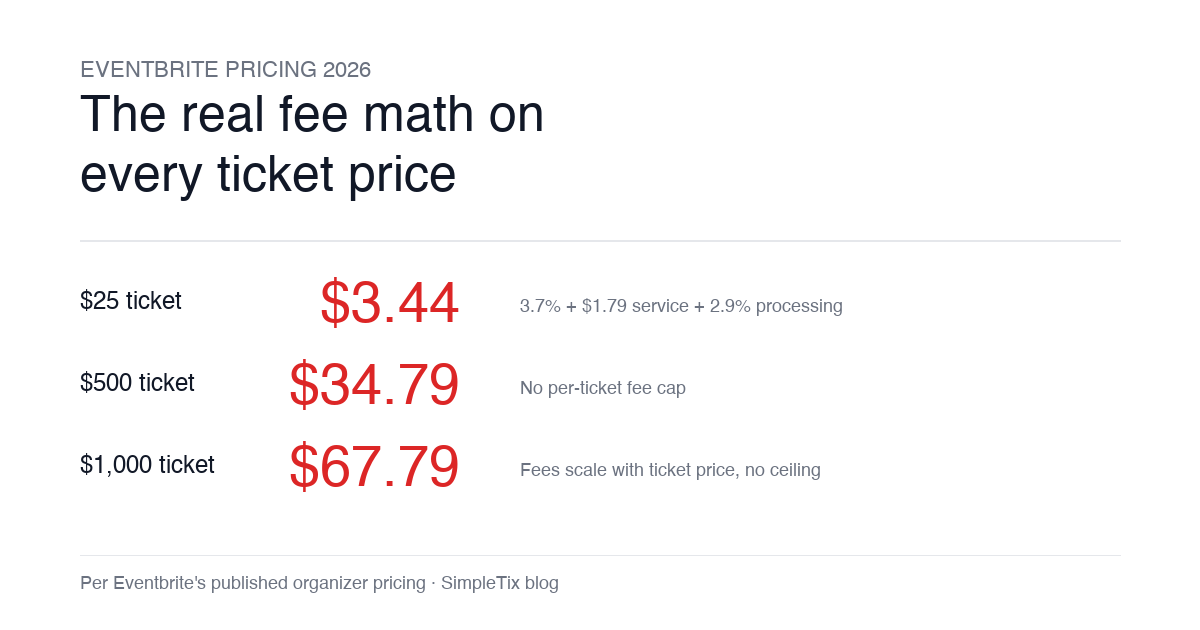
Eventbrite pricing 2026 is a lot for event organizers to sort through. There are longstanding policies that quietly cost paid-event operators real money, and there is genuine news under new ownership. This guide covers what the fees actually cost you today, what actually changed under the Bending Spoons acquisition, and how the alternatives compare on real numbers. Below is the honest breakdown, sourced to Eventbrite's own pricing page and SEC filings. Eventbrite pricing 2026: current fee structure As of 2026, Eventbrite charges 3.7% + $1.79 per paid ticket for the service fee, plus 2.9% for payment processing. In-person sales carry a $1 + 2.9% fee. There is no per-ticket fee cap. For a quick benchmark of total organizer-side fees: On a $25 ticket, fees total about $3.44 (13.8%) On a $50 ticket, fees total about $5.09 (10.2%) On a $100 ticket, fees total about $8.39 (8.4%) On a $500 ticket, fees total about $34.79 (7.0%) On a $1,000 ticket, fees total about $67.79 (6.8%) The fees scale with ticket price with no ceiling. That is the story for anyone selling premium tickets, season passes, VIP tiers, or corporate packages. Eventbrite pricing 2026: no per-ticket fee cap Eventbrite does not cap total ticket fees. This has been true since 2018, when Eventbrite removed the previous cap during its IPO. For most organizers selling everyday tickets ($20 to $50), the absence of a cap rarely comes up in the math. But for organizers selling premium tickets, the uncapped structure translates into real per-event cost. Take a conference selling three ticket tiers on Eventbrite: $150 general admission: fee about $12.34 (8.2%) $400 VIP ticket: fee about $27.09 (6.8%) $800 sponsor ticket: fee about $50.90 (6.4%) For a 200-person conference with a mix of GA and VIP tickets, that translates into hundreds of dollars...