Community Businesses
-
 by
by

Community Businesses: Ticketing, Registration, and Event Management
Community event ticketing should not feel like enterprise software. If you run classes, fundraisers, seasonal events, member nights, or local programs, you need a system that is easy to launch, easy for guests to use, and affordable every time you sell a ticket. SimpleTix gives community businesses a simpler way to handle ticketing, registration, check-in, memberships, and in-person sales — for just $0.79 + 2% per ticket.
Community groups often wear too many hats. You promote events, answer questions, manage volunteers, and deal with last-minute changes. Your ticketing platform should reduce work, not add more of it. SimpleTix helps you sell online, check people in fast, and get paid the same day.
Get started — $0.79 + 2% per ticket
Why community businesses choose SimpleTix
Most community events do not need bloated software. They need clear pricing, reliable check-in, and support that actually answers. That is where SimpleTix stands out.
You pay $0.79 + 2% per ticket. There are no contracts, no subscriptions, and no fees on free events. You can pass fees to attendees or absorb them yourself.
That pricing works well for community businesses because event volume changes. Some months are packed. Others are slower. You are not stuck paying for software you barely use.
SimpleTix also supports the real mix of events community organizations run:
- Timed entry events with capacity limits
- General admission programs
- Reserved seating for performances
- Season tickets
- Memberships
- In-person box office sales
- Virtual events through Zoom
If you are comparing options, start with the basics: price, payouts, ease of use, and support. SimpleTix is built to win on those points.
Community event ticketing for classes, fundraisers, and local programs
Community event ticketing needs flexibility because community calendars are rarely simple. One week, you may run a workshop. Next, you may host a family event, a holiday market, or a member-only night.
SimpleTix lets you create different event types without switching systems. For example, you can sell timed entry tickets for busy days, use reserved seating for performances, or offer season tickets for recurring programs. Meanwhile, custom attendee questions help you collect the details you need at checkout.
That matters for community businesses that need more than just a ticket sale. You may need:
- Emergency contact details
- Age group information
- Volunteer sign-up info
- Waiver confirmation
- Membership status
- Program preferences
You can also use promo codes, BOGO deals, quantity discounts, and waitlists. So if an event sells out, you still have a way to capture demand.

Sell online, at the door, or both
Many community businesses sell tickets in more than one place. Some guests buy online. Others show up at the door. Some want to pay with a card in person. Others ask about gift cards or mobile wallets.
SimpleTix covers both online and in-person sales. You can use Stripe for online and in-person payments through the Organizer app. You can also connect Square for POS, gift cards, and catalog upsells. PayPal and Venmo checkout are available too.
That flexibility helps community organizations serve more people without creating payment headaches. More importantly, SimpleTix offers same-day payouts, which helps when you are managing cash flow around events.
For in-person operations, SimpleTix includes:
- Point-of-sale mode
- Staff settings and permissions
- Mobile ticket printing
- Offline scanning mode
- Scan-only mode for staff
- Hardware scanner support
So whether you run a front desk, a gate, or a pop-up box office, your staff can keep lines moving.
Learn more about Square ticketing software or explore all ticketing features.
Community event ticketing that makes check-in easier
Long lines can ruin a good event. Fast entry matters just as much as online checkout. Community event ticketing should help staff scan quickly, solve issues fast, and keep guests moving.
The SimpleTix Organizer app works on iOS and Android. Staff can scan mobile tickets, PDF e-tickets, Apple Wallet passes, and Google Wallet passes. Offline scanning helps when Wi-Fi is weak or crowded.
This is especially useful for community events with volunteers or part-time staff. You can assign scan-only access, control permissions, and avoid giving full admin access to everyone.
If you run recurring programs or multi-entry experiences, Flex Pass is another useful option. It supports multi-use and re-entry passes, plus attendee photo verification. That can help with seasonal access, youth programs, or member admissions.
Memberships and member pricing without extra complexity
Many community businesses rely on members, donors, or repeat guests. Too many systems force you to bolt memberships onto a separate tool. That creates more admin work and more room for mistakes.
SimpleTix includes memberships alongside ticketing. You can offer one-time or recurring memberships, create tiered levels, and set member-only pricing or complimentary tickets. In other words, you can manage events and member benefits in one place.
That is useful for:
- Community centers
- Nonprofits
- Religious organizations
- Local arts groups
- Seasonal attractions
- Educational programs
You can also sell memberships online or at the box office. As a result, your team has more ways to convert walk-up visitors into long-term supporters.
See more on the industries we support on our Who We Serve page.
Built for promotion, reminders, and fewer no-shows
Selling the ticket is only part of the job. You still need people to show up. That is why community event ticketing should include practical marketing tools, not just checkout pages.
SimpleTix helps with that through:
- Automated event reminder emails
- Email blasts to attendees
- Customizable email templates
- Social media sharing tools
- Affiliate marketing center
- Conversion tracking with Google and Facebook pixels
- Abandoned cart recovery emails
These tools help community businesses stay visible without adding another platform to manage. For example, reminder emails can reduce missed attendance. Abandoned cart emails can recover sales you would have lost. Promo offers can also help boost slower events.
If you want to improve event promotion, the U.S. Small Business Administration offers practical marketing guidance for local organizations.
A better fit than oversized ticketing platforms
Some platforms are built for massive venues and high-overhead operations. That is fine for some teams. Many community businesses need something leaner.
SimpleTix is a strong fit if you want:
- Lower ticket fees
- No monthly subscription
- No contract
- Same-day payouts
- Easy online and in-person sales
- Memberships in the same system
- Helpful support when you need it
If you are also comparing alternatives, check out our guide to the best Eventbrite alternatives or read SimpleTix vs Eventbrite.
The point is simple. Community businesses should not have to overpay for tools they do not need. They should have software that works for real-world events, changing schedules, and limited staff time.
Get started with community event ticketing that stays simple
If you need community event ticketing that handles registration, memberships, check-in, and in-person sales, SimpleTix is built for that job. It is affordable, flexible, and easier to manage than bloated alternatives.
You can launch a single event, support a full season, or manage year-round community programming. Either way, you get the essentials without the extra friction.
FAQ
How much does SimpleTix cost for community event ticketing?
SimpleTix costs $0.79 + 2% per ticket. There are no contracts, no subscriptions, and no fees on free events. You can choose to pass fees to attendees or absorb them.
Can SimpleTix handle free and paid community events?
Yes. You can use SimpleTix for both free and paid events. Free events have no fees, which is helpful for registrations, open houses, and community programs.
Does SimpleTix support memberships for community organizations?
Yes. SimpleTix supports one-time and recurring memberships, tiered levels, member-only pricing, and complimentary tickets. You can also sell memberships online and at the box office.
Can staff check in guests on mobile devices?
Yes. The SimpleTix Organizer app works on iOS and Android. Staff can scan tickets, use offline mode, and work with scan-only permissions for simpler event entry.
Is community event ticketing available for in-person sales too?
Yes. Community event ticketing with SimpleTix supports online sales and in-person box office sales. You can also connect Square and use point-of-sale tools for door sales.
Latest News
Related Articles

Season Ticket Software for Fall 2026: Subscriptions, Reserved Seating & Renewals
-
by
Fall subscription sales are the single biggest revenue moment for most performing arts organizations. Season packages, member renewals, and early access windows all open between July and September. So the season ticket software you pick this summer decides how the fall series actually sells. This guide covers what season ticket software needs to do in 2026, how to configure it for a theater, symphony, or concert series, and what SimpleTix costs for season-driven event programs. What season ticket software actually needs to do Selling season tickets is nothing like selling single-event tickets. First, one subscriber buys 4 to 20 events in a single package. Second, seats need to lock across the entire season. Third, renewals from prior subscribers happen weeks before the general public gets access. And fourth, add-ons like parking, pre-show dinner, and backstage passes attach to the subscription, not the event. So the operational checklist for season ticket software looks like this: Season pass or subscription products that group multiple events into one purchase Reserved seating with locked seats across the whole season, so the subscriber sits in the same seat every night Priority access windows for existing subscribers before general on-sale Payment plans or full-payment options so patrons can split large subscription costs Renewal workflows that let last year's subscribers re-up with one click Comp ticket management for donors, sponsors, and press seats Membership tiers with different pricing, benefits, and priority access Reporting by subscriber, not just by event If your current tool cannot handle these, you are probably running Excel spreadsheets on the side and losing renewals every year. What is season ticket software? Season ticket software is a ticketing platform designed to sell multi-event packages (season subscriptions) alongside individual tickets, with reserved seat continuity, subscriber priority access, and renewal workflows built in. The core difference...

Holiday Event Ticketing Software: Timed Entry, Reserved Seating & Capacity Control for...
-
by
If you run a holiday event, you are booking dates now. So the ticketing platform you pick this month determines how November and December actually go. This guide covers what holiday event ticketing software needs to do in 2026, how to configure it for the season crunch, and what SimpleTix costs for holiday events of any size. What holiday event ticketing software needs to do Holiday events compress a whole year of sales into six weeks. First, most tickets sell in a 4 to 8 week window between mid-November and January 1. Second, weather cancels outdoor events without warning. Third, family groups buy 4 to 8 tickets in one order, not 1. And fourth, capacity is measured per time slot, not per venue. So the ticketing checklist for holiday operators looks like this: Timed entry with per-slot capacity for drive-throughs, walk-throughs, and Santa visits Reserved seating for holiday theater, Nutcracker, and holiday concerts Group and family bundles so a family of six is one checkout, not six Fast scanning at the gate, including offline mode for cold outdoor venues Waitlists for when peak-hour slots sell out Add-ons for hot chocolate, photo packages, VIP tiers, and holiday merch Automated email reminders so guests do not forget their timed slot Same-day payouts to fund the season's operational costs If your current tool cannot do all of that, October is too late to switch. Move now. How do timed entry tickets work for holiday events? Timed entry lets you release a fixed number of tickets per time slot (typically every 15 or 30 minutes) so guests arrive in waves instead of one 6pm surge. For a Christmas light drive-through with a 45-minute route, that usually means 30 to 60 vehicles per 15-minute window. Over a 5-hour evening, you can process 600 to 1,200...
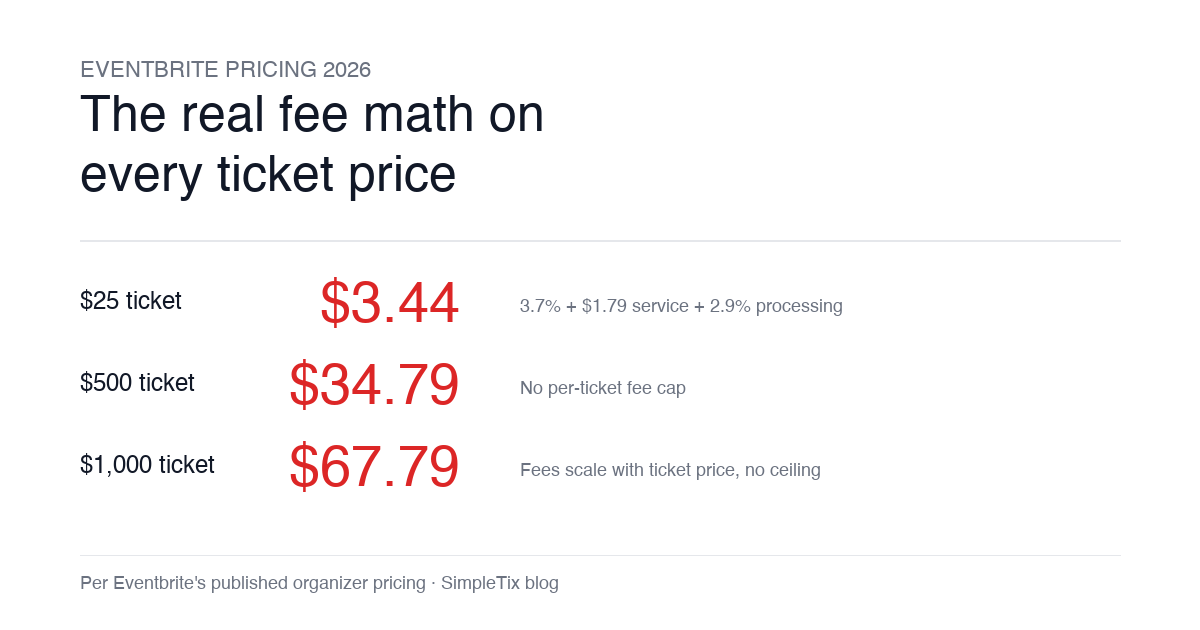
Eventbrite Pricing 2026: Fees, Refunds & What’s Actually Changed
-
by
Eventbrite pricing 2026 is a lot for event organizers to sort through. There are longstanding policies that quietly cost paid-event operators real money, and there is genuine news under new ownership. This guide covers what the fees actually cost you today, what actually changed under the Bending Spoons acquisition, and how the alternatives compare on real numbers. Below is the honest breakdown, sourced to Eventbrite's own pricing page and SEC filings. Eventbrite pricing 2026: current fee structure As of 2026, Eventbrite charges 3.7% + $1.79 per paid ticket for the service fee, plus 2.9% for payment processing. In-person sales carry a $1 + 2.9% fee. There is no per-ticket fee cap. For a quick benchmark of total organizer-side fees: On a $25 ticket, fees total about $3.44 (13.8%) On a $50 ticket, fees total about $5.09 (10.2%) On a $100 ticket, fees total about $8.39 (8.4%) On a $500 ticket, fees total about $34.79 (7.0%) On a $1,000 ticket, fees total about $67.79 (6.8%) The fees scale with ticket price with no ceiling. That is the story for anyone selling premium tickets, season passes, VIP tiers, or corporate packages. Eventbrite pricing 2026: no per-ticket fee cap Eventbrite does not cap total ticket fees. This has been true since 2018, when Eventbrite removed the previous cap during its IPO. For most organizers selling everyday tickets ($20 to $50), the absence of a cap rarely comes up in the math. But for organizers selling premium tickets, the uncapped structure translates into real per-event cost. Take a conference selling three ticket tiers on Eventbrite: $150 general admission: fee about $12.34 (8.2%) $400 VIP ticket: fee about $27.09 (6.8%) $800 sponsor ticket: fee about $50.90 (6.4%) For a 200-person conference with a mix of GA and VIP tickets, that translates into hundreds of dollars...