Educational Workshops & Seminars
-
 by
by

Educational Workshops & Seminars: Ticketing, Registration, and Event Management
If you’re looking for workshop registration software, you probably need more than a checkout page. You need a simple way to sell seats, collect attendee details, manage capacity, send reminders, and check people in without chaos. SimpleTix gives workshop and seminar organizers a cleaner, lower-cost option at $0.79 + 2% per ticket, with no contracts, no subscriptions, and no fees on free events.
Educational events have different problems than concerts or festivals. You may run limited-seat sessions, recurring classes, member pricing, virtual seminars, or in-person workshops with fast check-in. Meanwhile, your team still needs same-day payouts, solid support, and software that doesn’t take hours to learn. That’s where SimpleTix fits.
Get started — $0.79 + 2% per ticket
Why workshop registration software matters for educational events
Workshops and seminars live or die on the attendee experience. If registration feels clunky, people drop off. If reminders don’t go out, no-shows rise. If check-in backs up, your event starts with stress.
Good workshop registration software should reduce admin work before, during, and after the event. For example, it should help you:
- Limit seats by session or time slot
- Ask custom attendee questions at checkout
- Offer promo codes or group pricing
- Send confirmation and reminder emails
- Handle in-person and online events
- Check people in fast, even with weak internet
- Track sales, attendance, and attendee data
SimpleTix covers those basics without forcing you into a bloated system. It also keeps pricing easy to understand. You pay $0.79 + 2% per paid ticket, or nothing for free events.
Workshop registration software for seminars, classes, and trainings
Not every event platform works well for education. Some are built for nightlife. Others are packed with features most workshop organizers never use. As a result, you end up paying more and doing more manual work.
SimpleTix is a strong fit for:
- Professional development seminars
- Community education classes
- School workshops
- Continuing education sessions
- Hands-on training events
- Multi-session educational programs
- Virtual seminars on Zoom
- Member-only workshops
You can create timed entry events, standard general admission tickets, reserved seating, or even season-style access for recurring programming. If your organization offers a series of workshops, that flexibility matters.
You can also embed registration on your own website with widgets and custom registration pages. That means attendees can register without feeling like they got pushed onto a third-party site.
Learn more about SimpleTix features and who SimpleTix serves.

Solve the biggest workshop pain points without extra admin
Educational organizers usually juggle a few recurring headaches.
1. Limited capacity and session management
Many workshops have hard seat limits. Some also offer multiple time slots or repeat sessions. SimpleTix supports timed entry with capacity management, so you can control attendance without spreadsheets.
2. Collecting the right attendee information
You often need more than a name and email. For instance, you may need grade level, organization name, dietary notes, certification details, or session preferences. SimpleTix lets you add custom attendee questions at checkout, so your team gets the details upfront.
3. Reducing no-shows
No-shows hurt educational events. They waste seats and disrupt planning. SimpleTix includes automated event reminder emails and customizable email templates, so attendees get the right information before they arrive.
4. Handling free and paid events
Some seminars are free. Others are paid. Some offer discounts for members or early registrants. SimpleTix handles both. Better yet, there are no fees on free events.
5. Fast check-in on event day
Your staff needs a reliable check-in flow. The SimpleTix Organizer app for iOS and Android supports scanning, scan-only mode for staff, and offline scanning mode. So even if your venue has spotty internet, your line can keep moving.
Built for real workshop registration workflows
The best workshop registration software should match how educational teams actually work. That means it has to support registration, communication, on-site operations, and reporting in one place.
With SimpleTix, you can:
- Sell tickets online or in person
- Accept payments through Stripe or Square
- Offer PayPal and Venmo checkout
- Get same-day payouts
- Send email blasts to attendees
- Use promo codes, BOGO offers, and quantity discounts
- Create waitlists for sold-out sessions
- Recover missed sales with abandoned cart emails
- Export attendee badge PDFs when needed
- Track sales and scans from one dashboard
That combination helps small teams move faster. It also helps larger organizations keep staff aligned across marketing, registration, and event operations.
If your team already uses Square, see Square ticketing software. If you’re comparing providers more broadly, check out these Eventbrite alternatives.
Better payment and payout options for educational organizers
Cash flow matters. Many educational programs run on tight budgets, grants, or seasonal revenue. Waiting around for payouts can create real problems.
SimpleTix offers same-day payouts and integrates with Stripe and Square. You can also offer PayPal and Venmo checkout. That gives attendees more ways to pay while helping your organization access revenue faster.
This matters for workshops that need to cover:
- Instructor payments
- Room rentals
- Printed materials
- Supplies and kits
- Staff time
- Marketing spend
In other words, better payout timing can make operations smoother, not just accounting easier.
For payment flexibility, you can also review PayPal ticketing software.
Workshop registration software that works for in-person and virtual events
A lot of educational organizations run both in-person and virtual programming. You might host a classroom seminar one week and a Zoom training the next.
SimpleTix supports Zoom integration for virtual events. Meanwhile, in-person events get mobile scanning, printable tickets, PDF e-tickets, and Apple Wallet or Google Wallet passes.
That flexibility is useful if you run:
- Hybrid learning programs
- Guest speaker events
- Online certification prep
- Local workshops with digital follow-up
- Seasonal seminar series
According to the U.S. Small Business Administration, training events and workshops can play a major role in community and business education, which makes reliable registration systems even more important for organizers (SBA.gov).
Keep branding and attendee experience consistent
Your registration page should feel like part of your organization. It should not feel like a generic ticketing site with your logo pasted on top.
SimpleTix helps you keep that experience consistent with:
- Embeddable widgets for your website
- Custom registration pages
- Custom CSS for checkout and event pages
- Customizable ticket colors, messages, and print instructions
- Branded confirmation emails and e-tickets
That consistency builds trust. It also reduces confusion for attendees who expect a polished registration flow.
Reporting, staff access, and support that don’t slow you down
Educational events often involve more than one person. You may have staff, volunteers, instructors, or front-desk teams helping with registration and check-in.
SimpleTix includes user role management, staff permissions, audit logs, and multi-factor authentication. So you can give access without giving everyone full control. In addition, the platform includes sales, scan, and attendee reports, plus an interactive analytics dashboard.
Most importantly, support matters when your event is live. Big platforms can feel hard to reach when you actually need help. SimpleTix keeps things simpler and more responsive.
Why organizers choose SimpleTix over bigger platforms
Let’s keep it simple. Most workshop organizers are not looking for the biggest platform. They want one that is easy to run, fairly priced, and backed by real support.
SimpleTix stands out because it offers:
- $0.79 + 2% per ticket
- No contracts
- No subscriptions
- No fees on free events
- Same-day payouts
- Stripe, Square, PayPal, and Venmo options
- Tools for reminders, waitlists, discounts, and check-in
- Support for workshops, seminars, schools, and community education
If you’re comparing options, that mix of price, simplicity, and support is hard to ignore. The right workshop registration software should help you spend less time managing logistics and more time running a great event.
Try workshop registration software that keeps things simple
If your current system feels expensive, clunky, or harder than it should be, it may be time to switch. SimpleTix gives educational organizers the tools they need without contracts, subscriptions, or inflated fees.
Whether you run a one-day seminar, a recurring workshop series, or a mix of in-person and virtual classes, SimpleTix is built to make registration easier.
Try workshop registration software that is straightforward for your team and easy for attendees.
FAQ
What makes SimpleTix a good workshop registration software option?
SimpleTix fits educational events well because it supports timed entry, custom attendee questions, reminder emails, mobile check-in, and virtual event integration. It also keeps pricing simple at $0.79 + 2% per ticket.
Can I use workshop registration software for free events?
Yes. SimpleTix charges no fees on free events. That makes it a practical choice for community workshops, school programs, and informational seminars.
Does SimpleTix support virtual workshops and webinars?
Yes. SimpleTix integrates with Zoom, which helps organizers manage registration for virtual educational events from the same platform.
Can staff check in attendees on-site?
Yes. Staff can use the SimpleTix Organizer app on iOS or Android. The app supports offline scanning mode and scan-only mode for staff.
Can I collect custom registration details from attendees?
Yes. SimpleTix lets you add custom attendee questions at checkout. For example, you can collect organization names, session preferences, or other event-specific details.
Latest News
Related Articles

Season Ticket Software for Fall 2026: Subscriptions, Reserved Seating & Renewals
-
by
Fall subscription sales are the single biggest revenue moment for most performing arts organizations. Season packages, member renewals, and early access windows all open between July and September. So the season ticket software you pick this summer decides how the fall series actually sells. This guide covers what season ticket software needs to do in 2026, how to configure it for a theater, symphony, or concert series, and what SimpleTix costs for season-driven event programs. What season ticket software actually needs to do Selling season tickets is nothing like selling single-event tickets. First, one subscriber buys 4 to 20 events in a single package. Second, seats need to lock across the entire season. Third, renewals from prior subscribers happen weeks before the general public gets access. And fourth, add-ons like parking, pre-show dinner, and backstage passes attach to the subscription, not the event. So the operational checklist for season ticket software looks like this: Season pass or subscription products that group multiple events into one purchase Reserved seating with locked seats across the whole season, so the subscriber sits in the same seat every night Priority access windows for existing subscribers before general on-sale Payment plans or full-payment options so patrons can split large subscription costs Renewal workflows that let last year's subscribers re-up with one click Comp ticket management for donors, sponsors, and press seats Membership tiers with different pricing, benefits, and priority access Reporting by subscriber, not just by event If your current tool cannot handle these, you are probably running Excel spreadsheets on the side and losing renewals every year. What is season ticket software? Season ticket software is a ticketing platform designed to sell multi-event packages (season subscriptions) alongside individual tickets, with reserved seat continuity, subscriber priority access, and renewal workflows built in. The core difference...

Holiday Event Ticketing Software: Timed Entry, Reserved Seating & Capacity Control for...
-
by
If you run a holiday event, you are booking dates now. So the ticketing platform you pick this month determines how November and December actually go. This guide covers what holiday event ticketing software needs to do in 2026, how to configure it for the season crunch, and what SimpleTix costs for holiday events of any size. What holiday event ticketing software needs to do Holiday events compress a whole year of sales into six weeks. First, most tickets sell in a 4 to 8 week window between mid-November and January 1. Second, weather cancels outdoor events without warning. Third, family groups buy 4 to 8 tickets in one order, not 1. And fourth, capacity is measured per time slot, not per venue. So the ticketing checklist for holiday operators looks like this: Timed entry with per-slot capacity for drive-throughs, walk-throughs, and Santa visits Reserved seating for holiday theater, Nutcracker, and holiday concerts Group and family bundles so a family of six is one checkout, not six Fast scanning at the gate, including offline mode for cold outdoor venues Waitlists for when peak-hour slots sell out Add-ons for hot chocolate, photo packages, VIP tiers, and holiday merch Automated email reminders so guests do not forget their timed slot Same-day payouts to fund the season's operational costs If your current tool cannot do all of that, October is too late to switch. Move now. How do timed entry tickets work for holiday events? Timed entry lets you release a fixed number of tickets per time slot (typically every 15 or 30 minutes) so guests arrive in waves instead of one 6pm surge. For a Christmas light drive-through with a 45-minute route, that usually means 30 to 60 vehicles per 15-minute window. Over a 5-hour evening, you can process 600 to 1,200...
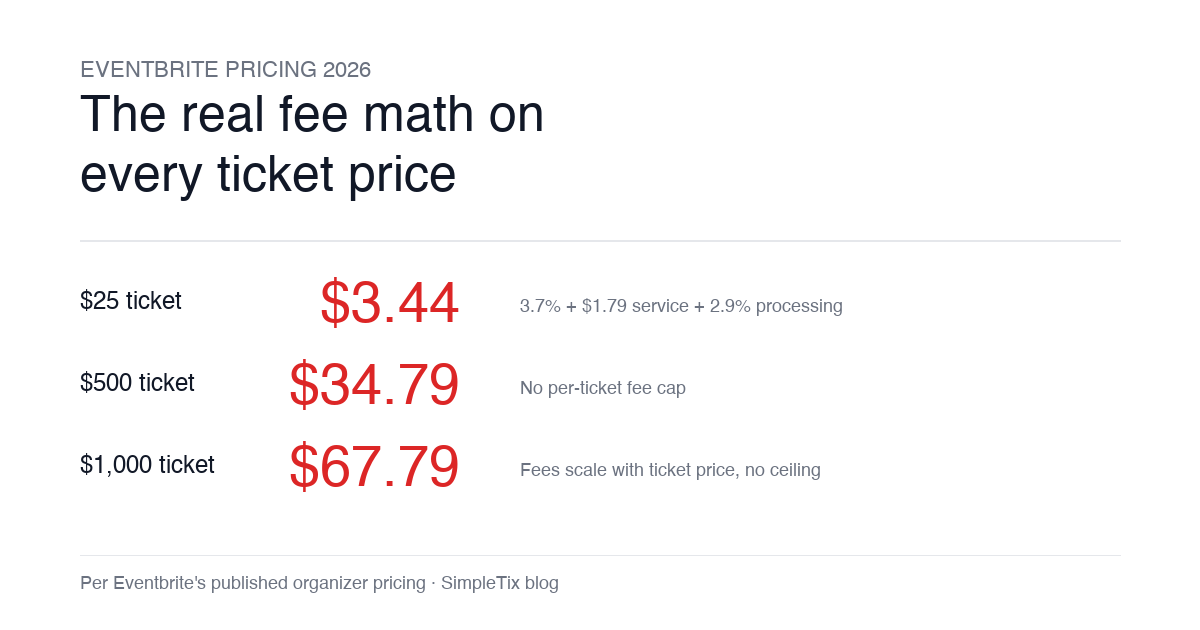
Eventbrite Pricing 2026: Fees, Refunds & What’s Actually Changed
-
by
Eventbrite pricing 2026 is a lot for event organizers to sort through. There are longstanding policies that quietly cost paid-event operators real money, and there is genuine news under new ownership. This guide covers what the fees actually cost you today, what actually changed under the Bending Spoons acquisition, and how the alternatives compare on real numbers. Below is the honest breakdown, sourced to Eventbrite's own pricing page and SEC filings. Eventbrite pricing 2026: current fee structure As of 2026, Eventbrite charges 3.7% + $1.79 per paid ticket for the service fee, plus 2.9% for payment processing. In-person sales carry a $1 + 2.9% fee. There is no per-ticket fee cap. For a quick benchmark of total organizer-side fees: On a $25 ticket, fees total about $3.44 (13.8%) On a $50 ticket, fees total about $5.09 (10.2%) On a $100 ticket, fees total about $8.39 (8.4%) On a $500 ticket, fees total about $34.79 (7.0%) On a $1,000 ticket, fees total about $67.79 (6.8%) The fees scale with ticket price with no ceiling. That is the story for anyone selling premium tickets, season passes, VIP tiers, or corporate packages. Eventbrite pricing 2026: no per-ticket fee cap Eventbrite does not cap total ticket fees. This has been true since 2018, when Eventbrite removed the previous cap during its IPO. For most organizers selling everyday tickets ($20 to $50), the absence of a cap rarely comes up in the math. But for organizers selling premium tickets, the uncapped structure translates into real per-event cost. Take a conference selling three ticket tiers on Eventbrite: $150 general admission: fee about $12.34 (8.2%) $400 VIP ticket: fee about $27.09 (6.8%) $800 sponsor ticket: fee about $50.90 (6.4%) For a 200-person conference with a mix of GA and VIP tickets, that translates into hundreds of dollars...