Blog

Season Ticket Software for Fall 2026: Subscriptions, Reserved Seating & Renewals
-
 by
by
Fall subscription sales are the single biggest revenue moment for most performing arts organizations. Season packages, member renewals, and early access windows all open between July and September. So the season ticket software you pick this summer decides how the fall series actually sells. This guide covers what season ticket software needs to do in 2026, how to configure it for a theater, symphony, or concert series, and what SimpleTix costs for season-driven event programs. What season ticket software actually needs to do Selling season tickets is nothing like selling single-event tickets. First, one subscriber buys 4 to 20 events in a single package. Second, seats need to lock across the entire season. Third, renewals from prior subscribers happen weeks before the general public gets access. And fourth, add-ons like parking, pre-show dinner, and backstage passes attach to the subscription, not the event. So the operational checklist for season ticket software looks like this: Season pass or subscription products that group multiple events into one purchase Reserved seating with locked seats across the whole season, so the subscriber sits in the same seat every night Priority access windows for existing subscribers before general on-sale Payment plans or full-payment options so patrons can split large subscription costs Renewal workflows that let last year's subscribers re-up with one click Comp ticket management for donors, sponsors, and press seats Membership tiers with different pricing, benefits, and priority access Reporting by subscriber, not just by event If your current tool cannot handle these, you are probably running Excel spreadsheets on the side and losing renewals every year. What is season ticket software? Season ticket software is a ticketing platform designed to sell multi-event packages (season subscriptions) alongside individual tickets, with reserved seat continuity, subscriber priority access, and renewal workflows built in. The core difference...

Holiday Event Ticketing Software: Timed Entry, Reserved Seating & Capacity Control for...
-
by
If you run a holiday event, you are booking dates now. So the ticketing platform you pick this month determines how November and December actually go. This guide covers what holiday event ticketing software needs to do in 2026, how to configure it for the season crunch, and what SimpleTix costs for holiday events of any size. What holiday event ticketing software needs to do Holiday events compress a whole year of sales into six weeks. First, most tickets sell in a 4 to 8 week window between mid-November and January 1. Second, weather cancels outdoor events without warning. Third, family groups buy 4 to 8 tickets in one order, not 1. And fourth, capacity is measured per time slot, not per venue. So the ticketing checklist for holiday operators looks like this: Timed entry with per-slot capacity for drive-throughs, walk-throughs, and Santa visits Reserved seating for holiday theater, Nutcracker, and holiday concerts Group and family bundles so a family of six is one checkout, not six Fast scanning at the gate, including offline mode for cold outdoor venues Waitlists for when peak-hour slots sell out Add-ons for hot chocolate, photo packages, VIP tiers, and holiday merch Automated email reminders so guests do not forget their timed slot Same-day payouts to fund the season's operational costs If your current tool cannot do all of that, October is too late to switch. Move now. How do timed entry tickets work for holiday events? Timed entry lets you release a fixed number of tickets per time slot (typically every 15 or 30 minutes) so guests arrive in waves instead of one 6pm surge. For a Christmas light drive-through with a 45-minute route, that usually means 30 to 60 vehicles per 15-minute window. Over a 5-hour evening, you can process 600 to 1,200...
Eventbrite Pricing 2026: Fees, Refunds & What’s Actually Changed
-
by
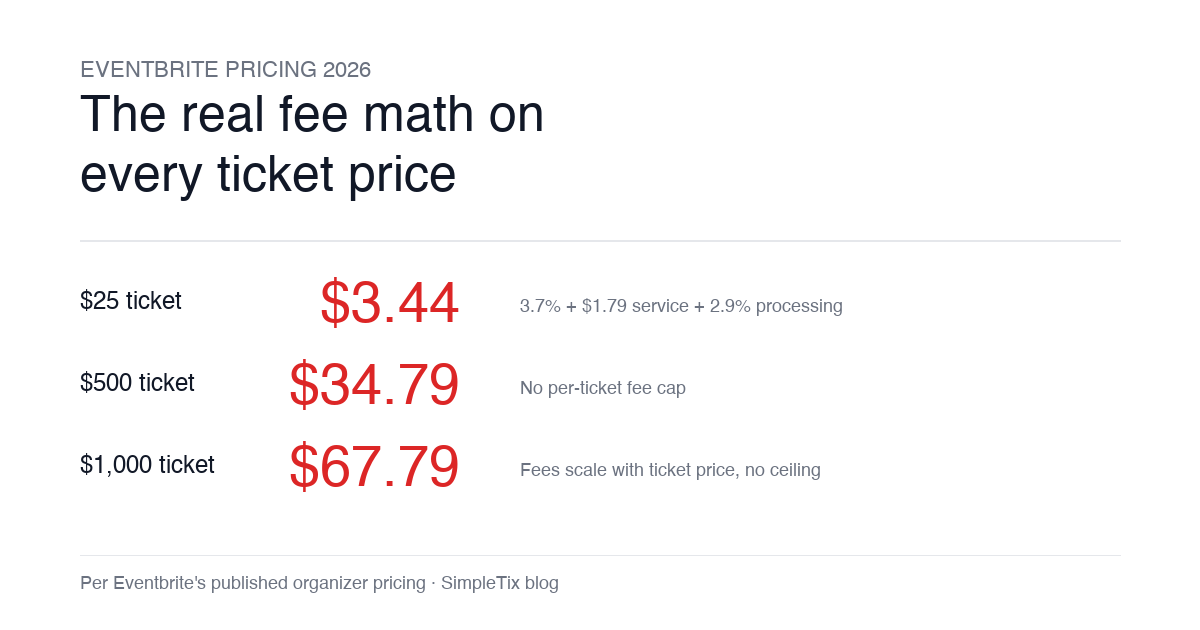
Eventbrite pricing 2026 is a lot for event organizers to sort through. There are longstanding policies that quietly cost paid-event operators real money, and there is genuine news under new ownership. This guide covers what the fees actually cost you today, what actually changed under the Bending Spoons acquisition, and how the alternatives compare on real numbers. Below is the honest breakdown, sourced to Eventbrite's own pricing page and SEC filings. Eventbrite pricing 2026: current fee structure As of 2026, Eventbrite charges 3.7% + $1.79 per paid ticket for the service fee, plus 2.9% for payment processing. In-person sales carry a $1 + 2.9% fee. There is no per-ticket fee cap. For a quick benchmark of total organizer-side fees: On a $25 ticket, fees total about $3.44 (13.8%) On a $50 ticket, fees total about $5.09 (10.2%) On a $100 ticket, fees total about $8.39 (8.4%) On a $500 ticket, fees total about $34.79 (7.0%) On a $1,000 ticket, fees total about $67.79 (6.8%) The fees scale with ticket price with no ceiling. That is the story for anyone selling premium tickets, season passes, VIP tiers, or corporate packages. Eventbrite pricing 2026: no per-ticket fee cap Eventbrite does not cap total ticket fees. This has been true since 2018, when Eventbrite removed the previous cap during its IPO. For most organizers selling everyday tickets ($20 to $50), the absence of a cap rarely comes up in the math. But for organizers selling premium tickets, the uncapped structure translates into real per-event cost. Take a conference selling three ticket tiers on Eventbrite: $150 general admission: fee about $12.34 (8.2%) $400 VIP ticket: fee about $27.09 (6.8%) $800 sponsor ticket: fee about $50.90 (6.4%) For a 200-person conference with a mix of GA and VIP tickets, that translates into hundreds of dollars...
Haunted House Ticketing Software: Timed Entry, Scanning & Capacity Control for 2026
-
by
If you run a haunted attraction, October is your Super Bowl. So how you sell tickets from June through September decides how the whole season goes. This guide covers what haunted house ticketing software actually needs to do in 2026, how to pick one, and what SimpleTix costs for haunts of any size. What haunted house ticketing software needs to do Selling haunted house tickets is not like selling concert tickets. First, capacity is measured in throughput per hour, not in seats. Second, weather can shut you down without warning. Third, most of your revenue happens across three or four weekends. And fourth, your staff is often in costume at 9pm in a field with spotty cell service. So the ticketing software has to handle all of that. Here is the checklist most haunt operators use: Timed entry with per-slot capacity control so lines stay manageable Fast scanning at the gate, including offline mode for outdoor venues Re-entry passes for multi-attraction ticketing Add-ons for photos, upcharges, VIP fast-pass Group and family bundles so a family of five is one checkout, not five Waitlists for when peak-hour slots sell out Attendee wallet passes so guests are not fumbling for paper Same-day or fast payouts during the season crunch If your current tool cannot do all of that, it is worth switching now. The last thing you want is to be debugging your ticketing at 8pm on the first weekend of October. How does timed entry work for haunted houses? Timed entry lets you release a fixed number of tickets per time slot (typically every 15 or 30 minutes) so guests arrive in waves instead of a single 7pm crush. For a walkthrough haunt with a 45-minute experience, that usually means 20 to 40 guests per 15-minute window. So over a four-hour...
Partiful Just Launched Ticketing: What Event Organizers Need to Know
-
by
Partiful just launched ticketing. As of June 2, 2026, hosts can now sell tickets directly inside the Partiful app on iOS, Android, and web. Initially, the feature is rolling out to U.S. hosts. Then broader availability is planned in the coming months. If you have run events before, you probably already know Partiful. It is the social-first invitation platform with millions of monthly active users. Until now, every paid event on Partiful had to push guests off-platform to actually buy a ticket. So this launch closes that gap. But here is the question every event organizer needs to ask. Is Partiful's new ticketing the right platform for your event? Or is it built for a different kind of host? Below is the honest breakdown. What Partiful Ticketing actually does Partiful's launch covers the basics every casual social host needs: Ticket tiers with multiple pricing levels Capacity limits to cap attendance Promo codes for special guest pricing QR code check-in at the door SMS notifications to attendees Staff permissions so bouncers or co-hosts can check guests in Sales tracking for real-time payouts and attendance Also, payment processing runs through Stripe. Then payouts are available roughly three days after the event ends. Meanwhile, free tickets carry no fees. Paid ticket fees scale with event size and ticket price. So Partiful shows hosts the exact fee during setup, and hosts can pass it on or absorb it. CEO Shreya Murthy framed the launch this way: "Ticketing has always lived outside the social experience of an event — you buy a ticket somewhere else, then figure out who's going. We think that's backwards." So if your event lives or dies on word of mouth and the "who else is going" dynamic, Partiful's pitch is real. The platform is built around social discovery, dynamic invites,...
Introducing SignPayGo: Permission Slips, Waivers & Payments in One Link
-
by
Today we are launching SignPayGo. It is a new product from the team behind SimpleTix. SignPayGo is all-in-one permission slip software that combines waivers, e-signatures, and payment collection in a single link. And we built it for camps, schools, sports programs, and youth organizations. If you run programs with permission slips, liability waivers, and parent payments, you know the workflow. First, paper slips come back half-completed. Then a separate e-signature tool handles the legal parts. Finally, Venmo or checks handle the money. So SignPayGo replaces all three with one link. signpaygo.com — Get started free Why we built SignPayGo The same problem kept showing up in conversations with SimpleTix customers. Ticketing worked fine. But the paperwork around their programs did not. For example, permission slips lived on paper. Meanwhile, liability waivers lived in a separate DocuSign account. Deposit payments lived in Venmo. Full payments came by check. And balances lived in a spreadsheet. Every program admin we talked to was doing the same manual reconciliation at the end of every week. So we built SignPayGo to solve that specific problem. First, one link goes to a parent. Then the slip, the signature, and the payment all happen in a single flow. The parent fills it out on their phone. Meanwhile, the admin sees it in the dashboard. No more chasing paperwork. If you trust how SimpleTix handles event ticketing, expect the same standard here. Clear pricing. Real support. And software built by the same team. What SignPayGo does Six features cover the entire permission slip workflow. Here is how each one works. Permission slips and waivers First, you get custom fields, ready-to-use templates, and liability language your attorney will approve. Also, you can build a permission slip in under ten minutes from a template. Or start from scratch with custom...

Tap to Pay on iPhone with Square: Accept Ticket Payments Without a...
-
by
Tap to Pay on iPhone with Square: Accept Ticket Payments Without a Card Reader If you sell tickets at the door, Tap to Pay on iPhone can make that process simpler. You can accept contactless payments directly in the SimpleTix Organizer app using Square, with no extra card reader needed. That means your staff can take payments on an iPhone Xs or later using physical debit and credit cards, Apple Pay, and other digital wallets. Why Tap to Pay on iPhone matters for event organizers Many events still need a way to take payments on site. Farms, festivals, popups, attractions, and community events may want a simple option for in-person sales. Previously, that usually meant a separate reader. However, Tap to Pay on iPhone removes that extra device. If your team already has an iPhone, they can take contactless payments right from the phone. This can be useful when your sales setup is mobile or temporary. For example, maybe you sell from a gate, a folding table, a merch tent, or while walking the grounds. It can also help keep sales inside the same Organizer app you already use for box office and check-in. What Tap to Pay on iPhone does inside SimpleTix SimpleTix supports Tap to Pay on iPhone in the Organizer app, powered by Square. That means organizers can accept contactless in-person payments without a separate reader. Here is what it supports right now: Physical contactless debit cards Physical contactless credit cards Apple Pay Other digital wallets There are a few important details to know: It works on iPhone Xs or later The phone should be running the latest iOS It works inside the SimpleTix Organizer app It is powered by Square Stripe support is coming soon for Tap to Pay on iPhone That last point matters. Stripe...

Eventbrite’s New Owner Just Cut Staff: What It Means for Event Organizers...
-
by
Eventbrite's New Owner Just Cut Staff: What It Means for Event Organizers in 2026 If you run events and use Eventbrite, the last 30 days have been noisy. In March 2026, Italian software holding company Bending Spoons completed its $500 million acquisition of Eventbrite, taking the platform private. In April, new leadership announced staff cuts and a shift to operating with what they called "a leaner team." Here's what actually changed, what it could mean for your events, and why a lot of organizers are quietly evaluating their options. The quick version of what happened December 2025: Bending Spoons announced the acquisition March 2026: Deal closed at roughly $500 million. Eventbrite is now a private company, no longer publicly traded April 13, 2026: New Eventbrite leader Andrea Parodi announced staff cuts and a new product roadmap Headcount trend: Eventbrite went from 866 employees at the end of 2023 to 636 at the end of 2025 — and the latest cuts bring it lower Bending Spoons isn't new to this playbook. They've acquired Vimeo, WeTransfer, Evernote, and AOL in recent years. Each acquisition has followed a similar pattern: buy the product, cut a significant portion of the workforce, consolidate operations. That's the backdrop. Now the organizer question: what does it mean for you? What organizers should actually be watching 1. Support quality Fewer people usually means slower replies. If you've ever been 48 hours out from doors opening and needed a fast answer from support, you know how much that matters. Watch your response times on tickets opened after April 2026 and compare them to what you got in 2024-2025. If things slow down, that's not a one-off — it's the new steady state. 2. Product direction New ownership always means a new roadmap. Parodi's announcement talked about faster event creation,...

How to Connect Square to SimpleTix and Start Selling Tickets
-
by
How to Connect Square to SimpleTix and Start Selling Tickets If you need square ticketing that works for online sales and the box office, you do not need a messy setup. You need a way to connect Square to SimpleTix and manage online and onsite ticket sales in one workflow. Square can make sense for organizers who already use Square hardware or want to accept gift cards and catalog upsells. Meanwhile, SimpleTix gives you the ticketing layer: timed entry, season passes, reserved seating, check-in tools, and simple pricing at $0.79 + 2% per ticket, with no contracts or subscriptions. Why use square ticketing with SimpleTix The main reason is simple. You get Square for payments and POS tools, plus SimpleTix for event ticketing. That matters if you sell more than basic admission. For example, you might need season tickets, timed entry, Flex Passes, or onsite scanning. You may also want online checkout and in-person sales to work together instead of feeling patched together. Common use cases include: Farms and agritourism spots selling timed admissions and add-ons Attractions that need re-entry or multi-use passes Venues that sell online, at the door, and through staff devices Festivals handling rushes at gates and box office windows Organizations already using Square hardware for in-person sales If that sounds familiar, this is the kind of square ticketing workflow worth setting up. What you can do after you connect Square Once connected, you can use Square with SimpleTix for POS, gift cards, and catalog upsells. On the SimpleTix side, you also get tools built for ticketing, including: General admission with timed entry and capacity management Reserved seating with interactive seat maps Season tickets for GA and reserved events Flex Pass with attendee photo verification Promo codes, BOGO offers, and quantity discounts Waitlists and abandoned cart recovery...

Get Paid to Share SimpleTix: Introducing the Ambassador Referral Program
-
by
Get Paid to Share SimpleTix: How the Ambassador Referral Program Works We just launched the SimpleTix Ambassador Referral Program. If you already use SimpleTix and tell other event organizers about it, you can now earn $100 for every qualified referral. No application. No waiting. If you've sold 100 or more paid tickets on SimpleTix, you're already in. How it works The program is built around a unique referral link tied to your account. Here's the step-by-step: 1. Grab your referral link If eligible, log into your Manager Portal. Scroll to the footer and look for Refer & Earn $100. That's where your unique link lives. 2. Share it with other event organizers Trade shows, industry groups, LinkedIn, local organizer communities, group chats — anywhere you talk shop with people who run events. The key detail: referrals only get credited when someone signs up through your link. Word-of-mouth is great, but the link is what gets you paid. 3. Earn $100 when they qualify When a referred organizer sells 50 or more paid tickets through SimpleTix, they're qualified. Our team will reach out to you directly to arrange your $100 payout. There's no cap on how many referrals you can make. Who qualifies You're automatically enrolled if you've sold 100+ paid tickets on SimpleTix. No application form, no approval process. If you're eligible, your referral link is live right now in your Manager Portal. Track your referrals in real time Every click and signup from your link is tracked in your dashboard. You can watch each referral move through three stages: Signed Up — they created an account through your link Event Published — they set up their first event Qualified — they've sold 50+ paid tickets, and you've earned your payout Full transparency, no black box. Why we built this...

How Vala’s Pumpkin Patch Scaled to 100K+ Visitors with SimpleTix
-
by
How Vala’s Pumpkin Patch Scaled to 100K+ Visitors with SimpleTix If you run a busy fall attraction, you already know the pressure: ticketing has to keep up when demand spikes, guests arrive in waves, and lines move fast. That is exactly what Vala’s Pumpkin Patch faced as it grew into Nebraska’s premier fall destination with more than 100,000 visitors each season. Founded in 1984, Vala’s Pumpkin Patch now draws huge crowds across 50+ attractions and multiple food stands. However, growth exposed weak spots in its old setup. Peak-morning surges strained the system, one technical admin became a bottleneck, and layered tools made operations harder than they needed to be. For Vala’s, the move to SimpleTix was about getting one reliable system for admissions, season passes, bookings, and on-site sales. Why Vala’s needed better farm ticketing software Dan McDonald, MS, PMP, IT Manager at Vala’s Pumpkin Patch, put it plainly: “We originally used a ticketing platform that served us well in our early years, but as our guest volume grew, it could no longer scale to meet demand.” That issue showed up in a few clear ways. First, the system struggled during peak-morning ticket surges. In other words, the exact time the platform mattered most was the time it became risky. Second, operations depended too heavily on one technical administrator. As a result, routine changes and troubleshooting could pile up around one person. Third, the team had to work across multiple layered applications. That created extra steps, more training, and more chances for something to break during the busiest weeks of the season. Finally, outdoor hardware added another challenge. Farm attractions do not run in perfect indoor conditions, so tools need to work in real weather and real crowds. The bottlenecks were operational, not just technical Vala’s wasn’t just trying to...

8 Best Eventbrite Alternatives & Competitors for 2026 (Real Pricing)
-
by
If you are looking for Eventbrite alternatives or Eventbrite competitors, you probably have a specific problem: the fees feel too high, or the platform does not fit how you actually run events. This guide compares the most common Eventbrite alternatives organizers consider in 2026, with real per-ticket pricing for each. Eventbrite alternatives and competitors at a glance Here is the quick comparison of per-ticket pricing on each platform's most popular plan. Pricing was current at time of writing. Always confirm on the provider's pricing page before deciding. SimpleTix - Per-ticket fee: $0.79 + 2% - Processing: Handled by your connected Stripe, Square, or PayPal account at their standard rates - Free events: No fees - Contract / subscription: None required - On a $20 ticket: $1.19 in platform fees (5.95%) Eventbrite (Flex plan) - Per-ticket fee: 3.7% + $1.79 - Processing: 2.9% - Free events: Free to list - Contract / subscription: Flex is pay-as-you-go; Pro and Premium plans available for higher volume - On a $20 ticket: $3.11 in fees (15.5%) TicketSpice - Per-ticket fee: $0.99 flat per ticket - Processing: 2.99% via their payment processor, or pass-through if using your own - Free events: Free to list - Contract / subscription: None required - On a $20 ticket: $0.99 + processing Ticket Tailor - Per-ticket fee: $0.79 per ticket (pay-as-you-go plan) - Processing: Via your Stripe, PayPal, or Square account at their standard rates - Free events: Free to list - Contract / subscription: Monthly subscription plans also available - On a $20 ticket: $0.79 + your processor's rate TicketLeap - Per-ticket fee: $1.00 + 2% per ticket - Processing: ~3% via included Stripe/PayPal - Free events: Free to list - Contract / subscription: None required - On a $20 ticket: ~$1.40 + processing The takeaway: SimpleTix, TicketSpice,...