Event Ticketing Software: The Complete Guide for Organizers
-
 by
by

Event Ticketing Software: The Complete Guide for Organizers
If you’re comparing event ticketing software, you probably want three things fast: lower fees, fewer headaches, and tools that actually help you sell and manage tickets. That’s exactly where many organizers get stuck. Plenty of platforms can process a ticket sale. Fewer support the work before, during, and after the event.
SimpleTix is built for organizers who need more than a basic checkout page. You get flexible ticketing, same-day payouts, strong check-in tools, and clear pricing at $0.79 + 2% per ticket. In addition, there are no contracts, no subscriptions, and no fees on free events.
What good event ticketing software should actually do
The best event ticketing software should do more than collect money. It should help you sell tickets, manage capacity, reduce lines, support your staff, and give attendees a smooth experience.
That means looking beyond a pretty event page.
You need software that handles real-world event workflows. For example, you may need timed entry, reserved seating, season tickets, or re-entry passes. You may also need mobile scanning, offline check-in, promo codes, waitlists, and reporting that makes sense.
SimpleTix covers those core needs. You can sell:
- General admission tickets with timed entry and capacity management
- Reserved seating with interactive seat maps
- Season tickets for GA or reserved seating
- Flex Pass products with multi-use or re-entry access and attendee photo verification
That range matters if you run different kinds of events.
Event ticketing software pricing: what to watch for
Pricing is often where platforms start to look very different.
SimpleTix keeps pricing straightforward:
- $0.79 + 2% per ticket
- No contracts
- No subscriptions
- No fees on free events
You can also choose whether to pass fees to attendees or absorb them yourself.
If pricing is a top concern, review the full SimpleTix pricing page.
The event ticketing software features that save time
A long feature list is not the goal. What matters is whether the software removes work from your team.
Here are the event ticketing software features that usually have the biggest impact:
Flexible ticket types
Different events need different setups. A yoga class is not a festival. A museum pass is not a comedy show.
SimpleTix supports:
- PDF e-tickets and mobile tickets
- Apple Wallet and Google Wallet passes
- Custom ticket colors, messages, and print instructions
- Promo codes, special offers, BOGO, and quantity discounts
- Waitlists for sold-out events
- Custom attendee questions at checkout
In other words, you can shape the checkout experience around your event instead of forcing your event into a rigid template.
Better recovery and conversion tools
Not every buyer completes checkout on the first try. Therefore, recovery tools matter.
SimpleTix includes abandoned cart recovery emails, automated reminder emails, and customizable order confirmation templates. You can also use conversion tracking with Google and Facebook pixels.
Strong check-in and box office tools
Check-in can make or break the guest experience. Long lines create stress fast. Meanwhile, your staff needs tools that are simple enough to use under pressure.
SimpleTix offers:
- Organizer mobile app for iOS and Android
- Offline scanning mode
- Scan-only mode for staff
- Group admit for batch check-in
- Ticket printing from the mobile app
- Hardware scanner support
- Point-of-sale mode for in-person sales
You can explore more on the SimpleTix features page.
Payment processing and payouts matter more than most organizers think
A lot of organizers focus on the event page first. That makes sense. However, payment setup and payout timing can affect your cash flow just as much as design.
SimpleTix supports:
- Stripe for online and in-person payments
- Square integration for POS, gift cards, and catalog upsells
- PayPal and Venmo checkout
- Same-day payouts
If your operation already uses Square, this Square ticketing software page shows how that workflow fits. If PayPal matters to your audience, SimpleTix also supports that through its PayPal ticketing software option.
Event ticketing software for marketing, memberships, and repeat sales
Good event ticketing software should not stop working after the first transaction. It should help you bring people back.
SimpleTix includes tools for:
- Email blasts to attendees
- Affiliate marketing
- Social sharing
- Member-only pricing
- Complimentary tickets for members
- One-time and recurring memberships
- Tiered membership levels
- Online and box office membership sales
In addition, SimpleTix integrates with Mailchimp, Constant Contact, HubSpot, Zapier, Make, Integrately, Zoom, and SmartWaiver. As a result, you can connect ticketing to your broader workflow instead of managing everything by hand.
Website integration and admin control
Some organizers want an all-in-one event page. Others want ticketing embedded on their own site. A solid event ticketing software platform should support both.
SimpleTix offers embeddable widgets, custom registration pages, and custom CSS for checkout and event pages. So you can keep your brand consistent while still using a dedicated ticketing engine.
On the admin side, you also get:
- Interactive analytics dashboard
- Sales, scan, and attendee reports
- Scheduled reports and notifications
- Audit logs
- Multi-factor authentication
- User role management
- Webhook notifications
These aren’t flashy features. However, they matter when multiple staff members need access, reports need to go out on time, or you want better visibility into sales and attendance.
If you want a broader look at use cases, visit Who We Serve.
Why many organizers choose SimpleTix over bigger platforms
SimpleTix stands out for a few straightforward reasons.
You get:
- Lower, clear pricing
- No contracts or subscriptions
- Same-day payouts
- Flexible event types
- Strong mobile check-in
- Useful marketing tools
- Square, Stripe, PayPal, and Venmo support
- No fees on free events
This is not about claiming every other platform lacks features. It’s about fit. If you need a clean system that covers serious event operations without excessive cost or complexity, SimpleTix may be a good fit.
How to choose the right event ticketing software for your event
Before you decide, ask these questions:
- What will I actually pay per ticket?
- Are there contracts or monthly fees?
- How fast do I get paid?
- Can the platform handle my ticket type?
- What happens at check-in if internet is weak?
- Can I use my current payment setup?
- Does it support marketing and repeat sales?
- Will my staff be able to use it quickly?
If a platform looks good in a demo but adds friction in real operations, it will cost you later.
The right event ticketing software should lower admin work, improve the buyer experience, and support growth without forcing a bigger commitment than you need.
Get started with event ticketing software that keeps things simple
SimpleTix gives organizers the tools they need without the usual pricing baggage. You can sell online, check in guests with mobile scanning and offline mode, manage staff access, connect your payment systems, and get same-day payouts.
Most importantly, you can do it without contracts, subscriptions, or fees on free events.
Try SimpleTix free or get started — $0.79 + 2% per ticket.
FAQ
What is event ticketing software?
Event ticketing software helps organizers sell tickets, collect attendee information, process payments, and manage check-in. Many platforms also include reporting, promotions, and website integrations.
How much does event ticketing software cost?
Costs vary by platform. SimpleTix charges $0.79 + 2% per ticket, with no contracts, no subscriptions, and no fees on free events.
Can event ticketing software handle in-person check-in?
Yes. Many platforms offer scanning tools. SimpleTix includes a mobile organizer app, offline scanning mode, scan-only staff access, and hardware scanner support.
Does event ticketing software work with Square or Stripe?
Some platforms do, and some do not. SimpleTix supports Stripe and Square, plus PayPal and Venmo checkout.
Is SimpleTix good for free events?
Yes. SimpleTix charges no fees on free events, which makes it a practical choice for community events, nonprofit programs, and free registrations.
Latest News
Related Articles

Season Ticket Software for Fall 2026: Subscriptions, Reserved Seating & Renewals
-
by
Fall subscription sales are the single biggest revenue moment for most performing arts organizations. Season packages, member renewals, and early access windows all open between July and September. So the season ticket software you pick this summer decides how the fall series actually sells. This guide covers what season ticket software needs to do in 2026, how to configure it for a theater, symphony, or concert series, and what SimpleTix costs for season-driven event programs. What season ticket software actually needs to do Selling season tickets is nothing like selling single-event tickets. First, one subscriber buys 4 to 20 events in a single package. Second, seats need to lock across the entire season. Third, renewals from prior subscribers happen weeks before the general public gets access. And fourth, add-ons like parking, pre-show dinner, and backstage passes attach to the subscription, not the event. So the operational checklist for season ticket software looks like this: Season pass or subscription products that group multiple events into one purchase Reserved seating with locked seats across the whole season, so the subscriber sits in the same seat every night Priority access windows for existing subscribers before general on-sale Payment plans or full-payment options so patrons can split large subscription costs Renewal workflows that let last year's subscribers re-up with one click Comp ticket management for donors, sponsors, and press seats Membership tiers with different pricing, benefits, and priority access Reporting by subscriber, not just by event If your current tool cannot handle these, you are probably running Excel spreadsheets on the side and losing renewals every year. What is season ticket software? Season ticket software is a ticketing platform designed to sell multi-event packages (season subscriptions) alongside individual tickets, with reserved seat continuity, subscriber priority access, and renewal workflows built in. The core difference...

Holiday Event Ticketing Software: Timed Entry, Reserved Seating & Capacity Control for...
-
by
If you run a holiday event, you are booking dates now. So the ticketing platform you pick this month determines how November and December actually go. This guide covers what holiday event ticketing software needs to do in 2026, how to configure it for the season crunch, and what SimpleTix costs for holiday events of any size. What holiday event ticketing software needs to do Holiday events compress a whole year of sales into six weeks. First, most tickets sell in a 4 to 8 week window between mid-November and January 1. Second, weather cancels outdoor events without warning. Third, family groups buy 4 to 8 tickets in one order, not 1. And fourth, capacity is measured per time slot, not per venue. So the ticketing checklist for holiday operators looks like this: Timed entry with per-slot capacity for drive-throughs, walk-throughs, and Santa visits Reserved seating for holiday theater, Nutcracker, and holiday concerts Group and family bundles so a family of six is one checkout, not six Fast scanning at the gate, including offline mode for cold outdoor venues Waitlists for when peak-hour slots sell out Add-ons for hot chocolate, photo packages, VIP tiers, and holiday merch Automated email reminders so guests do not forget their timed slot Same-day payouts to fund the season's operational costs If your current tool cannot do all of that, October is too late to switch. Move now. How do timed entry tickets work for holiday events? Timed entry lets you release a fixed number of tickets per time slot (typically every 15 or 30 minutes) so guests arrive in waves instead of one 6pm surge. For a Christmas light drive-through with a 45-minute route, that usually means 30 to 60 vehicles per 15-minute window. Over a 5-hour evening, you can process 600 to 1,200...
Eventbrite Pricing 2026: Fees, Refunds & What’s Actually Changed
-
by
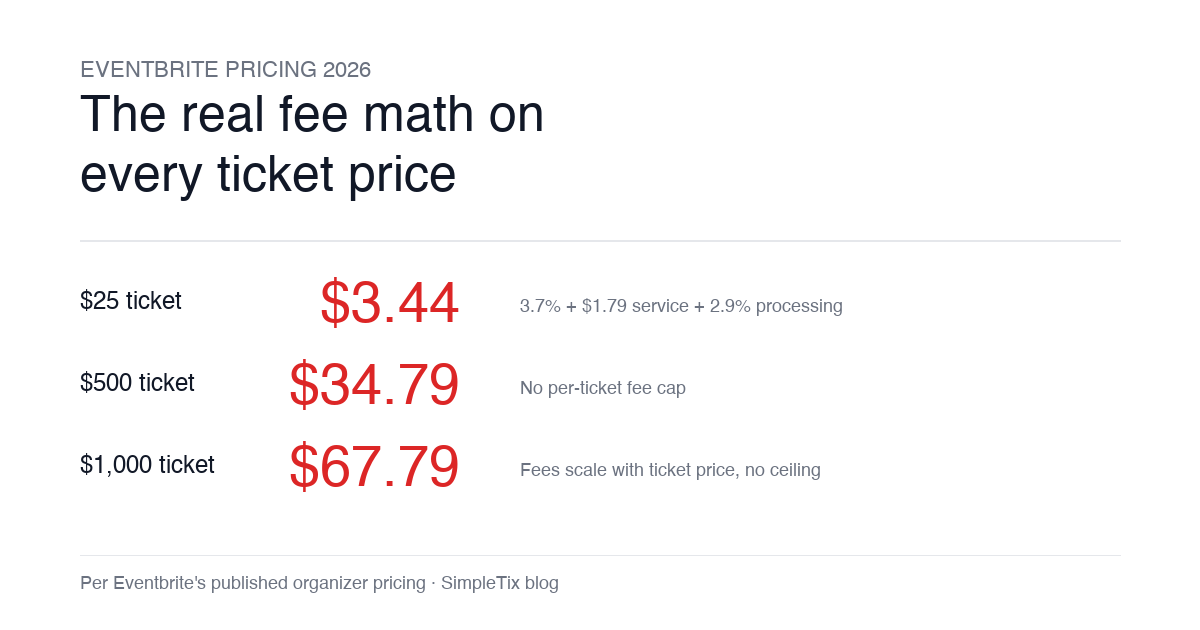
Eventbrite pricing 2026 is a lot for event organizers to sort through. There are longstanding policies that quietly cost paid-event operators real money, and there is genuine news under new ownership. This guide covers what the fees actually cost you today, what actually changed under the Bending Spoons acquisition, and how the alternatives compare on real numbers. Below is the honest breakdown, sourced to Eventbrite's own pricing page and SEC filings. Eventbrite pricing 2026: current fee structure As of 2026, Eventbrite charges 3.7% + $1.79 per paid ticket for the service fee, plus 2.9% for payment processing. In-person sales carry a $1 + 2.9% fee. There is no per-ticket fee cap. For a quick benchmark of total organizer-side fees: On a $25 ticket, fees total about $3.44 (13.8%) On a $50 ticket, fees total about $5.09 (10.2%) On a $100 ticket, fees total about $8.39 (8.4%) On a $500 ticket, fees total about $34.79 (7.0%) On a $1,000 ticket, fees total about $67.79 (6.8%) The fees scale with ticket price with no ceiling. That is the story for anyone selling premium tickets, season passes, VIP tiers, or corporate packages. Eventbrite pricing 2026: no per-ticket fee cap Eventbrite does not cap total ticket fees. This has been true since 2018, when Eventbrite removed the previous cap during its IPO. For most organizers selling everyday tickets ($20 to $50), the absence of a cap rarely comes up in the math. But for organizers selling premium tickets, the uncapped structure translates into real per-event cost. Take a conference selling three ticket tiers on Eventbrite: $150 general admission: fee about $12.34 (8.2%) $400 VIP ticket: fee about $27.09 (6.8%) $800 sponsor ticket: fee about $50.90 (6.4%) For a 200-person conference with a mix of GA and VIP tickets, that translates into hundreds of dollars...