How Much Does Eventbrite Cost in 2026? Real Math on a $20 Ticket
-
 by
by
Eventbrite charges 3.7% + $1.79 in service fees per paid ticket on its Flex plan, plus a 2.9% payment processing fee per order. On a $20 ticket, that comes out to roughly $3.11 in total fees, or about 15.5% of the ticket price. Source: Eventbrite Help Centre — Ticketing Fees.
This is the short answer. The longer answer matters if you sell more than a few tickets per month, because the structure changes with volume, with package, and with whether you pass fees to buyers.
How much does Eventbrite charge per ticket?
Eventbrite charges 3.7% + $1.79 per paid ticket on the Flex plan, plus a 2.9% payment processing fee per order.
Two fees, two purposes:
- Service fee (3.7% + $1.79): Eventbrite’s cut for using the platform.
- Payment processing fee (2.9%): The cost of moving money through credit card networks.
Free events have no fees on Eventbrite. Add-on products and upgrade features may incur their own charges.
How much does Eventbrite cost on a $20 ticket?
A $20 ticket on Eventbrite Flex costs about $3.11 in total fees, or 15.5% of the ticket price.
The math:
- Service fee: 3.7% of $20 = $0.74, plus the flat $1.79 = $2.53
- Payment processing: 2.9% of $20 = $0.58
- Total fees: $2.53 + $0.58 = $3.11
- Effective fee rate: $3.11 ÷ $20 = 15.55%
The effective rate scales with ticket price because the fixed $1.79 is the same on every ticket:
- On a $50 ticket, total fees are about $5.13 (10.3%)
- On a $100 ticket, total fees are about $7.69 (7.7%)
Lower-priced tickets feel the fixed $1.79 the most. If most of your tickets are under $25, Eventbrite’s effective fee rate is closer to 15% than the headline 3.7%.
What are Eventbrite’s pricing packages in 2026?
Eventbrite offers three plans: Flex (pay-as-you-go), Pro (monthly subscription), and Premium (custom enterprise).
- Flex: No monthly cost. Pay per ticket sold. Standard for most organizers.
- Pro: Monthly subscription. Lower per-ticket fees in exchange for the recurring cost. Targeted at higher-volume organizers.
- Premium: Custom pricing for large-scale or enterprise event programs.
The Flex plan is the default for new accounts. Switching plans is a manual decision based on volume.
Can organizers pass Eventbrite fees to attendees?
Yes. Organizers can choose to absorb the fees or pass them through to attendees at checkout.
If you pass fees through, attendees see a higher checkout total. If you absorb them, your net per ticket drops by the fee amount. Most small organizers pass fees through.
This is configurable per event in your Eventbrite dashboard.
Are free events free on Eventbrite?
Free events are free to list on Eventbrite. Standard ticketing fees do not apply.
Some premium features (advanced reporting, custom branding, marketing add-ons) may still carry costs. If your event is genuinely free with no upsells, you can run it on Eventbrite at zero platform cost.
How does Eventbrite’s pricing compare to alternatives?
Most Eventbrite alternatives charge significantly less than Eventbrite’s 15.5% effective rate on a $20 ticket. SimpleTix, for example, charges $0.79 + 2% per ticket with no contracts.
Here is the same $20 ticket on each platform:
Eventbrite Flex:
– Service fee: 3.7% + $1.79 = $2.53
– Processing: 2.9% = $0.58
– Total: $3.11 (15.5% of the ticket price)
SimpleTix:
– Per-ticket fee: 2% + $0.79 = $1.19
– Processing: handled by your connected processor (Stripe/Square/PayPal at their standard rates)
– Total: $1.19 (5.95% of the ticket price), before processing
The gap widens at scale. On 500 tickets at $20 each, Eventbrite fees total $1,555. SimpleTix fees total $595. That is $960 in retained revenue on a single event.
What’s the cheapest Eventbrite alternative?
SimpleTix is among the cheapest Eventbrite competitors at $0.79 + 2% per ticket, with no monthly subscription, no contracts, and no fees on free events.
Other low-fee alternatives include Ticket Tailor, TicketSpice, and Brown Paper Tickets. Each has tradeoffs around feature depth, payment processor support, and onsite operations.
The questions that matter when picking an alternative:
- What is the per-ticket fee, broken into service + processing?
- Is there a monthly subscription on top of per-ticket fees?
- Does it support reserved seating, season passes, or memberships if you need those?
- Does it work with your payment processor (Stripe, Square, PayPal)?
- Does it have an onsite check-in app?
- Is there a fee on free events?
The bottom line on Eventbrite fees
Eventbrite costs about 15.5% on a $20 ticket once service and processing fees are combined. That is the number to start with when comparing platforms.
If you sell low-priced tickets, the fixed $1.79 per ticket hits hardest. If you sell high-priced tickets, the percentage matters more. If you run free events, Eventbrite is free.
SimpleTix runs the same $20 ticket at $1.19 (5.95%) with no subscription, no contract, and no fees on free events. Run the math on your own volume here: SimpleTix pricing.
Latest News
Related Articles

Season Ticket Software for Fall 2026: Subscriptions, Reserved Seating & Renewals
-
by
Fall subscription sales are the single biggest revenue moment for most performing arts organizations. Season packages, member renewals, and early access windows all open between July and September. So the season ticket software you pick this summer decides how the fall series actually sells. This guide covers what season ticket software needs to do in 2026, how to configure it for a theater, symphony, or concert series, and what SimpleTix costs for season-driven event programs. What season ticket software actually needs to do Selling season tickets is nothing like selling single-event tickets. First, one subscriber buys 4 to 20 events in a single package. Second, seats need to lock across the entire season. Third, renewals from prior subscribers happen weeks before the general public gets access. And fourth, add-ons like parking, pre-show dinner, and backstage passes attach to the subscription, not the event. So the operational checklist for season ticket software looks like this: Season pass or subscription products that group multiple events into one purchase Reserved seating with locked seats across the whole season, so the subscriber sits in the same seat every night Priority access windows for existing subscribers before general on-sale Payment plans or full-payment options so patrons can split large subscription costs Renewal workflows that let last year's subscribers re-up with one click Comp ticket management for donors, sponsors, and press seats Membership tiers with different pricing, benefits, and priority access Reporting by subscriber, not just by event If your current tool cannot handle these, you are probably running Excel spreadsheets on the side and losing renewals every year. What is season ticket software? Season ticket software is a ticketing platform designed to sell multi-event packages (season subscriptions) alongside individual tickets, with reserved seat continuity, subscriber priority access, and renewal workflows built in. The core difference...

Holiday Event Ticketing Software: Timed Entry, Reserved Seating & Capacity Control for...
-
by
If you run a holiday event, you are booking dates now. So the ticketing platform you pick this month determines how November and December actually go. This guide covers what holiday event ticketing software needs to do in 2026, how to configure it for the season crunch, and what SimpleTix costs for holiday events of any size. What holiday event ticketing software needs to do Holiday events compress a whole year of sales into six weeks. First, most tickets sell in a 4 to 8 week window between mid-November and January 1. Second, weather cancels outdoor events without warning. Third, family groups buy 4 to 8 tickets in one order, not 1. And fourth, capacity is measured per time slot, not per venue. So the ticketing checklist for holiday operators looks like this: Timed entry with per-slot capacity for drive-throughs, walk-throughs, and Santa visits Reserved seating for holiday theater, Nutcracker, and holiday concerts Group and family bundles so a family of six is one checkout, not six Fast scanning at the gate, including offline mode for cold outdoor venues Waitlists for when peak-hour slots sell out Add-ons for hot chocolate, photo packages, VIP tiers, and holiday merch Automated email reminders so guests do not forget their timed slot Same-day payouts to fund the season's operational costs If your current tool cannot do all of that, October is too late to switch. Move now. How do timed entry tickets work for holiday events? Timed entry lets you release a fixed number of tickets per time slot (typically every 15 or 30 minutes) so guests arrive in waves instead of one 6pm surge. For a Christmas light drive-through with a 45-minute route, that usually means 30 to 60 vehicles per 15-minute window. Over a 5-hour evening, you can process 600 to 1,200...
Eventbrite Pricing 2026: Fees, Refunds & What’s Actually Changed
-
by
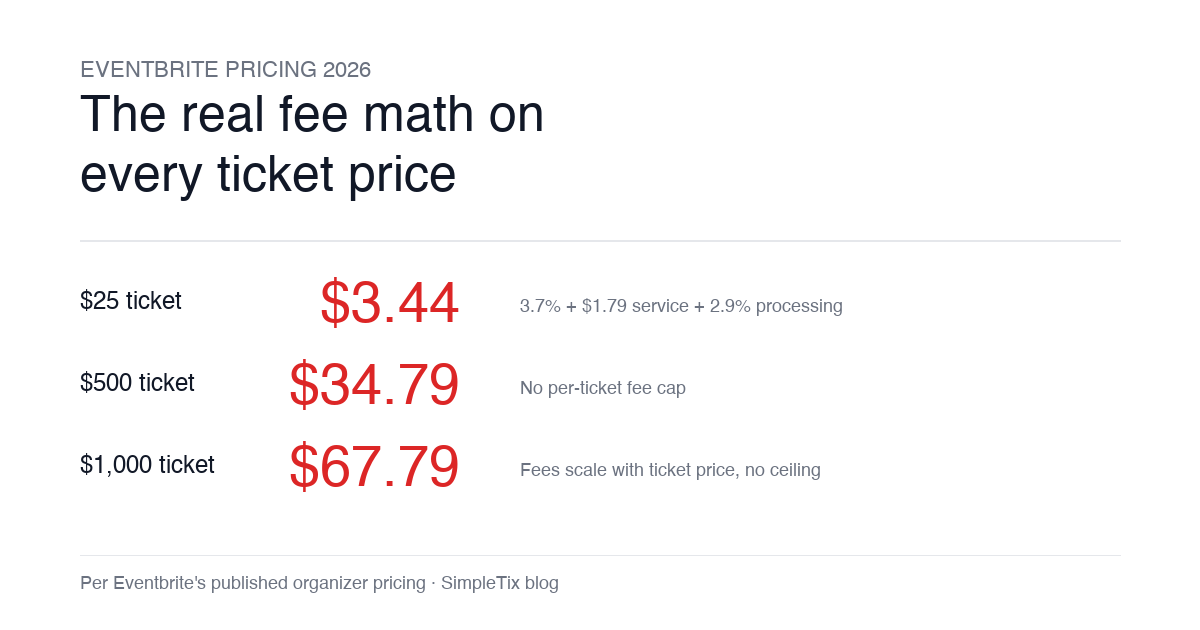
Eventbrite pricing 2026 is a lot for event organizers to sort through. There are longstanding policies that quietly cost paid-event operators real money, and there is genuine news under new ownership. This guide covers what the fees actually cost you today, what actually changed under the Bending Spoons acquisition, and how the alternatives compare on real numbers. Below is the honest breakdown, sourced to Eventbrite's own pricing page and SEC filings. Eventbrite pricing 2026: current fee structure As of 2026, Eventbrite charges 3.7% + $1.79 per paid ticket for the service fee, plus 2.9% for payment processing. In-person sales carry a $1 + 2.9% fee. There is no per-ticket fee cap. For a quick benchmark of total organizer-side fees: On a $25 ticket, fees total about $3.44 (13.8%) On a $50 ticket, fees total about $5.09 (10.2%) On a $100 ticket, fees total about $8.39 (8.4%) On a $500 ticket, fees total about $34.79 (7.0%) On a $1,000 ticket, fees total about $67.79 (6.8%) The fees scale with ticket price with no ceiling. That is the story for anyone selling premium tickets, season passes, VIP tiers, or corporate packages. Eventbrite pricing 2026: no per-ticket fee cap Eventbrite does not cap total ticket fees. This has been true since 2018, when Eventbrite removed the previous cap during its IPO. For most organizers selling everyday tickets ($20 to $50), the absence of a cap rarely comes up in the math. But for organizers selling premium tickets, the uncapped structure translates into real per-event cost. Take a conference selling three ticket tiers on Eventbrite: $150 general admission: fee about $12.34 (8.2%) $400 VIP ticket: fee about $27.09 (6.8%) $800 sponsor ticket: fee about $50.90 (6.4%) For a 200-person conference with a mix of GA and VIP tickets, that translates into hundreds of dollars...