How Do You Set Up Ticket Sales for International Events?
-
 by
by

Selling tickets for international events brings unique challenges, from handling payments in different currencies to meeting local regulations. While Eventbrite is a popular choice, many Eventbrite alternatives offer features specifically designed for global audiences.
Setting up an efficient system requires tools that address payment options, compliance, language preferences, and attendee support. What steps and tools are needed to successfully manage ticket sales for international events?
Use Payment Gateways That Work Worldwide
Global audiences expect flexibility in payment options. A reliable event ticketing system supports multiple payment gateways, including regional and mobile payment methods. Platforms that integrate with options like PayPal, Stripe, or region-specific systems like Alipay or iDEAL help reduce barriers to completing a purchase.
Some Eventbrite competitors go further, offering country-specific payment integrations. This is especially useful for events in areas with limited access to traditional banking systems. By providing attendees with familiar and accessible payment methods, you can increase trust and improve ticket sales.
Offer Multi-Currency Pricing
Ticket buyers are less likely to complete a purchase if prices are displayed only in a foreign currency. A platform with multi-currency pricing solves this issue by allowing attendees to view ticket prices in their local currency. This reduces confusion and friction during the buying process.
The best Eventbrite alternatives often have built-in currency conversion tools, automatically adjusting prices based on the buyer’s location. This capability not only makes transactions smoother but also shows attendees that you’ve thought about their needs, encouraging them to complete their purchases.
Simplify Taxes and Regional Compliance
Tax regulations and compliance laws can complicate international ticket sales. A reliable event registration platform should calculate and display taxes based on the buyer’s location. Platforms that automate this process make it easier for organizers to comply with local regulations and avoid fines or disputes.
Many trade show registration platforms and conference registration tools specialize in region-specific compliance. These platforms help with tax calculations, invoicing, and fee disclosures, making international ticketing simpler and more transparent for both organizers and attendees.
Customize Ticket Types to Fit Local Preferences
Cultural expectations for ticket types vary widely across regions. For instance, early bird discounts or VIP packages might hold different meanings in different countries. A flexible event registration platform comparison can help identify tools that allow you to adapt ticket categories to regional preferences.
Customizing ticket types also extends to creating packages that cater to local habits. For example, family bundles, meal-inclusive options, or time-limited offers can resonate better in certain markets. Tools like b2b event management software and online event management tools often provide the flexibility needed to customize ticketing options effectively.
Optimize Ticketing for Mobile Users
In many regions, mobile devices are the primary way people browse the internet and make purchases. A mobile-friendly ticketing system is essential for reaching these audiences. A poorly optimized mobile experience can lead to abandoned carts and lost sales.
Platforms designed with mobile-first features, like many Eventbrite alternatives, offer responsive designs and simple navigation for mobile users. They also support mobile payment methods, further streamlining the process. Ensuring your platform works seamlessly on smartphones can significantly improve your ticket sales.
Localize Event Pages and Communication
Language localization is critical when targeting international audiences. Buyers are more likely to trust and engage with events if information is available in their native language. This applies to event pages, ticket descriptions, and confirmation emails.
Some virtual event platforms and hybrid event management software include built-in localization tools. These features let you translate your event details into multiple languages without needing external services. A localized experience not only increases accessibility but also demonstrates respect for your audience.
Provide 24/7 Customer Support
When selling tickets internationally, attendees may come from vastly different time zones. Having customer support available at all hours is crucial for resolving issues quickly. Whether it’s a payment error or a question about event details, timely responses prevent dissatisfaction and lost sales.
Many conference registration software and business event management platforms include 24/7 customer support as part of their offerings. This feature ensures attendees get the help they need, no matter when or where they’re trying to make a purchase.
Integrate Regional Marketing Tools
Marketing for international events often requires region-specific strategies. Integrating your ticketing platform with local advertising tools or social media channels can help you reach the right audience more effectively.
For example, platforms like professional networking event tools and event planning software alternatives often include integrations with region-specific marketing platforms. These tools enable you to run targeted campaigns that appeal directly to the demographics you’re trying to reach, boosting visibility and ticket sales.
Analyze Global Ticket Sales with Advanced Reporting
Understanding where and how your tickets are selling is vital for adjusting strategies mid-campaign. A platform with real-time analytics lets you track sales by country, ticket type, and even device type. These insights help you identify trends and make data-driven decisions to improve performance.
Some Eventbrite competitors offer advanced reporting features that go beyond standard metrics. With these tools, you can see how specific promo codes perform across regions, identify popular ticket types, and adjust pricing or marketing efforts accordingly.
Reduce Service Fees for International Buyers
High service fees can be a major barrier for attendees, especially those in regions with lower income levels. Platforms that offer lower transaction fees or flexible pricing structures make tickets more accessible and attractive to a global audience.
Many event registration management software options and event planning software alternatives are designed to minimize costs for buyers. Choosing a platform with transparent and affordable fees can help you maximize sales while keeping your audience happy.
Selling tickets for international events involves more than just listing them online. It requires thoughtful planning, the right tools, and a platform that supports global needs like multi-currency pricing, localization, and advanced analytics. While Eventbrite is a common choice, many Eventbrite alternatives offer features better suited for international ticketing.
Whether you need lower fees, improved compliance tools, or a mobile-friendly interface, exploring alternative to Eventbrite platforms is essential. The right platform not only simplifies the process but also helps you reach more attendees, sell more tickets, and build stronger global connections.
Ready to simplify your international ticket sales? Book a free consultation with Simpletix today and see why it’s one of the best Eventbrite alternatives for organizers looking to grow their events worldwide!
Latest News
Related Articles

Season Ticket Software for Fall 2026: Subscriptions, Reserved Seating & Renewals
-
by
Fall subscription sales are the single biggest revenue moment for most performing arts organizations. Season packages, member renewals, and early access windows all open between July and September. So the season ticket software you pick this summer decides how the fall series actually sells. This guide covers what season ticket software needs to do in 2026, how to configure it for a theater, symphony, or concert series, and what SimpleTix costs for season-driven event programs. What season ticket software actually needs to do Selling season tickets is nothing like selling single-event tickets. First, one subscriber buys 4 to 20 events in a single package. Second, seats need to lock across the entire season. Third, renewals from prior subscribers happen weeks before the general public gets access. And fourth, add-ons like parking, pre-show dinner, and backstage passes attach to the subscription, not the event. So the operational checklist for season ticket software looks like this: Season pass or subscription products that group multiple events into one purchase Reserved seating with locked seats across the whole season, so the subscriber sits in the same seat every night Priority access windows for existing subscribers before general on-sale Payment plans or full-payment options so patrons can split large subscription costs Renewal workflows that let last year's subscribers re-up with one click Comp ticket management for donors, sponsors, and press seats Membership tiers with different pricing, benefits, and priority access Reporting by subscriber, not just by event If your current tool cannot handle these, you are probably running Excel spreadsheets on the side and losing renewals every year. What is season ticket software? Season ticket software is a ticketing platform designed to sell multi-event packages (season subscriptions) alongside individual tickets, with reserved seat continuity, subscriber priority access, and renewal workflows built in. The core difference...

Holiday Event Ticketing Software: Timed Entry, Reserved Seating & Capacity Control for...
-
by
If you run a holiday event, you are booking dates now. So the ticketing platform you pick this month determines how November and December actually go. This guide covers what holiday event ticketing software needs to do in 2026, how to configure it for the season crunch, and what SimpleTix costs for holiday events of any size. What holiday event ticketing software needs to do Holiday events compress a whole year of sales into six weeks. First, most tickets sell in a 4 to 8 week window between mid-November and January 1. Second, weather cancels outdoor events without warning. Third, family groups buy 4 to 8 tickets in one order, not 1. And fourth, capacity is measured per time slot, not per venue. So the ticketing checklist for holiday operators looks like this: Timed entry with per-slot capacity for drive-throughs, walk-throughs, and Santa visits Reserved seating for holiday theater, Nutcracker, and holiday concerts Group and family bundles so a family of six is one checkout, not six Fast scanning at the gate, including offline mode for cold outdoor venues Waitlists for when peak-hour slots sell out Add-ons for hot chocolate, photo packages, VIP tiers, and holiday merch Automated email reminders so guests do not forget their timed slot Same-day payouts to fund the season's operational costs If your current tool cannot do all of that, October is too late to switch. Move now. How do timed entry tickets work for holiday events? Timed entry lets you release a fixed number of tickets per time slot (typically every 15 or 30 minutes) so guests arrive in waves instead of one 6pm surge. For a Christmas light drive-through with a 45-minute route, that usually means 30 to 60 vehicles per 15-minute window. Over a 5-hour evening, you can process 600 to 1,200...
Eventbrite Pricing 2026: Fees, Refunds & What’s Actually Changed
-
by
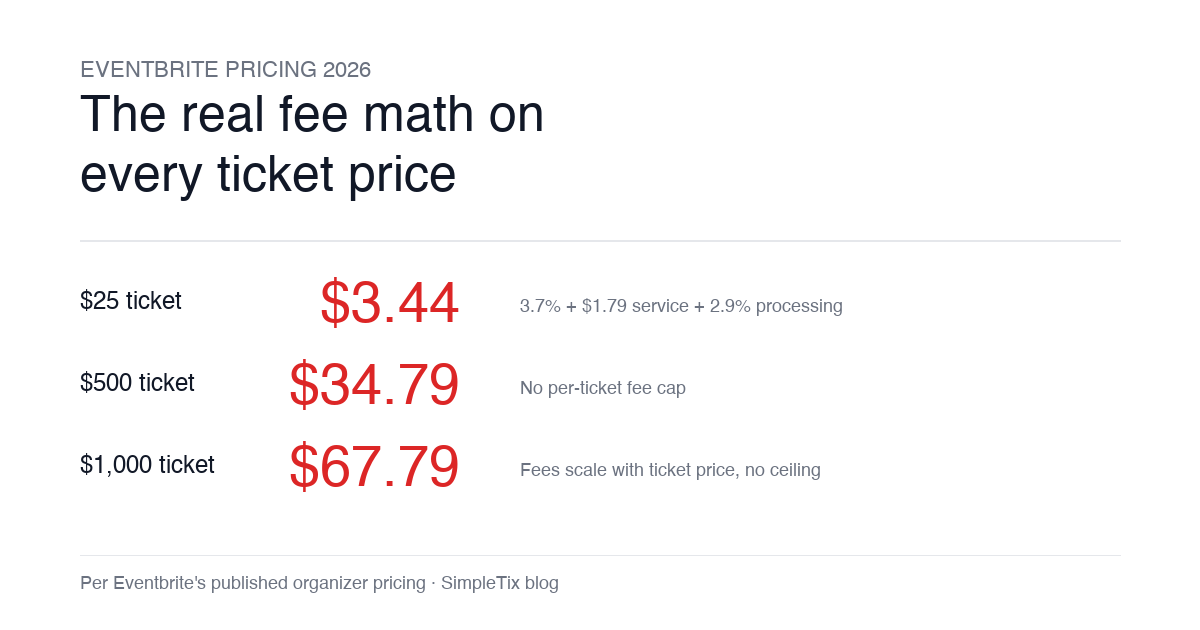
Eventbrite pricing 2026 is a lot for event organizers to sort through. There are longstanding policies that quietly cost paid-event operators real money, and there is genuine news under new ownership. This guide covers what the fees actually cost you today, what actually changed under the Bending Spoons acquisition, and how the alternatives compare on real numbers. Below is the honest breakdown, sourced to Eventbrite's own pricing page and SEC filings. Eventbrite pricing 2026: current fee structure As of 2026, Eventbrite charges 3.7% + $1.79 per paid ticket for the service fee, plus 2.9% for payment processing. In-person sales carry a $1 + 2.9% fee. There is no per-ticket fee cap. For a quick benchmark of total organizer-side fees: On a $25 ticket, fees total about $3.44 (13.8%) On a $50 ticket, fees total about $5.09 (10.2%) On a $100 ticket, fees total about $8.39 (8.4%) On a $500 ticket, fees total about $34.79 (7.0%) On a $1,000 ticket, fees total about $67.79 (6.8%) The fees scale with ticket price with no ceiling. That is the story for anyone selling premium tickets, season passes, VIP tiers, or corporate packages. Eventbrite pricing 2026: no per-ticket fee cap Eventbrite does not cap total ticket fees. This has been true since 2018, when Eventbrite removed the previous cap during its IPO. For most organizers selling everyday tickets ($20 to $50), the absence of a cap rarely comes up in the math. But for organizers selling premium tickets, the uncapped structure translates into real per-event cost. Take a conference selling three ticket tiers on Eventbrite: $150 general admission: fee about $12.34 (8.2%) $400 VIP ticket: fee about $27.09 (6.8%) $800 sponsor ticket: fee about $50.90 (6.4%) For a 200-person conference with a mix of GA and VIP tickets, that translates into hundreds of dollars...