How to Connect Square to SimpleTix and Start Selling Tickets
-
 by
by

How to Connect Square to SimpleTix and Start Selling Tickets
If you need square ticketing that works for online sales and the box office, you do not need a messy setup. You need a way to connect Square to SimpleTix and manage online and onsite ticket sales in one workflow.
Square can make sense for organizers who already use Square hardware or want to accept gift cards and catalog upsells. Meanwhile, SimpleTix gives you the ticketing layer: timed entry, season passes, reserved seating, check-in tools, and simple pricing at $0.79 + 2% per ticket, with no contracts or subscriptions.
Why use square ticketing with SimpleTix
The main reason is simple. You get Square for payments and POS tools, plus SimpleTix for event ticketing.
That matters if you sell more than basic admission. For example, you might need season tickets, timed entry, Flex Passes, or onsite scanning. You may also want online checkout and in-person sales to work together instead of feeling patched together.
Common use cases include:
- Farms and agritourism spots selling timed admissions and add-ons
- Attractions that need re-entry or multi-use passes
- Venues that sell online, at the door, and through staff devices
- Festivals handling rushes at gates and box office windows
- Organizations already using Square hardware for in-person sales
If that sounds familiar, this is the kind of square ticketing workflow worth setting up.
What you can do after you connect Square
Once connected, you can use Square with SimpleTix for POS, gift cards, and catalog upsells.
On the SimpleTix side, you also get tools built for ticketing, including:
- General admission with timed entry and capacity management
- Reserved seating with interactive seat maps
- Season tickets for GA and reserved events
- Flex Pass with attendee photo verification
- Promo codes, BOGO offers, and quantity discounts
- Waitlists and abandoned cart recovery emails
- Apple Wallet and Google Wallet passes
- Offline scanning through the Organizer app
- Point-of-sale mode for in-person sales
How to set up square ticketing in SimpleTix
The flow is straightforward.
1. Create your event in SimpleTix
Start with the event itself. Choose the event type that matches how you sell.
You can set up:
- General Admission for timed entry
- Reserved Seating for assigned seats
- Season Tickets for repeat attendance
- Flex Pass for multi-use or re-entry access
Timed entry can be useful if you want to spread arrivals and control capacity.
2. Connect your Square account
Next, connect Square inside your SimpleTix account. This step ties your payment setup to your ticketing workflow.
If you already use Square for onsite sales, you can keep using Square hardware while SimpleTix handles the event logic.
3. Match your selling flow to your event
Now decide how people will buy. Most organizers need more than one path.
A simple setup might include:
- Online checkout from your website
- Box office sales for walk-ups
- Staff sales from mobile devices
- Upsells from your Square catalog
- Gift card acceptance at checkout or POS
That mix is where square ticketing becomes practical.
4. Test a full purchase before launch
Do one online test order. Then do one in-person test sale.
Check the basics:
- Payment goes through
- Ticket confirmation email arrives
- Mobile or PDF ticket looks right
- Wallet pass options appear if enabled
- Scanner reads the ticket
- Staff permissions look correct
This step helps you catch problems before launch. It also gives staff a real example to practice with.
Best square ticketing use cases
Not every organizer uses Square the same way. That said, a few setups come up often.
Season passes and memberships
If you sell repeat access, SimpleTix gives you season tickets for both GA and reserved seating. Memberships can also be sold online and at the box office.
This is useful for venues, attractions, and community organizations. For example, you can offer member-only pricing or complimentary tickets for certain tiers.
Onsite sales with Square hardware
Some events do most of their volume at the gate. Others still need fast walk-up sales even if online presales are strong.
SimpleTix has point-of-sale mode and works with Square hardware. That gives staff a way to handle in-person sales without using a separate ticketing process.
Farms, attractions, and timed admissions
This is a common fit for square ticketing. Farms and attractions often need timed entry, add-ons, and flexible onsite sales.
Festivals and high-volume entry
Festivals often need presales, gate sales, and fast scanning. Staff may also be spread across entrances and sales points.
SimpleTix supports offline scanning, scan-only mode, and hardware scanner support.
Common setup mistakes to avoid
A Square connection is only part of the job. The bigger issue is usually workflow.
Here are the mistakes that cause trouble:
1. Selling tickets without testing onsite scanning
Do not assume checkout is the finish line. If scanning fails at the gate, your line backs up fast.
Instead, test with the exact devices your team will use. Also test offline mode if your venue has weak service.
2. Forgetting staff roles and permissions
Too many people with full access creates risk. Too few permissions slows down sales.
SimpleTix includes user role management. Set staff access before doors open, not during the rush.
3. Skipping add-ons and upsells
If you already use Square catalog items, use them. For instance, parking, merch, tastings, or feed cups can raise order value without adding friction.
4. Using one sales plan for every event type
A reserved-seat theater show is not a timed-entry attraction. A season pass setup is also different from a one-night event.
Pick the event structure first. Then build the payment and POS flow around it.
Tips to make square ticketing work better
Once the basics are live, improve the setup with a few small moves.
Send your first sales email early
Start promoting before doors open, then follow up with reminder emails as the event gets closer.
SimpleTix supports email blasts and automated reminder emails.
Add custom attendee questions only if you need them
Every extra field adds friction. So only ask for information you will actually use.
For example, ask for arrival date, waiver details, or membership ID if it matters operationally. Otherwise, keep checkout short.
Use timed entry to smooth arrivals
If people all show up at once, staffing gets expensive fast. Timed entry helps spread load across the day.
That can be especially helpful for farms, museums, and holiday attractions.
Train staff on one real sale and one real scan
Do not hand staff a login and hope for the best. Instead, run a five-minute practice session.
Have each person complete one sale and one scan. They will make fewer mistakes when the line forms.
Is SimpleTix a good fit for square ticketing?
If you already use Square, want onsite sales, or need more than a basic checkout page, SimpleTix is worth a look. It fills the ticketing gap without adding contracts or subscriptions.
It is a strong option if you need timed entry, season passes, reserved seating, Flex Passes, or easy box office tools. You can also pass fees to attendees or absorb them yourself, and there are no fees on free events.
If you want a simpler way to run square ticketing, SimpleTix is built for that.
Latest News
Related Articles

Season Ticket Software for Fall 2026: Subscriptions, Reserved Seating & Renewals
-
by
Fall subscription sales are the single biggest revenue moment for most performing arts organizations. Season packages, member renewals, and early access windows all open between July and September. So the season ticket software you pick this summer decides how the fall series actually sells. This guide covers what season ticket software needs to do in 2026, how to configure it for a theater, symphony, or concert series, and what SimpleTix costs for season-driven event programs. What season ticket software actually needs to do Selling season tickets is nothing like selling single-event tickets. First, one subscriber buys 4 to 20 events in a single package. Second, seats need to lock across the entire season. Third, renewals from prior subscribers happen weeks before the general public gets access. And fourth, add-ons like parking, pre-show dinner, and backstage passes attach to the subscription, not the event. So the operational checklist for season ticket software looks like this: Season pass or subscription products that group multiple events into one purchase Reserved seating with locked seats across the whole season, so the subscriber sits in the same seat every night Priority access windows for existing subscribers before general on-sale Payment plans or full-payment options so patrons can split large subscription costs Renewal workflows that let last year's subscribers re-up with one click Comp ticket management for donors, sponsors, and press seats Membership tiers with different pricing, benefits, and priority access Reporting by subscriber, not just by event If your current tool cannot handle these, you are probably running Excel spreadsheets on the side and losing renewals every year. What is season ticket software? Season ticket software is a ticketing platform designed to sell multi-event packages (season subscriptions) alongside individual tickets, with reserved seat continuity, subscriber priority access, and renewal workflows built in. The core difference...

Holiday Event Ticketing Software: Timed Entry, Reserved Seating & Capacity Control for...
-
by
If you run a holiday event, you are booking dates now. So the ticketing platform you pick this month determines how November and December actually go. This guide covers what holiday event ticketing software needs to do in 2026, how to configure it for the season crunch, and what SimpleTix costs for holiday events of any size. What holiday event ticketing software needs to do Holiday events compress a whole year of sales into six weeks. First, most tickets sell in a 4 to 8 week window between mid-November and January 1. Second, weather cancels outdoor events without warning. Third, family groups buy 4 to 8 tickets in one order, not 1. And fourth, capacity is measured per time slot, not per venue. So the ticketing checklist for holiday operators looks like this: Timed entry with per-slot capacity for drive-throughs, walk-throughs, and Santa visits Reserved seating for holiday theater, Nutcracker, and holiday concerts Group and family bundles so a family of six is one checkout, not six Fast scanning at the gate, including offline mode for cold outdoor venues Waitlists for when peak-hour slots sell out Add-ons for hot chocolate, photo packages, VIP tiers, and holiday merch Automated email reminders so guests do not forget their timed slot Same-day payouts to fund the season's operational costs If your current tool cannot do all of that, October is too late to switch. Move now. How do timed entry tickets work for holiday events? Timed entry lets you release a fixed number of tickets per time slot (typically every 15 or 30 minutes) so guests arrive in waves instead of one 6pm surge. For a Christmas light drive-through with a 45-minute route, that usually means 30 to 60 vehicles per 15-minute window. Over a 5-hour evening, you can process 600 to 1,200...
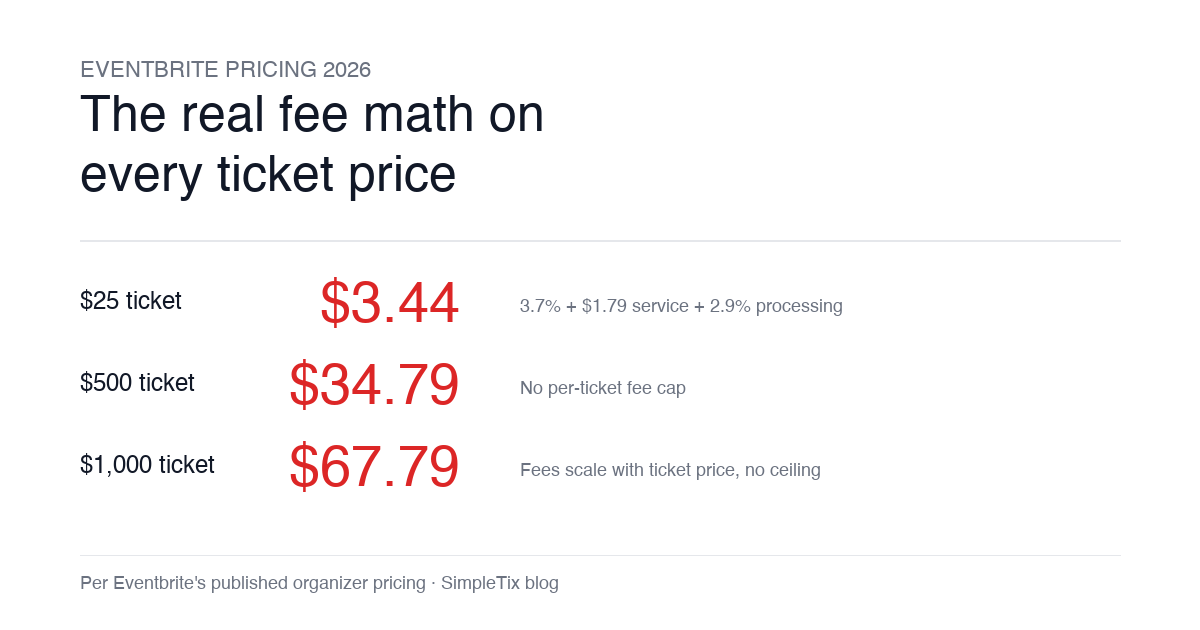
Eventbrite Pricing 2026: Fees, Refunds & What’s Actually Changed
-
by
Eventbrite pricing 2026 is a lot for event organizers to sort through. There are longstanding policies that quietly cost paid-event operators real money, and there is genuine news under new ownership. This guide covers what the fees actually cost you today, what actually changed under the Bending Spoons acquisition, and how the alternatives compare on real numbers. Below is the honest breakdown, sourced to Eventbrite's own pricing page and SEC filings. Eventbrite pricing 2026: current fee structure As of 2026, Eventbrite charges 3.7% + $1.79 per paid ticket for the service fee, plus 2.9% for payment processing. In-person sales carry a $1 + 2.9% fee. There is no per-ticket fee cap. For a quick benchmark of total organizer-side fees: On a $25 ticket, fees total about $3.44 (13.8%) On a $50 ticket, fees total about $5.09 (10.2%) On a $100 ticket, fees total about $8.39 (8.4%) On a $500 ticket, fees total about $34.79 (7.0%) On a $1,000 ticket, fees total about $67.79 (6.8%) The fees scale with ticket price with no ceiling. That is the story for anyone selling premium tickets, season passes, VIP tiers, or corporate packages. Eventbrite pricing 2026: no per-ticket fee cap Eventbrite does not cap total ticket fees. This has been true since 2018, when Eventbrite removed the previous cap during its IPO. For most organizers selling everyday tickets ($20 to $50), the absence of a cap rarely comes up in the math. But for organizers selling premium tickets, the uncapped structure translates into real per-event cost. Take a conference selling three ticket tiers on Eventbrite: $150 general admission: fee about $12.34 (8.2%) $400 VIP ticket: fee about $27.09 (6.8%) $800 sponsor ticket: fee about $50.90 (6.4%) For a 200-person conference with a mix of GA and VIP tickets, that translates into hundreds of dollars...