Transitioning Back to In-Person Events
-
 by
by
Riley Manning has worked as a travel and entertainment writer for more than 10 years. Today, he writes about unique events and the technology that helps make them happen.

While virtual events are here to stay, streaming a festival on a computer screen will simply never replace the energy and vitality of attending one in-person. Because COVID-19 still pervades every in-person interaction, shifting any virtual events back to in-person will most likely require some additional consideration and care to work around.
Festival software provides a versatile solution to facilitate this transition.
Your city or state may still have various regulations in place to quell the spread of COVID-19. From mask mandates, capacity limits, or vaccination regulations, you may have to accommodate a plethora of rules for your festival or event to remain compliant with state and local decrees.
Even with these additional directives to consider, online festival and event management software helps you safely and easily transition your virtual event to in-person with little hassle.
Table of Contents:
- Prepare with Online Festival and Event Management Software
- Communicate Efficiently with Online Festival and Event Management Software
- Manage Your Event with Minimal Staff
Prepare with Online Festival and Event Management Software

While COVID can be unpredictable, preparing as well as possible and staying up to date on current events will help your event go off successfully. Knowing what kind of regulations, mandates, and laws you are dealing with will establish a good starting point as you begin planning your return to in-person festivals and events.
Be aware of daily developments.
Staying abreast of news and trends locally and nationwide will be a good reference point for your own event. Your local infection, hospitalization, and vaccination rates could affect the possibility of returning in-person. Being informed will help you prepare for any changes as soon as they crop up.
Stay up to date on mandates and regulations.
As vaccination rates trend upward and infection rates trend down, precautions and rules have loosened up; however, not all precautionary measures have been abandoned. Your event may have to contend with capacity limits, masking mandates, or even vaccination documentation.
Capacity limits, either voluntary or mandated, can create a safe and healthy atmosphere to help your guests feel comfortable in a manageable crowd. Online festival and event management software should offer you seating charts customizable to your venue so guests can feel at ease and practice social distancing in their assigned seat.
Consider timed entry.
If you are requiring a vaccination or negative COVID test for entry into your event, the entrance line can be overwhelming as your staff must check each guest’s documentation before scanning their tickets.
Online festival and event management software with timed entry can facilitate manageable crowds and entrance lines. With staggered entry times, you will avoid the massive rush for entry and keep the line moving quickly and efficiently.
Communicate Efficiently with Online Festival and Event Management Software
Transitioning your event from in-person to online means you’ll need guests to fill up the venue. From emails, social media posts, and targeted ads, online festival and event management software allows you to easily get the word out to your potential guests.
Target previous event attendees.
Email campaigns are an incredibly cost-efficient marketing method with a very high ROI. Online festival and event management software saves the contact info for any events you’ve managed through the software, offering you a rich list of contacts to start contacting.
You can even offer promo codes, discounts, or early purchase windows to entice, attract, and show gratitude for loyal return customers.
Share on social media.
Social media remains a reliable method to direct traffic to your event’s ticket page. Once everything is set up, exciting posts create anticipation and hype for returning in-person. With festival software, you can direct your followers to your event page, where they should find not only this event but any others you host. This increases visibility for all events you are throwing.
Stay in touch with your guests.
Should anything change leading up to the event, online festival and event management software can help you easily communicate any last-minute information to your guests. Any FAQs, tips, or maps can be sent to any online ticket purchasers, and your event website can be updated to communicate any necessary information as well.
Thank attendees and look to your next event.
It’s important to show gratitude to your guests. Once your event wraps up, send attendees an email through your online festival and event management software to thank them for patronizing your event. You may even consider conducting a brief survey to hear about what went right and any areas for improvement.
Manage Your Event with Minimal Staff

You may have less access to experienced employees due to the pandemic. Luckily, online event and festival software allows you to run the same quality event with less staff just as efficiently as before.
Scan and go mobile check-ins facilitate quick entry.
Mobile check-ins mean you need less event staff to check people in. Staff can use their own mobile devices to scan each guest’s mobile ticket in seconds, keeping the line moving and check-in simple.
Square allows for quick in-person sales.
Tickets purchased ahead of time means less of a line at the ticket booth. For those who didn’t buy their tickets ahead of time, festival software with Square integration makes in-person purchases no problem.
Cashless transactions have increased in popularity each year and are forecasted to continue gaining popularity, and Square offers myriad methods to pay. With a versatile payment system and contactless payments, guests have multiple payment options to utilize. Plus, without having to handle cash, your staff will be able to complete each transaction in record time.
Allow guests to modify their tickets.
If you host a festival with multiple days, timed entry, or different events within an event, you may offer updates to tickets free of charge. Managing all of these potential updates can create a lot of work for your employees, however.
Online festival and event management software lets guests update their own tickets, rather than having to call the box office and request a change. This will make your guests happier, as they won’t have to wait on hold to make a simple change, and it will also free up your staff to handle other matters.
SimpleTix has offered an affordable, premium event ticketing platform that outperforms Eventbrite and similar apps for over 12 years. Compared to the competition, SimpleTix offers better options at a better price point. To learn more, call us at +1 (855) 550-3670 or email us at support@simpletix.com.
Latest News
Related Articles

Season Ticket Software for Fall 2026: Subscriptions, Reserved Seating & Renewals
-
 by
by
Fall subscription sales are the single biggest revenue moment for most performing arts organizations. Season packages, member renewals, and early access windows all open between July and September. So the season ticket software you pick this summer decides how the fall series actually sells. This guide covers what season ticket software needs to do in 2026, how to configure it for a theater, symphony, or concert series, and what SimpleTix costs for season-driven event programs. What season ticket software actually needs to do Selling season tickets is nothing like selling single-event tickets. First, one subscriber buys 4 to 20 events in a single package. Second, seats need to lock across the entire season. Third, renewals from prior subscribers happen weeks before the general public gets access. And fourth, add-ons like parking, pre-show dinner, and backstage passes attach to the subscription, not the event. So the operational checklist for season ticket software looks like this: Season pass or subscription products that group multiple events into one purchase Reserved seating with locked seats across the whole season, so the subscriber sits in the same seat every night Priority access windows for existing subscribers before general on-sale Payment plans or full-payment options so patrons can split large subscription costs Renewal workflows that let last year's subscribers re-up with one click Comp ticket management for donors, sponsors, and press seats Membership tiers with different pricing, benefits, and priority access Reporting by subscriber, not just by event If your current tool cannot handle these, you are probably running Excel spreadsheets on the side and losing renewals every year. What is season ticket software? Season ticket software is a ticketing platform designed to sell multi-event packages (season subscriptions) alongside individual tickets, with reserved seat continuity, subscriber priority access, and renewal workflows built in. The core difference...

Holiday Event Ticketing Software: Timed Entry, Reserved Seating & Capacity Control for...
-
by
If you run a holiday event, you are booking dates now. So the ticketing platform you pick this month determines how November and December actually go. This guide covers what holiday event ticketing software needs to do in 2026, how to configure it for the season crunch, and what SimpleTix costs for holiday events of any size. What holiday event ticketing software needs to do Holiday events compress a whole year of sales into six weeks. First, most tickets sell in a 4 to 8 week window between mid-November and January 1. Second, weather cancels outdoor events without warning. Third, family groups buy 4 to 8 tickets in one order, not 1. And fourth, capacity is measured per time slot, not per venue. So the ticketing checklist for holiday operators looks like this: Timed entry with per-slot capacity for drive-throughs, walk-throughs, and Santa visits Reserved seating for holiday theater, Nutcracker, and holiday concerts Group and family bundles so a family of six is one checkout, not six Fast scanning at the gate, including offline mode for cold outdoor venues Waitlists for when peak-hour slots sell out Add-ons for hot chocolate, photo packages, VIP tiers, and holiday merch Automated email reminders so guests do not forget their timed slot Same-day payouts to fund the season's operational costs If your current tool cannot do all of that, October is too late to switch. Move now. How do timed entry tickets work for holiday events? Timed entry lets you release a fixed number of tickets per time slot (typically every 15 or 30 minutes) so guests arrive in waves instead of one 6pm surge. For a Christmas light drive-through with a 45-minute route, that usually means 30 to 60 vehicles per 15-minute window. Over a 5-hour evening, you can process 600 to 1,200...
Eventbrite Pricing 2026: Fees, Refunds & What’s Actually Changed
-
by
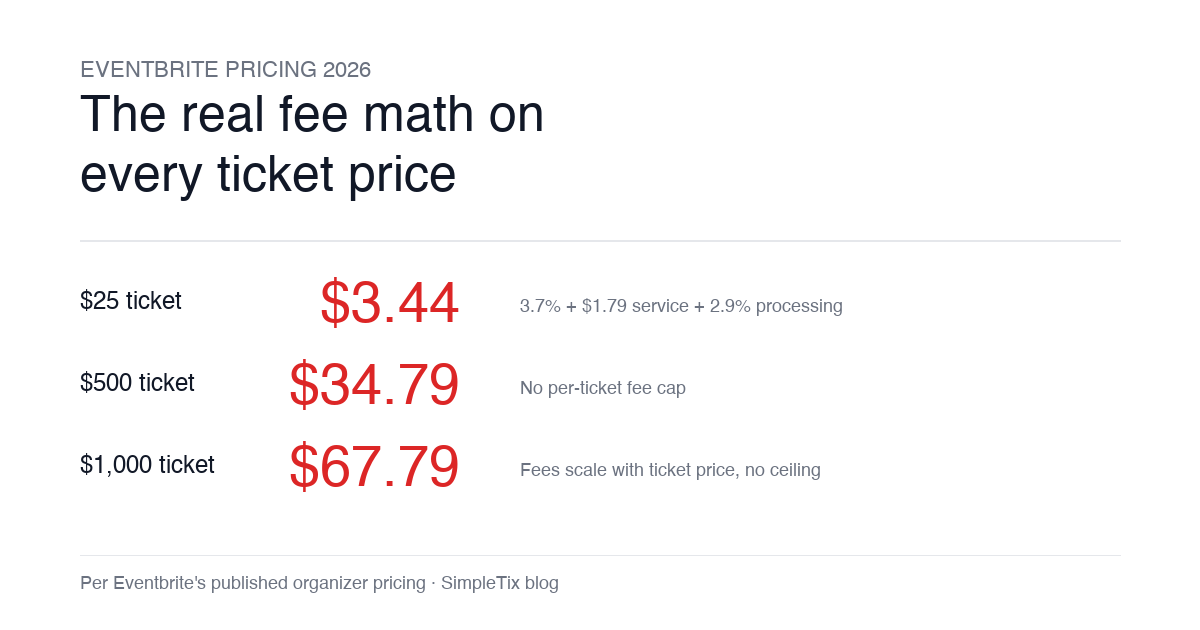
Eventbrite pricing 2026 is a lot for event organizers to sort through. There are longstanding policies that quietly cost paid-event operators real money, and there is genuine news under new ownership. This guide covers what the fees actually cost you today, what actually changed under the Bending Spoons acquisition, and how the alternatives compare on real numbers. Below is the honest breakdown, sourced to Eventbrite's own pricing page and SEC filings. Eventbrite pricing 2026: current fee structure As of 2026, Eventbrite charges 3.7% + $1.79 per paid ticket for the service fee, plus 2.9% for payment processing. In-person sales carry a $1 + 2.9% fee. There is no per-ticket fee cap. For a quick benchmark of total organizer-side fees: On a $25 ticket, fees total about $3.44 (13.8%) On a $50 ticket, fees total about $5.09 (10.2%) On a $100 ticket, fees total about $8.39 (8.4%) On a $500 ticket, fees total about $34.79 (7.0%) On a $1,000 ticket, fees total about $67.79 (6.8%) The fees scale with ticket price with no ceiling. That is the story for anyone selling premium tickets, season passes, VIP tiers, or corporate packages. Eventbrite pricing 2026: no per-ticket fee cap Eventbrite does not cap total ticket fees. This has been true since 2018, when Eventbrite removed the previous cap during its IPO. For most organizers selling everyday tickets ($20 to $50), the absence of a cap rarely comes up in the math. But for organizers selling premium tickets, the uncapped structure translates into real per-event cost. Take a conference selling three ticket tiers on Eventbrite: $150 general admission: fee about $12.34 (8.2%) $400 VIP ticket: fee about $27.09 (6.8%) $800 sponsor ticket: fee about $50.90 (6.4%) For a 200-person conference with a mix of GA and VIP tickets, that translates into hundreds of dollars...