4 Steps to Build an Effective Event Marketing Strategy
-
 by
by
Riley Manning has worked as a travel and entertainment writer for more than 10 years. Today, he writes about unique events and the technology that helps make them happen.

Events are used for all sorts of purposes, whether nonprofits are trying to raise money to fund their missions, associations are creating networking opportunities for their members, or businesses are cultivating social opportunities for their members.
The event must be done well for organizations to see these types of benefits, though. This means it must be an engaging concept that your audience wants to get involved with. Furthermore, the hosting organization has to get the word out there effectively to attract enough registrations.
In this guide, we’ll be covering the latter of those two necessities. Your organization needs to have an effective marketing strategy to raise awareness about your engaging event offerings and encourage your audience to get involved. We’ll cover the following steps to create an effective event marketing strategy:
- Set your goals and marketing budget.
- Choose your marketing channels.
- Create engaging marketing content.
- Ask your event speakers to help.
In particular, we’ll zero in on how nonprofit organizations can create a powerful marketing strategy. As these nonprofit organizations tend to have the most limited budgets and the greatest need, the strategies featured will apply to them as well as other organizations with fewer restrictions.
1. Set your goals and marketing budget
The first step to creating an effective marketing strategy is to define the goals of your marketing campaign in relation to your event. Nonprofit marketing strategies must be built on these goals and objectives, with your organization prioritizing them to determine the most important goals for the organization. For a nonprofit, these goals may include the following:
- Attract high-value donors to raise money at the event. Nonprofits may choose to reach out to major supporters with personalized invitations to a gala or another high-value fundraising event.
- Acquire and engage brand new donors. In this case, nonprofits may take additional steps like appending new data and specifying social media advertisements to go to those most likely to attend. This will help bring in new supporters to the event.
- Engage and show appreciation for returning donors. To achieve this goal, nonprofits can send out invitations to the event for their current supporters, making it an exclusive opportunity as a sign of appreciation.
- Create partnerships in the community. Organizations may gear marketing toward the small businesses in their community, asking them to get involved by sponsoring the event. The nonprofit can offer co-branded marketing to spread the word about the business as well.
- Attract volunteers to work the event. To attract volunteers, the nonprofit may reach out to their past volunteers to reengage them. Then, reach out with another message about volunteer opportunities to engage the rest of the community.
Before you jump into your marketing strategies, define and prioritize your own goals for your marketing strategy and for your event in general. This will help you as you go through the budgeting process as you determine how much funding to attribute to each marketing initiative.
Assign a budget for your marketing strategy and an approximate budget you’d be willing to spend for each of your goals. This will help you tie your goals to financial metrics for your organization.
2. Choose your marketing channels

Once you’ve determined the goals for your event and marketing campaigns, you’ll need to determine the channels that will be most effective in helping you reach your goals. A multi-channel strategy is the most effective, so be sure to choose several channels that you’ll be able to leverage effectively.
Keep in mind that it’s better to have a few well-cultivated channels rather than a ton of channels with ineffective messaging. Find the balance between choosing a number of channels and ensuring all of your messages are effective.
Choose marketing channels where your supporters already are instead of trying to introduce them to a new channel. Some of the most popular marketing channels include:
- Email is the bread and butter of a nonprofit marketing strategy. You can send messages directly to the inbox of every supporter in your database. But a more strategic approach is more effective on this platform. Leverage segmenting to reach specific audiences, geofencing to communicate with particular geographical areas, and retargeting to re-engage audiences who leave your event page without registering.
- There are several types of advertising your organization can leverage to reach your audience. Feathr’s nonprofit advertising guide explains that organizations can leverage retargeting ads, search engine ads, social media ads, and more to engage your audience. Retargeting ads are used to remind supporters of an abandoned page, like a registration form or volunteer opportunity. Search engine ads show up at the top of a results page, showing supporters ads related to the keyword they search. Finally, social media ads will show up in the feed of people browsing their social sites.
- Direct mail isn’t dead! It works well paired with digital marketing strategies to reinforce brand recognition and add a more personal touch to your outreach. Send individual invitations through this channel for formal events. For less formal events, simply ask your supporters who would prefer to receive direct mail, then limit your direct mail messages to these individuals. This will help cut costs.
- Phone calls provide an incredibly personalized way your organization can get in touch with your supporters. If you’re asking for volunteers or sponsors for the event, calling your prospects can help your organization make important personal connections necessary to achieve your goal.
These outreach channels can be used to guide your supporters to the landing pages that they’ll use to register to get involved with the event. For instance, you might link to the event registration page from your email and social posts. Meanwhile, you may provide the URL to sign up to be a sponsor on letters sent out to local businesses.
3. Create engaging marketing content
Next, your organization should cultivate an array of diverse, engaging marketing content to be featured on the marketing channels that you chose. Consider how your various marketing ideas work together as you write these messages. For example, you might provide detailed information about your event on your registration page, then a short and simple reminder on your advertisements.
Be sure to write as much marketing content as possible prior to your marketing campaign. This will help you launch the campaign faster, ensure effective communication, and reduce the work your team needs to put in during an already hectic time of event prep.
Some of the content you may decide to prewrite include the following:
- Invitations for your event. If you’re sending personalized invitations for your event, write those out ahead of time. Keep the general structure and message the same, but use the prospect’s preferred name and include their specific interests to tailor each not to the individual.
- Case for support. Your case for support will help organizations gain traction in conversations with sponsors and major supporters. If organizations are leveraging their event to build lasting relationships with important individuals and companies, make sure you have an effective case for support, outlining the purpose of your organization and discussing how the campaign will support your mission.
- Thank you messages. Be ready to show your appreciation for all attendees, sponsors, and volunteers. Write out your thank you messages well in advance. At the end of the event, you’ll still have plenty of work to do! Writing out thank you messages (or a template to get started) in advance will help make the event’s end easier and faster.
- Advertisement messages. Advertisements, especially retargeting messages, are unique because there is very little text. Don’t rush the process, and make sure every word counts by preparing effectively and writing the messages ahead of time.
- Social media posts. Your social media should be updated frequently in the lead-up to your event, with new posts drumming up anticipation among your audience and serving as a reminder for the big day ahead. Prepare these posts ahead of time so that you don’t need to spend hours each day contemplating your social media strategy.
Some of this content, like social media posts and some emails, can be scheduled ahead of time. This means they’ll be automatically sent out without you needing to worry about it. However, be sure to reread them before they’re live and reexamine their content in the context of your campaign’s current state. For example, if you’ve changed the date of your event, that’s something you’ll need to update before sending out the message.
4. Ask your event speakers to help

One of the greatest resources at your organization’s disposal is your event speakers. These individuals are speaking at your event for a reason! They’re likely experts of some sort or well-known members in your community, especially if your organization is hosting a conference-style event.
Leverage the following these individuals already have in the community and ask them to advocate for and promote your event. Chances are, they’ll be happy to help your organization succeed at the event and would love to spread the word.
Referrals, especially from a trusted member in the community, are absolutely essential for marketing. According to Feathr’s guide, 74% of consumers consider word of mouth a key influence in their purchasing decisions. By asking your keynote speakers to spread the word about your event, you’re creating additional word-of-mouth advertising for your event.
Additionally, your keynote speakers can play a key role in marketing your event by posting their own referral pages. The pages should:
- Be co-branded with your organization.
- Emphasize the speaker’s presence at the event.
- Link readers to registration forms.
Coach your speakers in how to best represent your organization on these referrals and in their posts. They should leverage their emotional connections to your cause to engage and connect with readers and supporters. Ask them to post the referral pages to social media, send them out in their email, and otherwise promote your cause.
SimpleTix has offered an affordable, premium event ticketing platform that outperforms Eventbrite and similar apps for over 12 years. Compared to the competition, SimpleTix offers better options at a better price point. To learn more, call us at +1 (855) 550-3670 or email us here.
Latest News
Related Articles

Season Ticket Software for Fall 2026: Subscriptions, Reserved Seating & Renewals
-
 by
by
Fall subscription sales are the single biggest revenue moment for most performing arts organizations. Season packages, member renewals, and early access windows all open between July and September. So the season ticket software you pick this summer decides how the fall series actually sells. This guide covers what season ticket software needs to do in 2026, how to configure it for a theater, symphony, or concert series, and what SimpleTix costs for season-driven event programs. What season ticket software actually needs to do Selling season tickets is nothing like selling single-event tickets. First, one subscriber buys 4 to 20 events in a single package. Second, seats need to lock across the entire season. Third, renewals from prior subscribers happen weeks before the general public gets access. And fourth, add-ons like parking, pre-show dinner, and backstage passes attach to the subscription, not the event. So the operational checklist for season ticket software looks like this: Season pass or subscription products that group multiple events into one purchase Reserved seating with locked seats across the whole season, so the subscriber sits in the same seat every night Priority access windows for existing subscribers before general on-sale Payment plans or full-payment options so patrons can split large subscription costs Renewal workflows that let last year's subscribers re-up with one click Comp ticket management for donors, sponsors, and press seats Membership tiers with different pricing, benefits, and priority access Reporting by subscriber, not just by event If your current tool cannot handle these, you are probably running Excel spreadsheets on the side and losing renewals every year. What is season ticket software? Season ticket software is a ticketing platform designed to sell multi-event packages (season subscriptions) alongside individual tickets, with reserved seat continuity, subscriber priority access, and renewal workflows built in. The core difference...

Holiday Event Ticketing Software: Timed Entry, Reserved Seating & Capacity Control for...
-
by
If you run a holiday event, you are booking dates now. So the ticketing platform you pick this month determines how November and December actually go. This guide covers what holiday event ticketing software needs to do in 2026, how to configure it for the season crunch, and what SimpleTix costs for holiday events of any size. What holiday event ticketing software needs to do Holiday events compress a whole year of sales into six weeks. First, most tickets sell in a 4 to 8 week window between mid-November and January 1. Second, weather cancels outdoor events without warning. Third, family groups buy 4 to 8 tickets in one order, not 1. And fourth, capacity is measured per time slot, not per venue. So the ticketing checklist for holiday operators looks like this: Timed entry with per-slot capacity for drive-throughs, walk-throughs, and Santa visits Reserved seating for holiday theater, Nutcracker, and holiday concerts Group and family bundles so a family of six is one checkout, not six Fast scanning at the gate, including offline mode for cold outdoor venues Waitlists for when peak-hour slots sell out Add-ons for hot chocolate, photo packages, VIP tiers, and holiday merch Automated email reminders so guests do not forget their timed slot Same-day payouts to fund the season's operational costs If your current tool cannot do all of that, October is too late to switch. Move now. How do timed entry tickets work for holiday events? Timed entry lets you release a fixed number of tickets per time slot (typically every 15 or 30 minutes) so guests arrive in waves instead of one 6pm surge. For a Christmas light drive-through with a 45-minute route, that usually means 30 to 60 vehicles per 15-minute window. Over a 5-hour evening, you can process 600 to 1,200...
Eventbrite Pricing 2026: Fees, Refunds & What’s Actually Changed
-
by
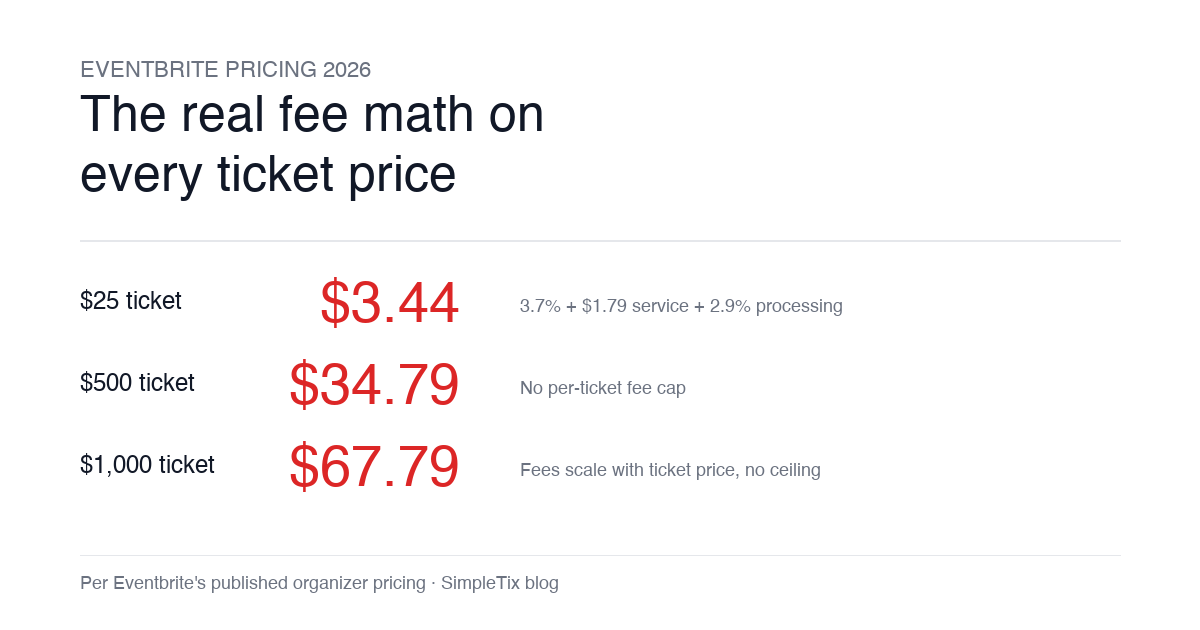
Eventbrite pricing 2026 is a lot for event organizers to sort through. There are longstanding policies that quietly cost paid-event operators real money, and there is genuine news under new ownership. This guide covers what the fees actually cost you today, what actually changed under the Bending Spoons acquisition, and how the alternatives compare on real numbers. Below is the honest breakdown, sourced to Eventbrite's own pricing page and SEC filings. Eventbrite pricing 2026: current fee structure As of 2026, Eventbrite charges 3.7% + $1.79 per paid ticket for the service fee, plus 2.9% for payment processing. In-person sales carry a $1 + 2.9% fee. There is no per-ticket fee cap. For a quick benchmark of total organizer-side fees: On a $25 ticket, fees total about $3.44 (13.8%) On a $50 ticket, fees total about $5.09 (10.2%) On a $100 ticket, fees total about $8.39 (8.4%) On a $500 ticket, fees total about $34.79 (7.0%) On a $1,000 ticket, fees total about $67.79 (6.8%) The fees scale with ticket price with no ceiling. That is the story for anyone selling premium tickets, season passes, VIP tiers, or corporate packages. Eventbrite pricing 2026: no per-ticket fee cap Eventbrite does not cap total ticket fees. This has been true since 2018, when Eventbrite removed the previous cap during its IPO. For most organizers selling everyday tickets ($20 to $50), the absence of a cap rarely comes up in the math. But for organizers selling premium tickets, the uncapped structure translates into real per-event cost. Take a conference selling three ticket tiers on Eventbrite: $150 general admission: fee about $12.34 (8.2%) $400 VIP ticket: fee about $27.09 (6.8%) $800 sponsor ticket: fee about $50.90 (6.4%) For a 200-person conference with a mix of GA and VIP tickets, that translates into hundreds of dollars...