Event Planning 101: Key Elements Any Event Needs to Include
-
 by
by
Riley Manning has worked as a travel and entertainment writer for more than 10 years. Today, he writes about unique events and the technology that helps make them happen.

So you want to plan an event for your organization. Great idea! A well-executed event can generate a ton of revenue. What makes it even better is that it can introduce your organization to new ongoing sources of support that extend well beyond the day of your event.
Hosting an event takes plenty of time, resources, and effort, though. Whether you’re hosting a music festival, an exclusive event for members of your cultural organization, or an online webinar that’s open to guests across the globe, every event needs a proper plan and fundamental building blocks in place to reach the organization’s objectives.
Even if this is your first time acting as an event planner, there’s no need to panic — despite all that goes into effective events. With a little bit of research and a whole lot of effective planning, you can pull off a successful event that has a high ROI for your organization!
In this article, we’ve defined the fundamental elements that will make up the foundation of your event plan. After you’ve laid a solid foundation, you can build the other activities and aspects of the event, but here are the key elements you should start with:
- A sustainable venue
- Branded merchandise
- A ticketing system
With these in mind, you can mark them off your checklist as you walk through the process of planning your event. In turn, you’ll develop a highly engaging event that inspires supporters to stick around and register for future ones. Let’s dive into your first key to success.
A sustainable venue
First thing’s first, you need to nail down the details of the event, and a major part of that is choosing the right venue. No matter if you’re hosting an exclusive gala as part of your member appreciation efforts or a large-scale seminar, you need a place for everyone to gather — even if it’s in the virtual space.
Your venue can vary significantly based on the type of event you’re hosting. Let’s say you’re hosting a convention. You’ll need a large venue that can accommodate several booths and hundreds (maybe thousands) of guests, whereas a 5K for a local nonprofit will simply need an outdoor course. It doesn’t make sense to host your race in a big conference center or a tradeshow at a high school track.
In your search for the perfect venue, keep these elements in mind:
- Location. Consider who you’re inviting to your event, so you can find a venue that’s located near them. If most of your guests live in New York, it doesn’t make much sense to host your event in Texas since that’ll quickly rack up their travel time and expenses.
- Capacity. How many guests are you inviting? Although it’s unlikely that everyone will attend, the venue you select should be large enough to accommodate a full house, including any vendors and event staff.
- Accessibility. Make sure your venue is accessible to those who have disabilities. This might include things like wheelchair ramps, elevators, and accessible parking spaces. The last thing you want is to exclude anyone from attending and participating in any activities.
- Amenities. Any benefits that your venue offers, the better. For instance, some venues come with tables, chairs, and linens that you can use. It’s also worthwhile to check if they have audiovisual equipment if you need it, so you don’t have to lug your own equipment there.
- Cost. You’ll naturally have a budget for your event, and there are expenses beyond a venue that you’ll need to account for. Make sure your venue falls in line with your budget.
- Availability. Will it be available on your preferred date? A venue might meet all your requirements, but that doesn’t mean anything if it won’t be available the day(s) you need it.
Build a shortlist of all the options you want to explore based on referrals and what’s popular in the area. Vet each venue, using these considerations as a guide to narrow it down. Then, schedule tours to choose a location that ticks off all of your boxes!
Branded merchandise
A memorable and exciting event needs merch to commemorate the day. Between t-shirts, mugs, hats, and tote bags, you have plenty of options to make something your attendees will love. Whether you sell your merchandise or include it as a freebie for your guests, it’s vital that you offer quality merchandise that won’t be thrown away as soon as people leave the venue.
Not only does quality merchandise boost revenue when sold, but it also deepens attendee engagement, spreads brand awareness when they use or wear it in public, and reminds them of the wonderful time they had for years to come.
Here’s how to create a fun keepsake for your attendees:
- Choose the merchandise that will work best. As we mentioned, there are endless possibilities, but the best type of merchandise for most events is apparel like t-shirts, hats, and sweatshirts. Consider what attendees would want to commemorate the event, whether you analyze what products sold well at previous events or simply poll your audience.
- Tie it to your cause and event. Most of the value of merchandise comes from growing brand recognition, so make sure whatever products you design align with both your event and the organization’s branding. That means infusing your logo, brand colors, and other symbols that represent your cause with the aspects that represent your event’s brand, like the event name, theme, typography, and slogan.
- Incorporate typography. Any text you include should express the organization’s purpose within the context of the event. Make it short and memorable, then present it in a bold way that stands out. Choose readable and large fonts. You’ll create a dynamic design by mixing fonts, using different text sizes, and bolding certain words, but limit yourself to a maximum of three fonts so that the design doesn’t become chaotic.
Bonfire’s guide to event t-shirts features several designs that check all these boxes. Check them out to get an idea of how you can infuse your organization’s branding, emphasize the cause, and pair typography with compelling graphics:
Choosing Your Merchandise Platform
When it comes time to pick the platform that you’ll use to create and sell your merchandise, we recommend looking for a site that offers excellent customer service, a variety of product options, reliable printing and shipping, and a free design tool to upload or create your design. You also want to pick a site that provides an intuitive user experience so buying your merchandise is as easy and secure as possible.
Most importantly though, make sure the platform offers quality products for you to sell. Your merchandise will be closely associated with your event (and therefore your organization), and poor quality could directly influence people’s impression of you and your event.
A ticketing system
As you’re well aware, there’s a lot that goes into hosting events, from creating your guest list to sending event reminders. With constantly advancing technology, the great news is you don’t have to handle every tiny detail by hand. That just takes away from an enjoyable planning experience. Today’s event technology can streamline your event planning process, starting with ticketing and guestlist management.
Ticket sales will be your main revenue source for your event. As such, spend some time researching different ticketing platforms and select a user-friendly option. Here are a few features that will make the ticketing process and guest experience a breeze:
- Options to set pricing tiers
- Add-on items like event merchandise and concessions
- The ability to sell booth registrations
- Donation options
- Seamless check-in, including for those who lost their tickets or opted for will-call
- Automated event reminders
- Integrations with leading event management tech to centralize all planning
A ticketing system that eliminates the need for manually completing tasks will result in a much less stressful event planning experience. Bear in mind that like the other aspects of your event, this will detract from your overall budget, so go with an option that’s affordable and eliminates any upfront costs.
Planning events can be overwhelming at times if you’re not quite sure what all needs to be accomplished. Luckily, you now have a few tricks in your back pocket to make sure your gathering is memorable for everyone involved. With these fundamental building blocks in mind, you’ll be well on your way to pulling off the event of the year for your organization!
SimpleTix has offered an affordable, premium event ticketing platform that outperforms Eventbrite and similar apps for over 12 years. Compared to the competition, SimpleTix offers better options at a better price point. To learn more, call us at +1 (855) 550-3670 or email us at support@simpletix.com.
Latest News
Related Articles

Season Ticket Software for Fall 2026: Subscriptions, Reserved Seating & Renewals
-
 by
by
Fall subscription sales are the single biggest revenue moment for most performing arts organizations. Season packages, member renewals, and early access windows all open between July and September. So the season ticket software you pick this summer decides how the fall series actually sells. This guide covers what season ticket software needs to do in 2026, how to configure it for a theater, symphony, or concert series, and what SimpleTix costs for season-driven event programs. What season ticket software actually needs to do Selling season tickets is nothing like selling single-event tickets. First, one subscriber buys 4 to 20 events in a single package. Second, seats need to lock across the entire season. Third, renewals from prior subscribers happen weeks before the general public gets access. And fourth, add-ons like parking, pre-show dinner, and backstage passes attach to the subscription, not the event. So the operational checklist for season ticket software looks like this: Season pass or subscription products that group multiple events into one purchase Reserved seating with locked seats across the whole season, so the subscriber sits in the same seat every night Priority access windows for existing subscribers before general on-sale Payment plans or full-payment options so patrons can split large subscription costs Renewal workflows that let last year's subscribers re-up with one click Comp ticket management for donors, sponsors, and press seats Membership tiers with different pricing, benefits, and priority access Reporting by subscriber, not just by event If your current tool cannot handle these, you are probably running Excel spreadsheets on the side and losing renewals every year. What is season ticket software? Season ticket software is a ticketing platform designed to sell multi-event packages (season subscriptions) alongside individual tickets, with reserved seat continuity, subscriber priority access, and renewal workflows built in. The core difference...

Holiday Event Ticketing Software: Timed Entry, Reserved Seating & Capacity Control for...
-
by
If you run a holiday event, you are booking dates now. So the ticketing platform you pick this month determines how November and December actually go. This guide covers what holiday event ticketing software needs to do in 2026, how to configure it for the season crunch, and what SimpleTix costs for holiday events of any size. What holiday event ticketing software needs to do Holiday events compress a whole year of sales into six weeks. First, most tickets sell in a 4 to 8 week window between mid-November and January 1. Second, weather cancels outdoor events without warning. Third, family groups buy 4 to 8 tickets in one order, not 1. And fourth, capacity is measured per time slot, not per venue. So the ticketing checklist for holiday operators looks like this: Timed entry with per-slot capacity for drive-throughs, walk-throughs, and Santa visits Reserved seating for holiday theater, Nutcracker, and holiday concerts Group and family bundles so a family of six is one checkout, not six Fast scanning at the gate, including offline mode for cold outdoor venues Waitlists for when peak-hour slots sell out Add-ons for hot chocolate, photo packages, VIP tiers, and holiday merch Automated email reminders so guests do not forget their timed slot Same-day payouts to fund the season's operational costs If your current tool cannot do all of that, October is too late to switch. Move now. How do timed entry tickets work for holiday events? Timed entry lets you release a fixed number of tickets per time slot (typically every 15 or 30 minutes) so guests arrive in waves instead of one 6pm surge. For a Christmas light drive-through with a 45-minute route, that usually means 30 to 60 vehicles per 15-minute window. Over a 5-hour evening, you can process 600 to 1,200...
Eventbrite Pricing 2026: Fees, Refunds & What’s Actually Changed
-
by
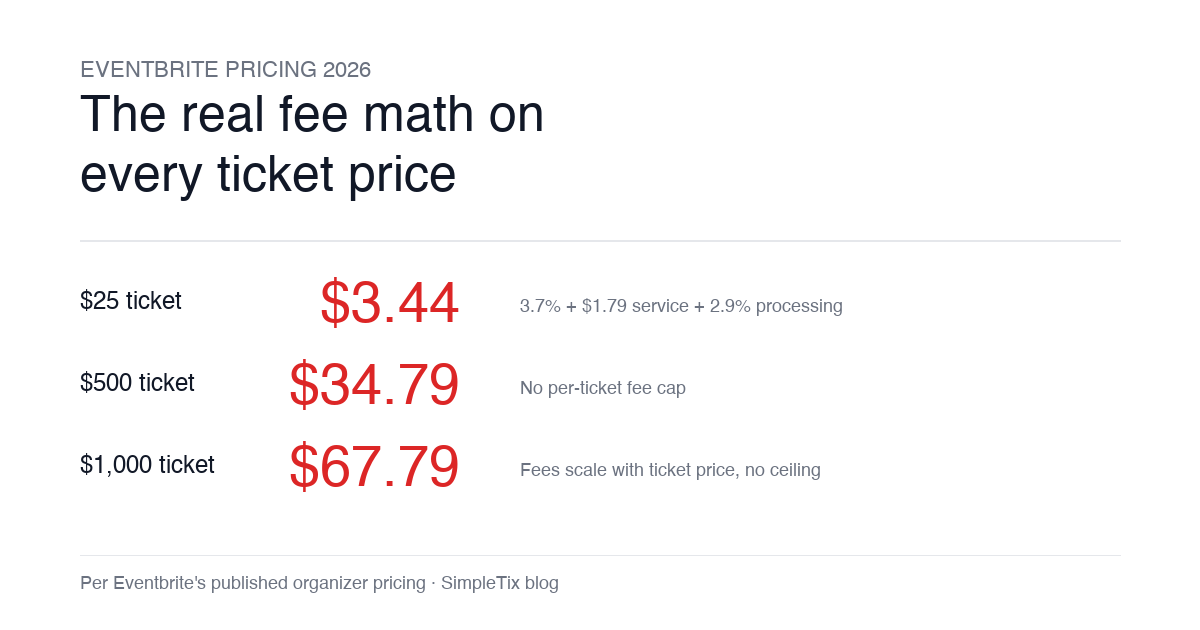
Eventbrite pricing 2026 is a lot for event organizers to sort through. There are longstanding policies that quietly cost paid-event operators real money, and there is genuine news under new ownership. This guide covers what the fees actually cost you today, what actually changed under the Bending Spoons acquisition, and how the alternatives compare on real numbers. Below is the honest breakdown, sourced to Eventbrite's own pricing page and SEC filings. Eventbrite pricing 2026: current fee structure As of 2026, Eventbrite charges 3.7% + $1.79 per paid ticket for the service fee, plus 2.9% for payment processing. In-person sales carry a $1 + 2.9% fee. There is no per-ticket fee cap. For a quick benchmark of total organizer-side fees: On a $25 ticket, fees total about $3.44 (13.8%) On a $50 ticket, fees total about $5.09 (10.2%) On a $100 ticket, fees total about $8.39 (8.4%) On a $500 ticket, fees total about $34.79 (7.0%) On a $1,000 ticket, fees total about $67.79 (6.8%) The fees scale with ticket price with no ceiling. That is the story for anyone selling premium tickets, season passes, VIP tiers, or corporate packages. Eventbrite pricing 2026: no per-ticket fee cap Eventbrite does not cap total ticket fees. This has been true since 2018, when Eventbrite removed the previous cap during its IPO. For most organizers selling everyday tickets ($20 to $50), the absence of a cap rarely comes up in the math. But for organizers selling premium tickets, the uncapped structure translates into real per-event cost. Take a conference selling three ticket tiers on Eventbrite: $150 general admission: fee about $12.34 (8.2%) $400 VIP ticket: fee about $27.09 (6.8%) $800 sponsor ticket: fee about $50.90 (6.4%) For a 200-person conference with a mix of GA and VIP tickets, that translates into hundreds of dollars...