How to Throw a Small One Day Music Festival
-
 by
by
Riley Manning has worked as a travel and entertainment writer for more than 10 years. Today, he writes about unique events and the technology that helps make them happen.

Music festivals claim ancient roots but have evolved into a multi-billion dollar industry catering to nearly all subsets of culture. And while festival software is a relatively recent technological advancement to assist with their execution, the focus remains the same – to get people to come together for good music and revelry.
There are more than 2000 different music festivals in the US alone each year spanning different cities, genres, and causes. Why not add your own unique festival to the mix?
Not all festivals are on the scale of Coachella or Lollapalooza, and it’s easier to start your own festival than you think.
Below we have listed the basics on how to throw a small one-day music festival. This is only a starting point – you’ll learn so much more as you develop your own unique festival and learn the ropes.
You never know – your festival could become as iconic as Woodstock.
Table of Contents:
1. Develop Your Festival’s Vision
2. Secure Your Date and Location
3. Create the Atmosphere with your Venue and Vendors
4. Hype Up Your Festival
5. Enjoy Your Hard Work
6. Bask in the Afterglow of Your Success
Develop Your Festival’s Vision
You’ve got the idea for your festival; now you want to let your imagination run wild brainstorming specifics.
Questions to consider include: What is your festival’s unique premise? What type of atmosphere do you want your festival to create? What kind of crowd do you want to attract?
And most importantly – why are you throwing this festival?
You’ll want to be able to confidently answer these questions to potential festival goers so that you really know the purpose of your festival and its place in the scene.
The more specific you can be as you develop the aura of your festival, the easier time you will have booking acts, advertising, and budgeting for it.
Choose a name for your festival that lets people know what you’re all about. Once you’ve gotten it all down, talk to your musical acts and start coordinating their schedules.
Secure Your Date and Location
When considering how to throw a small one day music festival, location is everything. The location sets the tone and expectations for your festival.
For example, it’s not ideal to host outdoor acoustic acts in the deafening flight path of your city’s international airport. Conversely, metal bands in the middle of a peaceful neighborhood could cut the festival short.
Basically, make sure your attendees will be able to hear the music clearly, while not disrupting the festival’s surroundings.
You’ll also want to consider venue accessibility for a diverse crowd, as well as guest transportation to your festival. Ample bathroom facilities and waste receptacles should also be accounted for to keep your festival clean and healthy.
Once you know the location, pick your festival’s date. Make sure it doesn’t clash with an already existing event that will attract your potential crowd. Consider the weather if your festival is outdoors, and how you’ll handle less-than-ideal conditions.
And remember your permits. You’ll need them.
Look up the local laws and requirements where your festival will be, or call your local city hall. Be sure to ask about noise ordinances, capacity limits, COVID regulations, and security presence in your plan for how to throw a small one day music festival.
Create the Atmosphere with Your Venue and Vendors
Even though the music is the focus of your festival, you’ll want to sell food and drinks throughout the event for your guests. Small, locally owned restaurants and breweries will want to get in on the action.
Inviting artists to sell their work or setting up a photo booth for attendees to capture their experience will help create a festive atmosphere. Some fun games, interesting art installations, or various attractions can give your attendees a fun and different experience to add to the music.
When laying out the space, consider the flow of the stage, vendors, facilities, entrance, and exits. You’ll want it to be conducive to the vibe and energy you are trying to create. Lighting, decorations, and signage will all help achieve your desired effect.
Hype Up Your Festival
If you’re wondering what the most important part is of how to throw a small one day music festival, ticket sales are it. With the details sorted out, you can officially start advertising and selling tickets.
This is where festival software really comes into play.
Selling most of your tickets before the event will be ideal so you will know how many guests to expect and what kind of budget you are working with.
Price your tickets appropriately. Charge enough to at least cover festival expenses while also not pricing out your potential customers. Provide attendees with digital tickets so they don’t have to print out tickets at home or wait in a long will call line to pick them up.
Make sure you select festival software that is affordable and provides you with fast payouts. Having your money upfront will help you secure your venue, vendors, and staff with ease.
Many festival software platforms let you create a web page for your event, which is key for sharing your event on social media. Just make sure to choose a festival platform that doesn’t clutter your page with its own branding and unrelated events.
SimpleTix provides all these features and even gives you a QR code for your event, which you can place on posters and promotional materials to send viewers straight to your event page.
With your ticket website in place, you can start directing traffic to your festival’s site and selling tickets.
Enjoy Your Hard Work
On the day of your festival, you should be able to enjoy the music and vendors you’ve organized. You can’t do that if you are tied up with last minute emergencies the day of your event.
If you use festival software, it should provide you with an app to manage the behind the scenes work on the day of your festival. This will help you monitor attendance and conveniently manage many aspects of the day from your mobile device.
Nothing kills the festival buzz like a long line at the gate. Your festival software should issue digital tickets that can be scanned on a phone screen or a print-out. If someone forgets their ticket, your gate staff should be able to check them in manually through the festival software platform.
Handling cash at the gate bogs down the check-in process. It’s a bonus if your festival software integrates with your existing payment processing platform, like Square or Stripe. That way, you can take payment in a blink, no matter what form it comes in.
SimpleTix is one of the only ticketing platforms with an official Square partnership, not to mention integrations with 20 payment gateways, including Stripe.
Once you get everyone in, sit back and enjoy the music!
Bask in the Afterglow of Your Success

Congratulations, you’ve contributed to the more than 32 million people attending festivals each year! What’s next?
After your festival, debrief with your staff to see what worked and what didn’t the day of the festival. Consider sending a survey through your event software to your attendees asking for feedback.
Be sure to reconcile your accounts and get a clear picture of your revenue streams. With SimpleTix, your ticket revenue will flow to the same account as concessions and merch, making post-event reconciliation that much simpler.
Check out social media for tagged photos to relive the fun. Make sure you really bask in your successes. It’s truly a feat to pull off a festival of any size.
Now you can start planning your follow-up and show others how to throw a small one day music festival.
SimpleTix has offered an affordable, premium event ticketing platform that outperforms Eventbrite and similar apps for over 12 years. Compared to the competition, SimpleTix offers better options at a better price point. To learn more, call us at +1 (855) 550-3670 or email us at support@simpletix.com.
Latest News
Related Articles

Season Ticket Software for Fall 2026: Subscriptions, Reserved Seating & Renewals
-
 by
by
Fall subscription sales are the single biggest revenue moment for most performing arts organizations. Season packages, member renewals, and early access windows all open between July and September. So the season ticket software you pick this summer decides how the fall series actually sells. This guide covers what season ticket software needs to do in 2026, how to configure it for a theater, symphony, or concert series, and what SimpleTix costs for season-driven event programs. What season ticket software actually needs to do Selling season tickets is nothing like selling single-event tickets. First, one subscriber buys 4 to 20 events in a single package. Second, seats need to lock across the entire season. Third, renewals from prior subscribers happen weeks before the general public gets access. And fourth, add-ons like parking, pre-show dinner, and backstage passes attach to the subscription, not the event. So the operational checklist for season ticket software looks like this: Season pass or subscription products that group multiple events into one purchase Reserved seating with locked seats across the whole season, so the subscriber sits in the same seat every night Priority access windows for existing subscribers before general on-sale Payment plans or full-payment options so patrons can split large subscription costs Renewal workflows that let last year's subscribers re-up with one click Comp ticket management for donors, sponsors, and press seats Membership tiers with different pricing, benefits, and priority access Reporting by subscriber, not just by event If your current tool cannot handle these, you are probably running Excel spreadsheets on the side and losing renewals every year. What is season ticket software? Season ticket software is a ticketing platform designed to sell multi-event packages (season subscriptions) alongside individual tickets, with reserved seat continuity, subscriber priority access, and renewal workflows built in. The core difference...
Holiday Event Ticketing Software: Timed Entry, Reserved Seating & Capacity Control for...
-
by
If you run a holiday event, you are booking dates now. So the ticketing platform you pick this month determines how November and December actually go. This guide covers what holiday event ticketing software needs to do in 2026, how to configure it for the season crunch, and what SimpleTix costs for holiday events of any size. What holiday event ticketing software needs to do Holiday events compress a whole year of sales into six weeks. First, most tickets sell in a 4 to 8 week window between mid-November and January 1. Second, weather cancels outdoor events without warning. Third, family groups buy 4 to 8 tickets in one order, not 1. And fourth, capacity is measured per time slot, not per venue. So the ticketing checklist for holiday operators looks like this: Timed entry with per-slot capacity for drive-throughs, walk-throughs, and Santa visits Reserved seating for holiday theater, Nutcracker, and holiday concerts Group and family bundles so a family of six is one checkout, not six Fast scanning at the gate, including offline mode for cold outdoor venues Waitlists for when peak-hour slots sell out Add-ons for hot chocolate, photo packages, VIP tiers, and holiday merch Automated email reminders so guests do not forget their timed slot Same-day payouts to fund the season's operational costs If your current tool cannot do all of that, October is too late to switch. Move now. How do timed entry tickets work for holiday events? Timed entry lets you release a fixed number of tickets per time slot (typically every 15 or 30 minutes) so guests arrive in waves instead of one 6pm surge. For a Christmas light drive-through with a 45-minute route, that usually means 30 to 60 vehicles per 15-minute window. Over a 5-hour evening, you can process 600 to 1,200...
Eventbrite Pricing 2026: Fees, Refunds & What’s Actually Changed
-
by
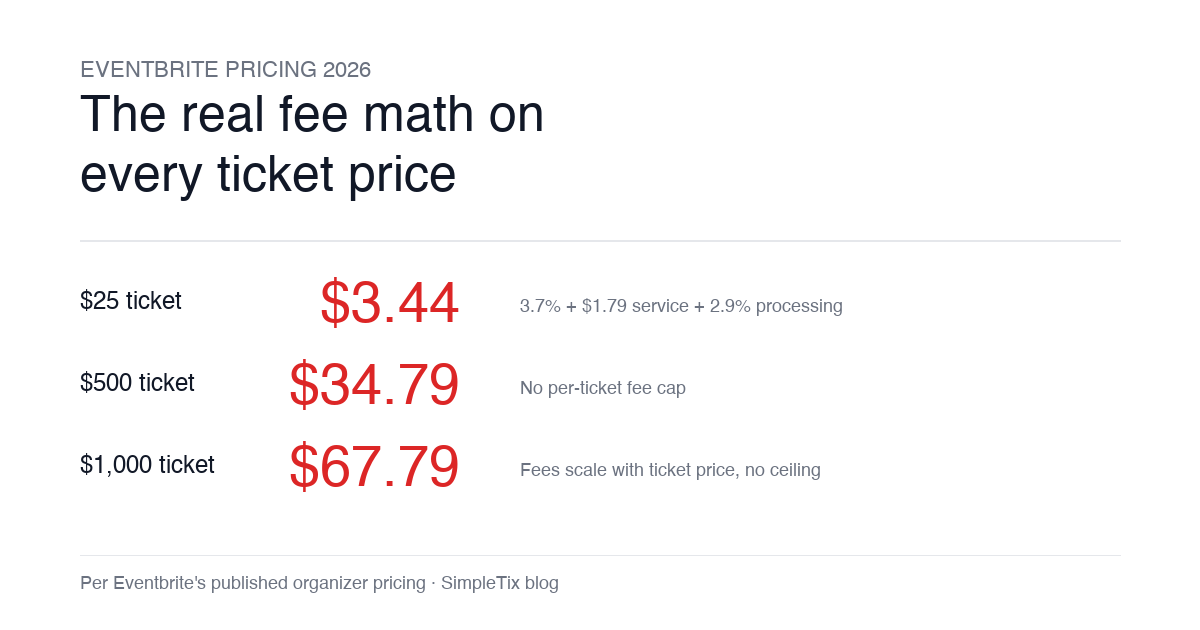
Eventbrite pricing 2026 is a lot for event organizers to sort through. There are longstanding policies that quietly cost paid-event operators real money, and there is genuine news under new ownership. This guide covers what the fees actually cost you today, what actually changed under the Bending Spoons acquisition, and how the alternatives compare on real numbers. Below is the honest breakdown, sourced to Eventbrite's own pricing page and SEC filings. Eventbrite pricing 2026: current fee structure As of 2026, Eventbrite charges 3.7% + $1.79 per paid ticket for the service fee, plus 2.9% for payment processing. In-person sales carry a $1 + 2.9% fee. There is no per-ticket fee cap. For a quick benchmark of total organizer-side fees: On a $25 ticket, fees total about $3.44 (13.8%) On a $50 ticket, fees total about $5.09 (10.2%) On a $100 ticket, fees total about $8.39 (8.4%) On a $500 ticket, fees total about $34.79 (7.0%) On a $1,000 ticket, fees total about $67.79 (6.8%) The fees scale with ticket price with no ceiling. That is the story for anyone selling premium tickets, season passes, VIP tiers, or corporate packages. Eventbrite pricing 2026: no per-ticket fee cap Eventbrite does not cap total ticket fees. This has been true since 2018, when Eventbrite removed the previous cap during its IPO. For most organizers selling everyday tickets ($20 to $50), the absence of a cap rarely comes up in the math. But for organizers selling premium tickets, the uncapped structure translates into real per-event cost. Take a conference selling three ticket tiers on Eventbrite: $150 general admission: fee about $12.34 (8.2%) $400 VIP ticket: fee about $27.09 (6.8%) $800 sponsor ticket: fee about $50.90 (6.4%) For a 200-person conference with a mix of GA and VIP tickets, that translates into hundreds of dollars...