Should Your Event Offer Early Bird, VIP, and Tiered Pricing?
-
 by
by

Are your ticket sales hitting a plateau? Between rising venue costs, marketing expenses, and production budgets, generating profitable ticket revenue gets harder each year. Meanwhile, attendees compare your prices against every other entertainment option and event in their area.
Many organizers stick to simple flat-rate pricing because tiered pricing seems complex to manage without the right event ticketing software. But our analysis of 1,000+ events reveals that strategic tiered pricing consistently drives 25-40% more revenue while attracting larger audiences. One festival organizer increased their revenue by $247,000 simply by restructuring their pricing tiers through specialized ticketing software for events.
In this guide, we’ll break down:
- How early bird pricing generates up to 40% of total sales before your marketing even begins
- Why VIP tiers bring in more revenue with fewer tickets (and less operational complexity)
- The optimal number of pricing tiers for different event types
- When to transition between price points to maximize both sales and revenue
- How to use dynamic pricing to sell out while capturing maximum value
You’ll get actionable frameworks and real examples from conferences, festivals, shows, and other events that have mastered tiered pricing. Let’s dive into specific strategies you can implement for your next event.
How Early Bird Tickets Drive More Than Just Early Sales
Early bird pricing creates natural urgency and incentivizes your most engaged attendees. The discounted first phase generates immediate cash flow for event expenses while building sales momentum that attracts more buyers. Event ticketing software simplifies managing early bird phases, ensuring seamless implementation and tracking.
Event data shows that organizers sell 30-40% of their tickets during early bird phases, providing working capital months before the event date. When early adopters commit, their social circles notice – making your marketing efforts more effective as regular pricing begins.
Timing affects your early bird success rate significantly. A premature release undervalues your event experience, while a late release misses eager early adopters. Use event ticketing software to analyze your event type’s typical sales cycle: conferences benefit from 6-month early bird windows, while concerts thrive with 2-3 months of early pricing.
How VIP Tiers Improve Your Revenue Model
Modern VIP tiers go beyond premium seating to deliver exclusive experiences worth premium prices. Attendees increasingly spend more for unique opportunities like meet-and-greets, exclusive content access, and VIP-only areas.
Value differentiation drives VIP tier success. Adding a basic “VIP” label without meaningful benefits often backfires and damages event reputation. Research shows successful VIP offerings focus on exclusivity and personalization. The most profitable events create memorable experiences that VIP ticket holders can’t get anywhere else. The best event ticketing software platforms make managing these complex access levels seamless.
For example, a music festival’s VIP experience might include private viewing areas with perfect sight lines, dedicated bars with craft cocktails, and air-conditioned lounges. These amenities solve common pain points like crowding, long drink lines, and weather exposure. A business conference VIP package might offer reserved seating in keynote sessions, exclusive networking events with speakers, and one-on-one mentoring sessions.
The psychology behind VIP pricing reveals that attendees often value status and exclusivity more than tangible perks. Creating visible differences between standard and VIP experiences – like separate entrances or distinctive wristbands – adds perceived value beyond the actual benefits. Event ticket sales software with built-in access control features helps staff validate different VIP privileges efficiently.
Multiple VIP levels with distinct perks perform better:
- Silver VIP: Priority check-in, exclusive lounge access, dedicated concierge
- Gold VIP: All Silver benefits plus backstage tours, premium seating, complimentary drinks
- Platinum VIP: All Gold benefits plus private meet-and-greets, custom merchandise, priority parking
Analysis of 500+ events using specialized event ticketing software shows well-structured VIP tiers generate 40% more revenue compared to flat-rate pricing, even when selling fewer total tickets.
What’s the Right Number of Pricing Tiers for Your Event?
Too few tiers leave money uncaptured. Too many confuse buyers and complicate operations. Testing across different event types using advanced digital ticketing systems reveals optimal tier structures.
The psychology of choice plays a significant role in tier design. Behavioral economics research shows that presenting too many options can paralyze decision-making, while too few options might not meet diverse attendee needs. The sweet spot typically lies in offering enough variety to capture different willingness-to-pay levels without overwhelming potential buyers.
Different events demand different approaches. A local music show using ticketing software for concerts might succeed with three simple tiers: early bird, regular, and VIP. A multi-day conference might need more granular options through specialized conference ticketing software to capture varying levels of professional development budgets and commitment levels.
Consider your operational capacity when designing tiers. Each price point affects seat allocation features, automated ticket distribution, and attendee experience management. Cloud-based ticketing solutions simplify these complexities – making it practical to start with fewer tiers and expand based on demand and capability.
Ticket sales analytics from high-performing events show 3-5 pricing tiers work best:
- Early Bird (time-based with clear deadlines)
- Regular Admission (standard experience with defined perks)
- VIP (enhanced experience with exclusive access)
- Premium/Platinum (luxury experience with personalized service)
Each tier needs at least 20-25% price difference to justify the distinction. Corporate event registration data shows gaps larger than 40% between tiers create perceived value disconnects that hurt higher-tier sales.
How To Time Your Pricing Transitions
Successful price transitions require a strategic mix of timing, quantity limits, and demand indicators. Time-based deadlines create clear urgency – for example, announcing “Early Bird pricing ends December 1st” gives potential attendees a firm deadline to act. These fixed dates work particularly well for corporate event registrations where attendees need to plan ahead and secure budgets.
Quantity thresholds add another persuasive element to your pricing strategy. Messaging like “Only 100 tickets remain at current pricing” creates scarcity while giving you control over inventory at each price point. Our analysis shows that displaying the remaining ticket count accelerates purchases by 35% when inventory drops below 15% of capacity.
Demand-based price shifts complement these fixed triggers. By monitoring real-time sales velocity, you can adjust pricing as different sections or ticket types fill up. For instance, when premium seats reach 75% capacity, increasing their price by 15% captures additional revenue from late-deciding attendees who specifically want those locations.
Data across 1,000+ events reveals an optimal pricing framework that maximizes both sales and revenue. Early Bird pricing, set 25-30% below regular rates, should target your first 30% of capacity. This initial discount drives early momentum and provides working capital. Regular pricing then serves your core audience, typically covering 40% of capacity. As demand builds, Late Bird pricing at 15-20% above regular rates covers your next 30% of capacity.
Finally, Last-minute pricing at 25-30% above regular rates captures high-intent buyers who decide late – though some events reserve a small allotment for these premium-priced tickets, others sell out before reaching this tier.
When Should You Transition Between Price Points?
Successful price transitions require a strategic mix of timing, quantity limits, and demand indicators. Time-based deadlines create clear urgency – for example, announcing “Early Bird pricing ends December 1st” gives potential attendees a firm deadline to act. These fixed dates work particularly well for corporate events where attendees need to plan ahead and secure budgets.
Quantity thresholds add another persuasive element to your pricing strategy. Messaging like “Only 100 tickets remain at current pricing” creates scarcity while giving you control over inventory at each price point. Our analysis shows that displaying the remaining ticket count accelerates purchases by 35% when inventory drops below 15% of capacity.
Demand-based price shifts complement these fixed triggers. By monitoring real-time sales velocity, you can adjust pricing as different sections or ticket types fill up. For instance, when premium seats reach 75% capacity, increasing their price by 15% captures additional revenue from late-deciding attendees who specifically want those locations.
Data across 1,000+ events reveals an optimal pricing framework that maximizes both sales and revenue. Early Bird pricing, set 25-30% below regular rates, should target your first 30% of capacity. This initial discount drives early momentum and provides working capital. Regular pricing then serves your core audience, typically covering 40% of capacity. As demand builds, Late Bird pricing at 15-20% above regular rates covers your next 30% of capacity. Finally, Last-minute pricing at 25-30% above regular rates captures high-intent buyers who decide late – though some events reserve a small allotment for these premium-priced tickets, others sell out before reaching this tier.
Transform Your Event’s Pricing Strategy
Modern event ticketing software provides the automation and analytics needed to implement sophisticated pricing strategies without adding operational complexity. Our ticketing platform offers:
- Advanced tier pricing controls with automated transitions
- Real-time sales analytics and demand monitoring
- Dynamic pricing automation based on multiple triggers
- Revenue optimization tools backed by market data
The best event ticketing software doesn’t just process transactions – it drives strategic pricing decisions that boost your bottom line. Our platform has helped organizers achieve:
- 40% higher revenue through optimized tier structures
- 35% faster sellouts with demand-based pricing
- 25% reduction in unsold inventory
- 50% less time spent on pricing administration
Want to see how advanced event ticket sales software can transform your pricing strategy? Book a 30-minute demo with our team to explore solutions tailored to your specific event needs.
Latest News
Related Articles

Season Ticket Software for Fall 2026: Subscriptions, Reserved Seating & Renewals
-
by
Fall subscription sales are the single biggest revenue moment for most performing arts organizations. Season packages, member renewals, and early access windows all open between July and September. So the season ticket software you pick this summer decides how the fall series actually sells. This guide covers what season ticket software needs to do in 2026, how to configure it for a theater, symphony, or concert series, and what SimpleTix costs for season-driven event programs. What season ticket software actually needs to do Selling season tickets is nothing like selling single-event tickets. First, one subscriber buys 4 to 20 events in a single package. Second, seats need to lock across the entire season. Third, renewals from prior subscribers happen weeks before the general public gets access. And fourth, add-ons like parking, pre-show dinner, and backstage passes attach to the subscription, not the event. So the operational checklist for season ticket software looks like this: Season pass or subscription products that group multiple events into one purchase Reserved seating with locked seats across the whole season, so the subscriber sits in the same seat every night Priority access windows for existing subscribers before general on-sale Payment plans or full-payment options so patrons can split large subscription costs Renewal workflows that let last year's subscribers re-up with one click Comp ticket management for donors, sponsors, and press seats Membership tiers with different pricing, benefits, and priority access Reporting by subscriber, not just by event If your current tool cannot handle these, you are probably running Excel spreadsheets on the side and losing renewals every year. What is season ticket software? Season ticket software is a ticketing platform designed to sell multi-event packages (season subscriptions) alongside individual tickets, with reserved seat continuity, subscriber priority access, and renewal workflows built in. The core difference...

Holiday Event Ticketing Software: Timed Entry, Reserved Seating & Capacity Control for...
-
by
If you run a holiday event, you are booking dates now. So the ticketing platform you pick this month determines how November and December actually go. This guide covers what holiday event ticketing software needs to do in 2026, how to configure it for the season crunch, and what SimpleTix costs for holiday events of any size. What holiday event ticketing software needs to do Holiday events compress a whole year of sales into six weeks. First, most tickets sell in a 4 to 8 week window between mid-November and January 1. Second, weather cancels outdoor events without warning. Third, family groups buy 4 to 8 tickets in one order, not 1. And fourth, capacity is measured per time slot, not per venue. So the ticketing checklist for holiday operators looks like this: Timed entry with per-slot capacity for drive-throughs, walk-throughs, and Santa visits Reserved seating for holiday theater, Nutcracker, and holiday concerts Group and family bundles so a family of six is one checkout, not six Fast scanning at the gate, including offline mode for cold outdoor venues Waitlists for when peak-hour slots sell out Add-ons for hot chocolate, photo packages, VIP tiers, and holiday merch Automated email reminders so guests do not forget their timed slot Same-day payouts to fund the season's operational costs If your current tool cannot do all of that, October is too late to switch. Move now. How do timed entry tickets work for holiday events? Timed entry lets you release a fixed number of tickets per time slot (typically every 15 or 30 minutes) so guests arrive in waves instead of one 6pm surge. For a Christmas light drive-through with a 45-minute route, that usually means 30 to 60 vehicles per 15-minute window. Over a 5-hour evening, you can process 600 to 1,200...
Eventbrite Pricing 2026: Fees, Refunds & What’s Actually Changed
-
by
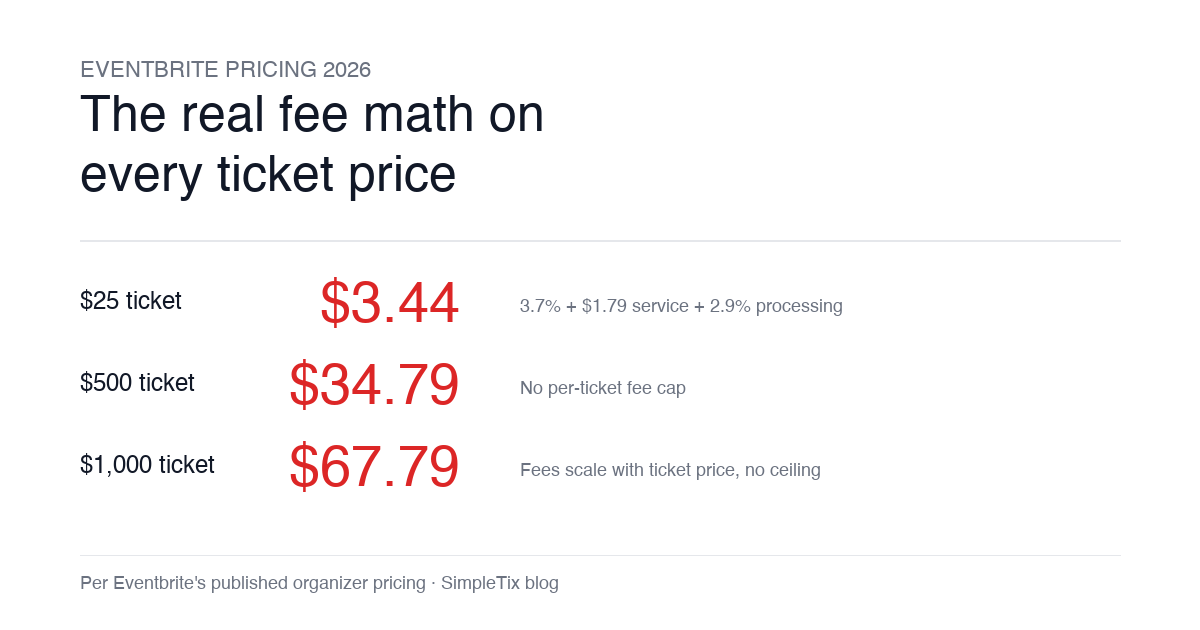
Eventbrite pricing 2026 is a lot for event organizers to sort through. There are longstanding policies that quietly cost paid-event operators real money, and there is genuine news under new ownership. This guide covers what the fees actually cost you today, what actually changed under the Bending Spoons acquisition, and how the alternatives compare on real numbers. Below is the honest breakdown, sourced to Eventbrite's own pricing page and SEC filings. Eventbrite pricing 2026: current fee structure As of 2026, Eventbrite charges 3.7% + $1.79 per paid ticket for the service fee, plus 2.9% for payment processing. In-person sales carry a $1 + 2.9% fee. There is no per-ticket fee cap. For a quick benchmark of total organizer-side fees: On a $25 ticket, fees total about $3.44 (13.8%) On a $50 ticket, fees total about $5.09 (10.2%) On a $100 ticket, fees total about $8.39 (8.4%) On a $500 ticket, fees total about $34.79 (7.0%) On a $1,000 ticket, fees total about $67.79 (6.8%) The fees scale with ticket price with no ceiling. That is the story for anyone selling premium tickets, season passes, VIP tiers, or corporate packages. Eventbrite pricing 2026: no per-ticket fee cap Eventbrite does not cap total ticket fees. This has been true since 2018, when Eventbrite removed the previous cap during its IPO. For most organizers selling everyday tickets ($20 to $50), the absence of a cap rarely comes up in the math. But for organizers selling premium tickets, the uncapped structure translates into real per-event cost. Take a conference selling three ticket tiers on Eventbrite: $150 general admission: fee about $12.34 (8.2%) $400 VIP ticket: fee about $27.09 (6.8%) $800 sponsor ticket: fee about $50.90 (6.4%) For a 200-person conference with a mix of GA and VIP tickets, that translates into hundreds of dollars...