See How a SimpleTix User Created a Bloomerang Integration Using Zapier
-
 by
by
Riley Manning has worked as a travel and entertainment writer for more than 10 years. Today, he writes about unique events and the technology that helps make them happen.

Whether you’re hosting a film festival, concert series, or launch party, event ticketing is an important part of the big day. Successfully selling tickets to your event ensures you have an excited and lively crowd to enjoy the results of all of the hard work you did to plan and pull off your event. But event ticketing software can help streamline your work behind the scenes, too.
SimpleTix offers dozens of native integrations that make it easier to manage your operation, event, or attraction. By saving even the smallest step, you can repurpose hours of manual administrative tasks toward things that matter — like making your event unforgettable and allowing your staff to elevate the guest experience.
Our integration with Zapier puts the power in your hands. With Zapier, you can create custom integrations between SimpleTix and almost anything else — from Zoom to Zoho, from Quickbooks to Constant Contact, and beyond. The best part: Zapier users can use integrations created by other SimpleTix users, so our network of integrations is constantly growing.
Recently, a unique client used Zapier to create an integration between SimpleTix and donor management platform Bloomerang, with fantastic results.
KANEKO’s Journey to Automation

KANEKO is a 501(c)(3) nonprofit founded with the mission to explore creativity through the multidisciplinary scope of art, science, education, urban planning, entrepreneurship, and philosophy.
KANEKO regularly hosts artists, performances, and exhibitions at their institute located in Omaha, Nebraska. They use the event ticketing software SimpleTix to sell tickets to their various exhibits, installations, and performances.
KANEKO will present the Oscar-winning virtual reality experience Carne y Arena by acclaimed director Alejandro González Iñárritu throughout June 2022. Since the prestigious presentation will most likely attract new potential members for the nonprofit, KANEKO decided they wanted the ability to communicate further with guests after their experience.
SimpleTix does host communication abilities through its platform. Users can send ticket holders important information before the event, including parking instructions, answers to frequently asked questions, or weather forecasts for outdoor events. Event organizers can also distribute post-event surveys or follow-up details through SimpleTix.
While SimpleTix does host these communication abilities, KANEKO wanted to be able to record guests from Carne y Arena as potential members in their donor management software, Bloomerang.

Nonprofits like KANEKO often use Bloomerang to recruit and retain potential and current donors to their institution. KANEKO saw an opportunity to transfer attendees to Carne y Arena from SimpleTix into their Bloomerang instance, allowing for access to develop a deeper relationship after they left the installation.
Rather than have a staff member manually enter attendee contact information from the SimpleTix attendee list into Bloomerang, KANEKO set up a Zapier connection to automatically transfer the data.
Unlocking Zapier’s Potential

Zapier connects information in disparate systems by seamlessly transferring data back and forth. It is the ultimate connector, servicing integrations across over 4,000 apps.
Setting up a Zapier connection, or Zap, takes less than five minutes. Zapier uses events within the systems – such as when a guest buys a ticket, a payment completes, or an event is created – to trigger data imports and exports between them. These data imports can either transfer instantly or as scheduled loads.
KANEKO set up a Zapier connection to create a new constituent in Bloomerang each time a new ticket purchase to Carne y Arena created a new attendee in SimpleTix. This automatic data transfer allowed KANEKO to use the Bloomerang to communicate with guests after the event.
With the guests’ information in Bloomerang, KANEKO could incorporate them into their communications and attempt to entice new donors and members.
Once a Zap is set up, Zapier allows other organizations that use both platforms to simply implement the existing webhook into their own system. Anyone who uses Bloomerang and SimpleTix can easily set up the integration KANEKO created.
This simple connection takes less than five minutes to set up and saves KANEKO’s employees potential hours of manual data entry. Automatic data loads are also more accurate than manual data entry, as there are less opportunities for human errors and typos. With all of the tedium taken care of, you can focus on your most important tasks.
Event Ticketing Software with Multiple Integrations
Not all event ticketing software is designed with flexibility in mind. Many systems lock event organizers into outdated systems with little opportunities for integration and difficulty working with other apps.
By providing simple transactions, you can sell more merch, concessions, and tickets while keeping your guests happy.
Many organizations rely on multiple systems to accomplish different goals. Adding in event ticketing software to the mix should be an easy task to accomplish. This is why SimpleTix offers automatic integrations with various payment gateways like Stripe and PayPal, among others.
SimpleTix also uses Square to facilitate versatile transactions at your event. It is the only event ticketing software that offers a full Square integration. With Square, you can use one system to sell event merchandise, concessions, and tickets.
This means your guests can buy tickets, snacks, and souvenirs in one place, with one transaction. Other event ticketing software require separate sales for different categories of purchases, complicating the check out process. With SimpleTix, your event staff can check out guests more efficiently, and with less complication, and all of your profits are funneled into one account.
Square also provides multiple payment options, like contactless payments, chip payments, Apple Pay, and Android Pay. More guests’ preferred payment types can be accommodated this way.
SimpleTix also connects directly to Zoom, meaning you don’t have to set up a new connection to sell digital tickets and collect guest registrations for your virtual event. Existing integrations with MailChimp and SalesForce mean you can easily transfer information between systems.
By using SimpleTix, you can create new leads in Salesforce or contacts in Mailchimp, so that you can contact guests after the event. By retaining these leads, you can advertise future events easily and increase attendance.
SimpleTix accommodates event organizers that rely on multiple systems for their operations, like KANEKO does. By using SimpleTix as your event ticketing software, you don’t have to worry about inaccessible data. You can do more for your event with less effort.
SimpleTix has offered an affordable, premium event ticketing platform that outperforms Eventbrite and similar apps for over 12 years. Compared to the competition, SimpleTix offers better options at a better price point. To learn more, call us at +1 (855) 550-3670 or email us at support@simpletix.com.
Latest News
Related Articles

Season Ticket Software for Fall 2026: Subscriptions, Reserved Seating & Renewals
-
 by
by
Fall subscription sales are the single biggest revenue moment for most performing arts organizations. Season packages, member renewals, and early access windows all open between July and September. So the season ticket software you pick this summer decides how the fall series actually sells. This guide covers what season ticket software needs to do in 2026, how to configure it for a theater, symphony, or concert series, and what SimpleTix costs for season-driven event programs. What season ticket software actually needs to do Selling season tickets is nothing like selling single-event tickets. First, one subscriber buys 4 to 20 events in a single package. Second, seats need to lock across the entire season. Third, renewals from prior subscribers happen weeks before the general public gets access. And fourth, add-ons like parking, pre-show dinner, and backstage passes attach to the subscription, not the event. So the operational checklist for season ticket software looks like this: Season pass or subscription products that group multiple events into one purchase Reserved seating with locked seats across the whole season, so the subscriber sits in the same seat every night Priority access windows for existing subscribers before general on-sale Payment plans or full-payment options so patrons can split large subscription costs Renewal workflows that let last year's subscribers re-up with one click Comp ticket management for donors, sponsors, and press seats Membership tiers with different pricing, benefits, and priority access Reporting by subscriber, not just by event If your current tool cannot handle these, you are probably running Excel spreadsheets on the side and losing renewals every year. What is season ticket software? Season ticket software is a ticketing platform designed to sell multi-event packages (season subscriptions) alongside individual tickets, with reserved seat continuity, subscriber priority access, and renewal workflows built in. The core difference...

Holiday Event Ticketing Software: Timed Entry, Reserved Seating & Capacity Control for...
-
by
If you run a holiday event, you are booking dates now. So the ticketing platform you pick this month determines how November and December actually go. This guide covers what holiday event ticketing software needs to do in 2026, how to configure it for the season crunch, and what SimpleTix costs for holiday events of any size. What holiday event ticketing software needs to do Holiday events compress a whole year of sales into six weeks. First, most tickets sell in a 4 to 8 week window between mid-November and January 1. Second, weather cancels outdoor events without warning. Third, family groups buy 4 to 8 tickets in one order, not 1. And fourth, capacity is measured per time slot, not per venue. So the ticketing checklist for holiday operators looks like this: Timed entry with per-slot capacity for drive-throughs, walk-throughs, and Santa visits Reserved seating for holiday theater, Nutcracker, and holiday concerts Group and family bundles so a family of six is one checkout, not six Fast scanning at the gate, including offline mode for cold outdoor venues Waitlists for when peak-hour slots sell out Add-ons for hot chocolate, photo packages, VIP tiers, and holiday merch Automated email reminders so guests do not forget their timed slot Same-day payouts to fund the season's operational costs If your current tool cannot do all of that, October is too late to switch. Move now. How do timed entry tickets work for holiday events? Timed entry lets you release a fixed number of tickets per time slot (typically every 15 or 30 minutes) so guests arrive in waves instead of one 6pm surge. For a Christmas light drive-through with a 45-minute route, that usually means 30 to 60 vehicles per 15-minute window. Over a 5-hour evening, you can process 600 to 1,200...
Eventbrite Pricing 2026: Fees, Refunds & What’s Actually Changed
-
by
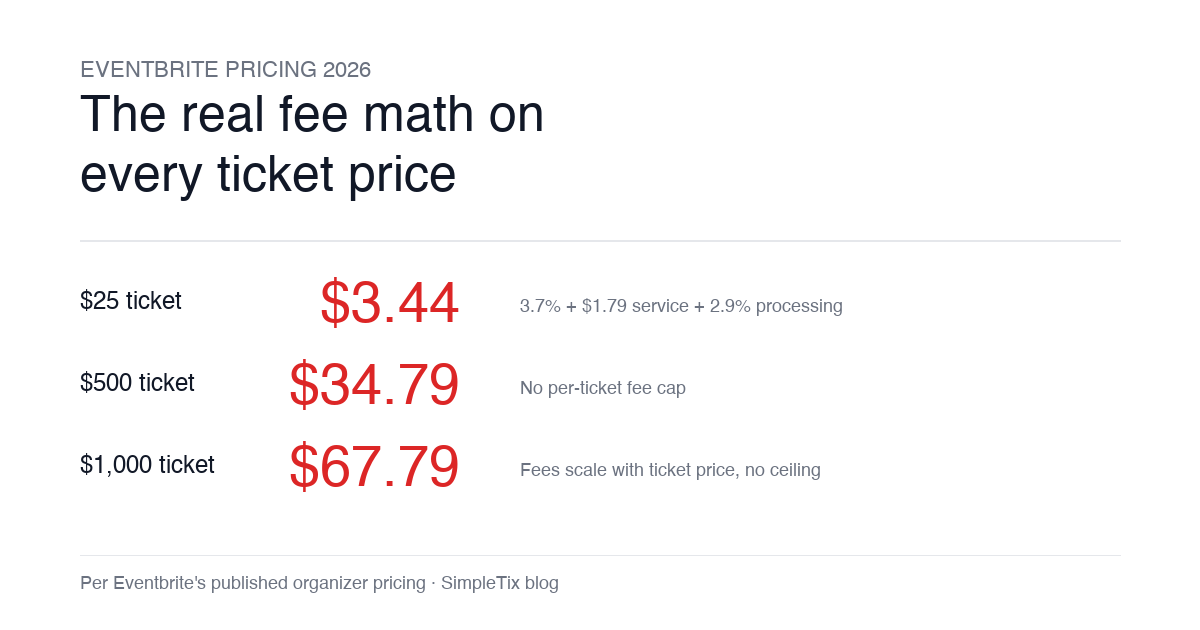
Eventbrite pricing 2026 is a lot for event organizers to sort through. There are longstanding policies that quietly cost paid-event operators real money, and there is genuine news under new ownership. This guide covers what the fees actually cost you today, what actually changed under the Bending Spoons acquisition, and how the alternatives compare on real numbers. Below is the honest breakdown, sourced to Eventbrite's own pricing page and SEC filings. Eventbrite pricing 2026: current fee structure As of 2026, Eventbrite charges 3.7% + $1.79 per paid ticket for the service fee, plus 2.9% for payment processing. In-person sales carry a $1 + 2.9% fee. There is no per-ticket fee cap. For a quick benchmark of total organizer-side fees: On a $25 ticket, fees total about $3.44 (13.8%) On a $50 ticket, fees total about $5.09 (10.2%) On a $100 ticket, fees total about $8.39 (8.4%) On a $500 ticket, fees total about $34.79 (7.0%) On a $1,000 ticket, fees total about $67.79 (6.8%) The fees scale with ticket price with no ceiling. That is the story for anyone selling premium tickets, season passes, VIP tiers, or corporate packages. Eventbrite pricing 2026: no per-ticket fee cap Eventbrite does not cap total ticket fees. This has been true since 2018, when Eventbrite removed the previous cap during its IPO. For most organizers selling everyday tickets ($20 to $50), the absence of a cap rarely comes up in the math. But for organizers selling premium tickets, the uncapped structure translates into real per-event cost. Take a conference selling three ticket tiers on Eventbrite: $150 general admission: fee about $12.34 (8.2%) $400 VIP ticket: fee about $27.09 (6.8%) $800 sponsor ticket: fee about $50.90 (6.4%) For a 200-person conference with a mix of GA and VIP tickets, that translates into hundreds of dollars...